More like this: Self-hosting playbooks: checklists, setups, troubleshooting
Most self-hosting guides handle firewalls in one of two ways. They either skip the subject and assume you will figure it out later, or they give you a block of ufw allow commands and move on. Neither approach teaches you what is happening on the network. Without that understanding, you are not really securing the system. You are copying rules and hoping they describe the machine you actually run.
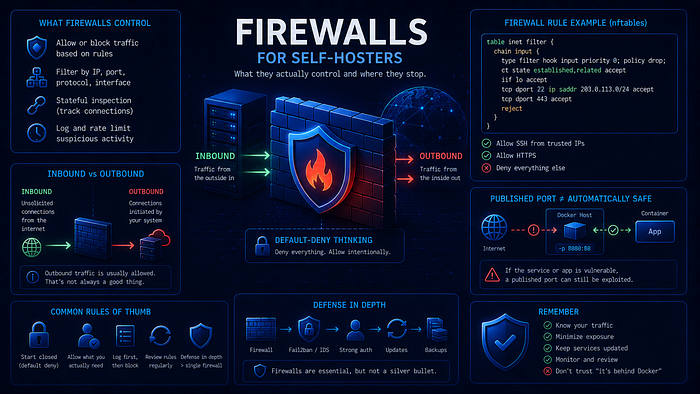
A firewall is a rule system for network traffic. It decides which traffic is allowed, which traffic is denied, on which interface, in which direction, and under which conditions. Once you understand that policy model, the specific tool matters less. nftables, iptables, ufw, firewalld, and the firewall page on a home router are different interfaces to the same basic job.
This article starts with the useful basics, then works through the places that trip up self-hosters: inbound versus outbound traffic, LAN versus WAN boundaries, default-deny policy, Docker port publishing, IPv6, and verification. The practical goal is simple: know what your server exposes, know why it is exposed, and verify from outside that reality matches your intent.
Before we continue
If this story helps you improve your homelab: 👏 Clap 50 times (yes, you can, simply hold the button), it will help me a lot. Medium's algorithm favors this, increasing visibility to others who then discover the article. 🔔 Follow me on Medium and subscribe to get my stories straight to your inbox.
What a firewall is
At the lowest useful level, a firewall is a set of rules that inspects packets and decides what to do with them. The decision is usually one of three actions: accept the packet, drop it silently, or reject it with a response telling the sender the traffic is not allowed.
A firewall does not scan for viruses, prove that an application is safe, or understand the business logic of your service. It usually does not inspect the contents of HTTPS traffic. Instead, it works with packet and flow metadata: source address, destination address, protocol, port number, connection state, and often the interface the packet arrived on.
A good mental model is a door policy. The firewall does not read the visitor's documents. It checks whether this kind of visitor is allowed through this door, from this direction, under the current rules. That narrow scope is exactly why firewalls are useful and exactly why they are not enough on their own.
Packets, connections, and state
Network communication is built from packets: small chunks of data with headers that describe where they came from and where they are going. When your browser requests a web page, it sends packets to port 443 on a remote server. The server sends packets back.
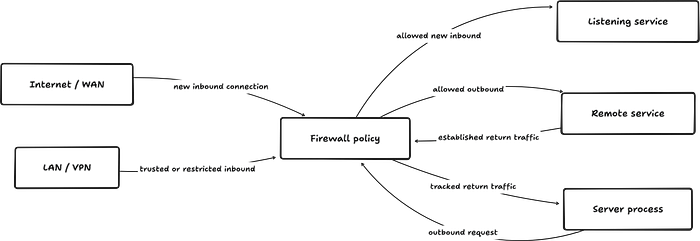
A stateful firewall tracks these exchanges as connections. When it allows your server to start an outbound HTTPS connection, it can recognize the return packets as part of that established connection and allow them back in. On Linux, this tracking is handled by conntrack in the kernel.
This is what makes a normal default-deny firewall practical. You do not need to open broad ranges of ephemeral ports for return traffic. You allow the connection in one direction, and the firewall allows the return path only for traffic that belongs to a known flow.
Where the firewall lives
On a Linux server, packet filtering is handled in the kernel. The older user-facing toolset is iptables, part of the xtables family. The newer framework is nftables, which replaces the older {ip,ip6,arp,eb}tables tools and reuses the existing Netfilter subsystems, including hooks, NAT, and connection tracking. The Netfilter project describes nftables as the replacement for the older tables stack, and its inet family is designed to simplify combined IPv4 and IPv6 rule sets.
You will also see ufw on Ubuntu and firewalld on Fedora, RHEL-family systems, and other distributions. These are frontends, not separate packet filters. They generate and manage lower-level Netfilter rules for you. That abstraction is useful, but it can also hide important details. When firewall behavior does not match your expectations, you often have to inspect the actual rules loaded into the kernel, not just the frontend's summary.
Your home router usually applies the same idea at the network edge. The interface is a web page instead of a shell, and the implementation may be Linux-based or proprietary, but the job is still rule evaluation: match traffic, then allow, drop, reject, forward, or translate it.
Where a firewall stops
A firewall controls reachability. It does not make the reached service safe.
If you expose a web application on port 443 and that application has a SQL injection vulnerability, the firewall will pass the malicious request through because the request arrived over an allowed path. If you expose PostgreSQL to the internet, the firewall will not decide whether a password is strong enough. If an application is allowed to make outbound HTTP requests and an attacker turns that into server-side request forgery (SSRF), the firewall may only see an allowed process making allowed outbound traffic.
This does not make the firewall weak. It defines the layer it operates at. Authentication, authorization, input validation, patching, application hardening, and secrets management still matter. The firewall's job is narrower: reduce who can reach what in the first place.
Inbound vs outbound
Every packet has a direction relative to your machine. Inbound traffic arrives at your server from somewhere else. Outbound traffic is initiated by your server toward another host. That distinction sounds basic, but many self-hosting mistakes come from blurring it.
Inbound: who can knock
Inbound traffic is any connection initiated by an external host toward your server. When someone types your domain name into a browser and visits your site, their device sends a connection attempt to your server's public address on port 443. That is inbound traffic.
For most self-hosted servers, the intended inbound surface should be small: SSH for management, HTTP and HTTPS for web services, and perhaps a VPN port for WireGuard or a similar remote-access layer. Everything else should require a specific reason.
The useful question for inbound rules is not only whether a service needs a port. It is who should be able to reach that port and from where. PostgreSQL listens on port 5432 because PostgreSQL clients need to connect to it. That does not mean the whole internet should be able to try. In most self-hosted setups, the database belongs on localhost, on a private network, or behind a VPN.
Inbound rules define attack surface. Every publicly reachable port is a place where the internet can apply pressure.
Outbound: what your server reaches for
Outbound traffic is initiated by your server. Package updates, container image pulls, ACME certificate renewals, SMTP delivery, webhook calls, API calls, and monitoring uploads are all outbound flows.
Most self-hosters allow all outbound traffic. For a personal server, that can be a reasonable tradeoff. A strict egress policy takes work to maintain, and broken outbound rules can cause confusing failures. But unrestricted outbound access is still a policy choice. If a service is compromised, it can call out to arbitrary hosts, download payloads, exfiltrate data, or establish a reverse shell unless something else stops it.
You do not need to build a corporate egress firewall for a small homelab. Sensible first steps are more modest: avoid giving containers internet access when they do not need it, restrict particularly sensitive services, and log unusual outbound ports when that helps you investigate incidents. The important part is to treat outbound access as deliberate, not invisible.
The direction trap
A port without an explicit inbound rule is only closed if your default policy blocks unmatched inbound traffic. If the default policy is accept, every listening service is reachable unless another rule blocks it. If the default policy is drop, only traffic with an explicit allow rule gets through.
Connection tracking adds one more detail. Return packets for an allowed outbound connection are allowed inbound because they belong to an established flow. That is correct behavior. It does not mean you have opened a new inbound service. It means stateful rules and explicit allow rules must be read together.
LAN vs WAN boundaries
Firewalls operate on interfaces, and interfaces connect to networks with different trust levels. A rule that is reasonable on loopback may be dangerous on a public interface. A rule that is fine for a VPN subnet may be wrong for the whole LAN.
The two-zone starting point
Most self-hosting setups begin with two zones. The WAN side is the internet: untrusted, noisy, and constantly scanned. The LAN side is your internal network, often using private IPv4 ranges such as 192.168.0.0/16, 172.16.0.0/12, or 10.0.0.0/8.
A home router sits between those zones. It has an internet-facing interface and a LAN-facing interface. With IPv4, it usually performs network address translation (NAT), mapping one public address to multiple private LAN addresses. A port forward tells the router to take inbound traffic arriving at the public address and forward it to a private host and port.
That creates two separate policy points. The router may allow traffic through a port forward, but the server firewall can still drop it. If you forward port 443 to a server while the server drops inbound 443, the web service will remain unreachable. Both layers need to match the exposure you intend.
NAT is not a security model
A server behind an IPv4 NAT router has practical protection from unsolicited inbound internet traffic when no port forward exists. There is no translation path to the internal host. That effect is useful, but NAT itself is address translation, not a security policy you should rely on as your only control.
A VPS is different. It usually has a public address directly on the host or on a provider network that routes traffic straight to it. Every service listening on a public interface is potentially reachable unless the host firewall, provider firewall, or both block it.
IPv6 also changes the mental model. A machine can have a globally routable IPv6 address even inside a residential network. Many routers still include a default firewall for inbound IPv6, but the old "NAT protects me by accident" assumption no longer applies. Treat IPv6 as a first-class exposure path and verify it separately.
Interface-specific rules
A useful firewall policy distinguishes interfaces.
Loopback traffic on lo is local communication between processes on the same machine. It should normally be allowed. Traffic arriving on a public interface should be filtered tightly. Traffic arriving from a WireGuard interface may deserve different rules from traffic arriving from a general LAN interface.
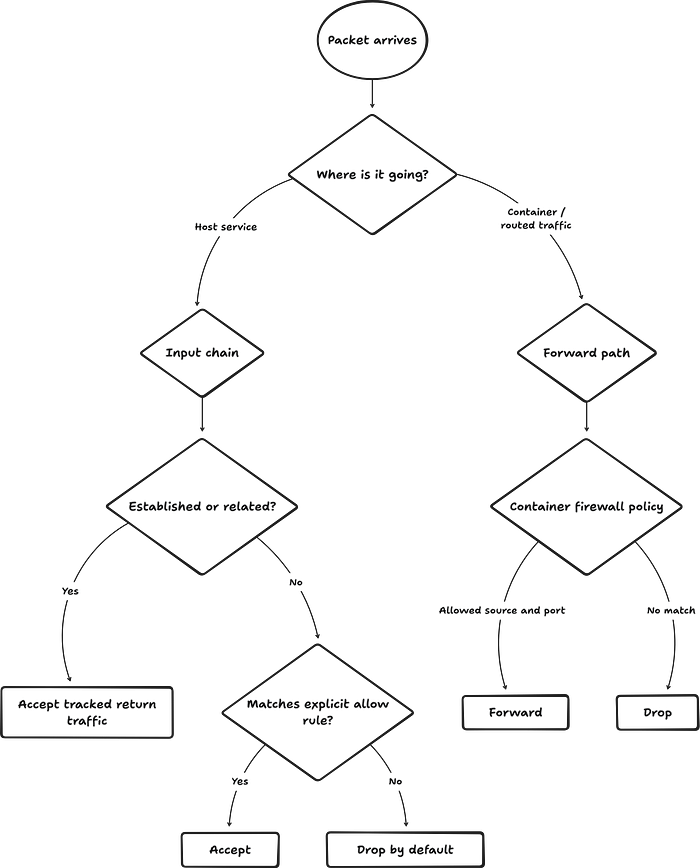
Docker adds more interfaces: docker0, custom br-* bridge interfaces, veth pairs, and sometimes overlay networks. These interfaces are part of why container firewall behavior can surprise you. The packet may not travel through the chain you expected, and it may be forwarded rather than delivered to the host input path.
A rule such as "allow port 5432" is incomplete without context. Is it loopback only? LAN only? VPN only? Public interface? The same port can be safe in one place and reckless in another.
Default deny vs default allow
Default policy is the behavior used when no explicit rule matches. For server inbound traffic, default deny is the safer baseline.
In a base firewall chain, the policy is usually accept, drop, or reject. Accept lets unmatched traffic through. Drop discards it silently. Reject refuses it with an error response. Drop and reject differ operationally, but both prevent the connection.
Default deny: the safe starting point
Default deny blocks traffic unless you explicitly allow it. That is the right starting point for inbound traffic on internet-facing systems and for any interface that receives untrusted traffic.
The value is operational. New services may start listening after an install, a container may publish a port you forgot about, or an update may enable something unexpected. With default deny on the relevant path, the surprise service is not reachable until you add a rule for it.
A small nftables input chain might look like this:
#!/usr/sbin/nft -f

flush ruleset

table inet filter {
    chain input {
        type filter hook input priority filter; policy drop;

        # Local process-to-process traffic.
        iifname "lo" accept

        # Return traffic for flows already allowed.
        ct state established,related accept

        # Keep basic network diagnostics and IPv6 neighbor discovery working.
        ip protocol icmp accept
        ip6 nexthdr icmpv6 accept

        # Management and web entry points.
        tcp dport 22 accept
        tcp dport { 80, 443 } accept
    }
}
The critical part is policy drop;. Packets that do not match one of the explicit accept rules are discarded. The ICMP rules are intentional. Blocking ICMP blindly can break troubleshooting, path MTU discovery, and important IPv6 behavior.
With ufw, the same basic host policy looks like this:
sudo ufw default deny incoming
sudo ufw default allow outgoing
sudo ufw allow 22/tcp
sudo ufw allow 80/tcp
sudo ufw allow 443/tcp
sudo ufw enable
sudo ufw status verbose
That sets inbound default deny, outbound default allow, and allows only the management and web ports shown here. On Ubuntu, ufw status verbose should show the default policy, which is more useful than relying on memory.
Default allow: where surprises become exposure
Default allow accepts traffic unless you block it. Many fresh Linux installations effectively behave this way until a firewall frontend is enabled. That is risky on a server because it makes every listening service part of your exposure unless you remembered to block it.
In a default-deny setup, an unexpected service on port 8080 is merely listening. In a default-allow setup, it may be listening to the internet.
The gap between intention and reality
A frontend summary is not the same as the active kernel rules. ufw status can look clean while Docker has created forwarding and NAT rules outside the path ufw normally protects. firewalld zones can be broader than you assume. Provider firewalls can allow or block traffic before it reaches the host.
Verify the real rules:
sudo nft list ruleset
sudo iptables -S
sudo iptables -L -n -v
sudo ip6tables -S
Which commands matter depends on your distribution and backend, but the habit is the same: inspect the loaded rules, not only the tool that generated them.
Connection tracking and the established,related rule
In a default-deny input chain, the established,related rule is not optional plumbing. Without it, your server could start an outbound connection, but the return packets would be dropped by the inbound policy.
This rule does not allow arbitrary new inbound connections. It allows packets that belong to flows the kernel already knows about, plus limited related traffic. It is the normal foundation of a stateful firewall.
Published, bound, reachable, and public
Self-hosters often use "published" and "public" as if they mean the same thing. They do not.
A service can bind to 127.0.0.1 and be reachable only from the local host. It can bind to a LAN address and be reachable only from that network. It can bind to 0.0.0.0 or :: and listen on all addresses. Docker can publish a container port to all host addresses, to one specific host address, or to localhost. A router can forward a public port to a private host. A firewall can still allow or block the resulting traffic.
The operational question is not "is the port published?" It is "from which network can this service be reached?" That answer depends on binding address, Docker rules, host firewall, router NAT, provider firewall, and IPv6 routing.
Where Docker and container networking complicate things
Docker is common in self-hosting, and it is one of the main reasons firewall behavior surprises people. Docker creates firewall rules to implement bridge networking, port publishing, NAT, masquerading, and isolation. Those rules are required for normal Docker networking, so disabling Docker's firewall manipulation is not a clean fix for most users.
How Docker handles port publishing
When you run this:
docker run -p 8080:80 nginxDocker maps port 8080 on the host to port 80 in the container. With the default bridge networking model, Docker uses firewall rules to make that mapping work. Current Docker documentation is explicit: publishing container ports is insecure by default because a published port is available not only to the Docker host, but to the outside world unless you bind it more narrowly or filter it.
This is why ufw can mislead you. Docker routes published container traffic through NAT and forwarding paths that do not behave like a normal process listening on the host input path. You can have a tidy ufw status output and still expose a Docker-published port.
The practical result looks like this:
sudo ufw status
# Looks restrictive.

docker ps
# Shows 0.0.0.0:8080->80/tcp.
If port 8080 is published on 0.0.0.0, assume it may be reachable from outside until you verify otherwise from outside.
The DOCKER-USER chain, with the important caveat
When Docker uses its iptables firewall backend, it creates a DOCKER-USER chain. Docker processes this chain before its own forwarding rules, which makes it the right place for user filtering of container traffic.
To restrict Docker-published ports so only a LAN subnet can reach them through a specific external interface, use a pattern like this:
# Replace ext_if with the real external interface, such as eth0 or ens3.
sudo iptables -I DOCKER-USER 1 -m conntrack --ctstate ESTABLISHED,RELATED -j ACCEPT
sudo iptables -I DOCKER-USER 2 -i ext_if ! -s 192.168.1.0/24 -j DROP
This is intentionally written as a drop rule for sources outside the allowed subnet. Docker's own later rules can still accept the allowed traffic. The established/related rule is placed first so return traffic for container-initiated connections is not broken.
Avoid this broken pattern:
iptables -I DOCKER-USER -i eth0 -s 192.168.1.0/24 -j ACCEPT
iptables -I DOCKER-USER -i eth0 -j DROP
With bare -I, each rule is inserted at the top of the chain. The second command can end up before the first one, dropping the traffic you meant to allow.
The caveat: Docker's newer nftables firewall backend does not provide a DOCKER-USER chain. With that backend, Docker expects you to add rules in your own nftables tables with appropriate base-chain hooks and priorities. The principle is the same, but the mechanism is different. Before you copy rules, confirm which firewall backend your Docker Engine is using.
Binding Docker ports to localhost
The simplest and most reliable pattern is to avoid publishing application ports on all interfaces.
Instead of this:
docker run -p 8080:80 nginxprefer this when the service is meant to sit behind a local reverse proxy:
docker run -p 127.0.0.1:8080:80 nginxThen let Caddy, Nginx, or Traefik accept public traffic on 443 and proxy to 127.0.0.1:8080. Your firewall only needs to expose the reverse proxy. The application container is not directly reachable from the network.
In Docker Compose, write the binding explicitly:
services:
  app:
    image: nginx:1.27.4-alpine
    ports:
      - "127.0.0.1:8080:80"
For databases, caches, and internal dependencies, usually publish no host port at all. Put services on a Docker network and let containers reach each other by service name. A PostgreSQL container backing one application rarely needs ports:.
Docker's networking opacity
On a Docker host, nft list ruleset, iptables -S, or iptables -L -n -v can show many rules you did not write. You will see bridge interfaces such as docker0 and br-*, custom chains, NAT rules, and forwarding rules. Most self-hosters do not need to understand every generated rule, but they do need to know those rules exist.
The minimum audit is straightforward:
docker ps --format 'table {{.Names}}\t{{.Ports}}'
sudo ss -tulpen
Then scan from outside. If an unexpected port is open externally and it appears in Docker's published port list, Docker is probably the reason.
Common self-hosting firewall mistakes
The same firewall mistakes show up repeatedly in homelabs and small VPS setups. They are understandable because the tooling hides a lot of detail. They are still worth fixing.
Mistake 1: assuming ufw is the whole firewall
ufw is a good host firewall frontend for many simple Ubuntu servers. It is not a complete description of every packet path on a Docker host. Docker can publish container ports through forwarding and NAT paths that do not line up with the host INPUT chain view that many users have in mind.
You do not have to abandon ufw. You do need one of these patterns:
- bind container ports to localhost and expose only the reverse proxy;
- use
DOCKER-USERwhen Docker is using the iptables backend; - manage forwarding rules explicitly with nftables or another tool that covers the path you actually use;
- use a provider firewall as an additional outer control, then still keep the host policy sane.
Mistake 2: opening ports for tests and leaving them open
Temporary firewall rules become permanent through neglect. You open port 9090 for Prometheus, 3000 for Grafana, or 8443 for an admin panel. The test succeeds, the task moves on, and the port remains exposed.
A safer testing habit is to bind the service to localhost and tunnel to it over SSH:
ssh -L 9090:localhost:9090 yourserverNow your browser can use http://localhost:9090 through the SSH session, while the server never exposes port 9090 to the internet.
Mistake 3: not checking what is listening
Firewall rules are only half the picture. You also need to know which processes are listening and on which addresses.
Use:
sudo ss -tulpenLook at the local address. A service bound to 0.0.0.0:5432 or [::]:5432 is listening on all IPv4 or IPv6 addresses. A service bound to 127.0.0.1:5432 or [::1]:5432 is local-only. The cleanest firewall rule is the one you do not need because the service is not listening on the wrong interface in the first place.
Mistake 4: testing only from inside the LAN
Testing from another machine on the same LAN does not prove what the internet can reach. LAN-to-LAN traffic, hairpin NAT, router port forwards, provider firewalls, and IPv6 routing can all produce different results.
Test from outside the network. Use a VPS, a mobile phone on cellular data, or a reputable external scanner. For IPv6, scan the IPv6 address directly. A local test is useful, but it is not the final authority for internet exposure.
Mistake 5: ignoring IPv6
IPv6 is a separate exposure path. On old iptables-based systems, IPv4 and IPv6 rules live in separate tools: iptables and ip6tables. It is possible to have IPv4 locked down and IPv6 wide open.
ufw can manage both protocols when IPv6 support is enabled in its configuration. nftables can manage both using the inet family. Docker and provider networks can also expose IPv6 in ways that differ from IPv4. Do not assume an IPv4 scan tells the whole story.
Also avoid blocking ICMPv6 blindly. IPv6 relies on ICMPv6 for neighbor discovery and other core network functions. A firewall that drops all ICMPv6 may look restrictive while quietly breaking the network.
Mistake 6: confusing timeout with security
A dropped packet usually produces no response. A closed TCP port often produces a reset. A routing problem can also produce a timeout. So can a broken port forward.
Do not treat "it timed out" as proof that the firewall worked. Combine an external scan with logs, counters, or packet capture. If the drop rule counter increases while the scan reports the port as filtered, you have evidence. If nothing increments, the packet may not be reaching the firewall at all.
Mistake 7: not persisting rules across reboots
Runtime firewall changes can disappear after reboot unless they are saved through the tool that manages boot-time configuration.
With nftables, the usual pattern is to keep the ruleset in /etc/nftables.conf and enable the service:
sudo systemctl enable --now nftables
sudo nft list ruleset
With iptables, persistence is commonly handled with iptables-save, iptables-restore, and distribution packages such as iptables-persistent. With ufw, rules added through ufw commands are persisted by the tool.
After you configure a firewall, reboot once and verify immediately. A policy that does not survive reboot is not an operational control.
A beginner firewall checklist
Use this as a practical starting point for a small self-hosted server. It is not exhaustive, but it covers the controls that prevent most accidental exposure.
Before you configure anything
Know what is listening. Run sudo ss -tulpen. Note every TCP and UDP listener and its local address. Anything bound to 0.0.0.0 or :: deserves attention.
Know your interfaces. Run ip addr. Identify loopback, LAN, public, VPN, and Docker bridge interfaces. Use interface-specific rules where they make the policy clearer.
Know your network position. A VPS, a server behind a home router, and a host behind a cloud firewall have different exposure paths. Document which layer is supposed to block what.
Setting up default deny
Set inbound default deny. With ufw, use sudo ufw default deny incoming. With nftables, use policy drop; on the relevant input chain.
Start with outbound default allow. For many personal servers, sudo ufw default allow outgoing is a reasonable first policy. Tighten outbound later where it gives you real value.
Allow loopback. Local process communication on lo should normally be accepted.
Allow established and related traffic. Default-deny input rules need this or normal outbound connections will break.
Allow ICMP deliberately. At minimum, do not break IPv6 by dropping ICMPv6 wholesale. For many small servers, allowing ICMP and ICMPv6 is operationally simpler and safer than cargo-cult blocking.
Adding service rules
Allow SSH, preferably narrowly. You need management access. If you have a stable admin IP or VPN, restrict SSH to that source instead of opening it to the world.
Allow only intentional public services. A typical web host needs 80 and 443. Internal dashboards, databases, caches, and admin panels usually do not belong on the public internet.
Restrict by source when possible. This is better:
sudo ufw allow from 203.0.113.5 to any port 3000 proto tcpthan this:
sudo ufw allow 3000/tcpDocker-specific steps
Bind application containers to localhost when possible. Use 127.0.0.1:host_port:container_port and put the service behind a reverse proxy or SSH tunnel.
Do not publish internal dependencies. Databases and caches should usually use Docker networks without host ports:.
If you must filter Docker-published ports, filter the forwarding path. With Docker's iptables backend, that usually means DOCKER-USER. With Docker's nftables backend, it means your own nftables base chains with the correct hook and priority.
Audit published ports after deployment. Run:
docker ps --format 'table {{.Names}}\t{{.Ports}}'Any 0.0.0.0:PORT or [::]:PORT mapping should be treated as public until verified otherwise.
Verification
Scan from outside. Use a VPS, cellular connection, or external scanner. Test IPv4 and IPv6 separately.
Check the real rules. Use sudo nft list ruleset, sudo iptables -S, sudo ip6tables -S, or the equivalent for your system.
Check listeners and bindings. Use sudo ss -tulpen after deployments, not only during initial setup.
Reboot and verify again. Confirm that the firewall, Docker, and services come back with the same exposure you intended.
Maintenance
Review rules periodically. Services change. Containers come and go. Temporary rules accumulate. A quarterly firewall review is enough for many homelabs and small VPS hosts.
Log selectively. Logging every drop can fill disks and create noise. Prefer targeted or rate-limited logging for traffic you actually want to investigate.
Test after exposure changes. Any new port, reverse proxy route, container publish, VPN change, provider firewall change, or IPv6 enablement deserves an external scan.
Summary
A firewall is a policy you maintain. Its value depends on whether the policy matches the system you are actually running.
For self-hosters, the core habits are simple. Use default deny for inbound traffic. Bind services only where they need to listen. Treat Docker-published ports as exposure until proven otherwise. Account for IPv6. Read the real rules, not only the frontend summary. Test from outside after changes.
Docker adds complexity because it creates firewall rules for bridge networks, port publishing, NAT, and forwarding. The answer is not to avoid Docker. The answer is to use safer patterns: bind application ports to localhost, expose only the reverse proxy, keep databases off host ports, and use the correct filtering path when a container really must be reachable directly.
The most useful habit is still the least glamorous one: verify externally. Your intended design, your ufw status output, and your neat nftables file matter only if the network agrees. What an external host can reach is the exposure you actually have.
Firewalls do not make services secure. They decide who can reach those services. That is a modest job, but in self-hosting it prevents a large class of painful mistakes.
If you like what I'm doing here, I'd be thrilled if you'd consider buying me a coffee.