Some of you may often encounter such scenarios at work: being confused by various generic symbols when reading framework source code, not sure which symbol to use when writing business code, or being confused when asked about the difference between generic wildcards during an interview.
In fact, these symbols are not that mysterious. As long as you understand their design intentions and usage scenarios, you can easily master them.
Today, I will take you from the shallow to the deep to thoroughly understand these symbols of Java generics. I hope it will be helpful to you.
Why Do We Need Generic Notation?
Before we dive into the specific symbols, let's talk about why Java introduced generics and why these symbols are needed.
The Past and Present of Generics
Before Java 5, collection classes could only store Object types, which led to two problems:
- Type unsafe: Any object can be put into the collection, and forced type conversion is required when taking it out.
- Runtime exceptions: Type conversion errors can only be discovered at runtime.
// Pre-Java 5 style - error-prone
List list = new ArrayList();
list.add("hello");
list.add(123); // Compiles, but logically wrong

String str = (String) list.get(1); // Runtime ClassCastException!
The introduction of generics solves these problems and allows type errors to be discovered at compile time.
The Role of Symbols
Generic symbols are essentially type parameters that allow code to:
- Safer: Compile-time type checking
- Clearer: Self-documenting code
- More flexible: Support code reuse
Some of you may think these symbols are very abstract at work. In fact, they are just placeholders, just like the variables x, y, and z in mathematics.
Next, let us unveil their mysteries one by one.
Symbol T: The Most General Type Parameter
T is the abbreviation of Type, which is the most commonly used and most common generic symbol. When you are not sure what symbol to use, using T is usually not wrong.
Why Do We Need T?
T stands for "some type", which allows classes, interfaces, and methods to handle multiple data types while maintaining type safety.
Sample Code
// 1. Generic class - wrapper
public class Box<T> {
    private T value;

    public Box(T value) {
        this.value = value;
    }

    public T getValue() {
        return value;
    }

    public void setValue(T value) {
        this.value = value;
    }

    // 2. Generic method
    public <T> void printArray(T[] array) {
        for (T element : array) {
            System.out.println(element);
        }
    }
}

// Usage example
public class TExample {
    public static void main(String[] args) {
        // String-type Box
        Box<String> stringBox = new Box<>("Hello");
        String value1 = stringBox.getValue(); // No casting needed

        // Integer-type Box
        Box<Integer> intBox = new Box<>(123);
        Integer value2 = intBox.getValue(); // Type-safe

        // Generic method usage
        stringBox.printArray(new String[]{"A", "B", "C"});
        intBox.printArray(new Integer[]{1, 2, 3});
    }
}
In-Depth Analysis
Some friends may be confused at work: Is the T on the class <T> and the method <T> the same?
The answer is not necessarily!
They belong to different scopes:
public class ScopeExample<T> {          // Class-level T
    private T field;                    // Uses class-level T

    public <T> void method(T param) {   // Method-level T - shadows class-level T!
        System.out.println("Class T: " + field.getClass());
        System.out.println("Method T: " + param.getClass());
    }
}

// Test
ScopeExample<String> example = new ScopeExample<>();
example.method(123);
// Output:
// Class T: class java.lang.String
// Method T: class java.lang.Integer
To avoid confusion, it is recommended to use different symbols:
public class ClearScopeExample<T> {          // Class-level T
    public <U> void method(U param) {        // Method-level U
        // Clear distinction
    }
}
Benefits of generic classes:
- Type-safe storage and retrieval
- Eliminates casting
- Enables reusable components
Usage Scenarios
- General tools and packaging
- Scenarios where the specific type is uncertain but type safety is required
- Framework basic components
Symbol E: Exclusive Representation of a Set Element
E is the abbreviation of Element, which is mainly used in the collection framework to represent the element type.
Although there is no functional difference between E and T, using E can make the code intention clearer.
Why Do We Need E?
In the context of collections, E explicitly represents the "element type", making the code easier to read and adhering to the principle of least surprise.
Sample Code
// Custom collection interface
public interface MyCollection<E> {
    boolean add(E element);
    boolean remove(E element);
    boolean contains(E element);
    Iterator<E> iterator();
}

// Custom ArrayList implementation
public class MyArrayList<E> implements MyCollection<E> {
    private Object[] elements;
    private int size;

    public MyArrayList() {
        this.elements = new Object[10];
        this.size = 0;
    }

    @Override
    public boolean add(E element) {
        if (size >= elements.length) {
            // Resize logic
            Object[] newElements = new Object[elements.length * 2];
            System.arraycopy(elements, 0, newElements, 0, elements.length);
            elements = newElements;
        }
        elements[size++] = element;
        return true;
    }

    @Override
    @SuppressWarnings("unchecked")
    public E get(int index) {
        if (index < 0 || index >= size) {
            throw new IndexOutOfBoundsException("Index: " + index + ", Size: " + size);
        }
        return (E) elements[index]; // Note: cast required
    }

    // Other method implementations...
}

// Usage example
public class EExample {
    public static void main(String[] args) {
        MyCollection<String> stringList = new MyArrayList<>();
        stringList.add("Java");
        stringList.add("Generics");

        // Compile-time type checking
        // stringList.add(123); // Compile error!

        MyCollection<Integer> intList = new MyArrayList<>();
        intList.add(1);
        intList.add(2);
    }
}
In-Depth Analysis
Some friends may ask at work: Why does the Java collection framework choose E instead of T?
This reflects the idea of domain-driven design:
- List<E>: E explicitly represents an element in the list
- Set<E>: E explicitly represents the elements in the collection
- Collection<E>: E explicitly represents a collection element
This naming makes the API more self-documenting. List<String> — we immediately know it's a list of strings; if we wrote it as List<T>, the meaning wouldn't be so clear.
The truth about type erasure: Although we write it in the code MyArrayList<String>, at runtime, JVM sees MyArrayList (raw type).
The generic information is erased, that's why the cast is required in the get method.
Usage Scenarios
- Custom collection classes
- Utility methods for handling element types
- Any scenario where an element needs to be clearly represented
Symbols K and V: The Golden Pair of Key-Value Pairs
K and V stand for Key and Value respectively, and are specially designed for key-value pair data structures such as Map.
They always appear in pairs.
Why Do We Need K and V?
In the context of Map, it is very important to clearly distinguish between key types and value types, and K and V make this distinction clear at a glance.
Sample Code
// Custom Map interface
public interface MyMap<K, V> {
    V put(K key, V value);
    V get(K key);
    boolean containsKey(K key);
    Set<K> keySet();
    Collection<V> values();
    Set<Entry<K, V>> entrySet();

    interface Entry<K, V> {
        K getKey();
        V getValue();
        V setValue(V value);
    }
}

// Custom HashMap implementation
public class MyHashMap<K, V> implements MyMap<K, V> {
    private static final int DEFAULT_CAPACITY = 16;
    private Node<K, V>[] table;
    private int size;

    // Linked list node
    static class Node<K, V> implements MyMap.Entry<K, V> {
        final K key;
        V value;
        Node<K, V> next;

        Node(K key, V value, Node<K, V> next) {
            this.key = key;
            this.value = value;
            this.next = next;
        }

        @Override
        public K getKey() { return key; }

        @Override
        public V getValue() { return value; }

        @Override
        public V setValue(V newValue) {
            V oldValue = value;
            value = newValue;
            return oldValue;
        }
    }

    public MyHashMap() {
        table = new Node[DEFAULT_CAPACITY];
        size = 0;
    }

    @Override
    public V put(K key, V value) {
        int index = hash(key) & (table.length - 1);
        Node<K, V> head = table[index];

        // Check if key already exists
        for (Node<K, V> node =-growth head; node != null; node = node.next) {
            if (key.equals(node.key)) {
                V oldValue = node.value;
                node.value = value;
                return oldValue;
            }
        }

        // Insert new node at head
        table[index] = new Node<>(key, value, head);
        size++;
        return null;
    }

    @Override
    public V get(K key) {
        int index = hash(key) & (table.length - 1);
        for (Node<K, V> node = table[index]; node != null; node = node.next) {
            if (key.equals(node.key)) {
                return node.value;
            }
        }
        return null;
    }

    private int hash(K key) {
        return key == null ? 0 : key.hashCode();
    }

    // Other method implementations...
}

// Usage example
public class KVExample {
    public static void main(String[] args) {
        MyMap<String, Integer> ageMap = new MyHashMap<>();
        ageMap.put("John", 25);
        ageMap.put("Jane", 30);

        // Type safety
        Integer age = ageMap.get("John"); // No casting needed
        // ageMap.put(123, "test"); // Compile error!

        // Iteration example
        for (String name : ageMap.keySet()) {
            Integer personAge = ageMap.get(name);
            System.out.println(name + ": " + personAge);
        }
    }
}
In-Depth Analysis
Some of you may find in your work that K and V are not only used in Map, but are also widely used in various key-value pair scenarios:
// Tuple - contains two objects of different types
public class Pair<K, V> {
    private final K key;
    private final V value;

    public Pair(K key, V value) {
        this.key = key;
        this.value = value;
    }

    public K getKey() { return key; }
    public V getValue() { return value; }
}

// Usage
Pair<String, Integer> nameAge = new Pair<>("Mike", 28);
String name = nameAge.getKey();
Integer age = nameAge.getValue();
Constraints on K: In most cases, K should be an immutable object (or have correct hashCode and equals implementations) because Map relies on these methods to locate values.
Usage Scenarios
- Map and its related implementations
- Key-value data structure
- Scenarios where multiple related values need to be returned
- Cache implementation
Symbol ?: The Magic of Wildcards
? is the most flexible and most confusing symbol in generics, which represents "unknown type".
Why Is It Needed?
Sometimes, we don't need to know the specific type, we just need to express the concept of "certain type", and this is when ? comes in handy.
Sample Code
import java.util.ArrayList;
import java.util.List;

public class WildcardExample {

    // 1. Unbounded wildcard - accepts List of any type
    public static void printList(List<?> list) {
        for (Object element : list) {
            System.out.println(element);
        }
    }

    // 2. Upper-bounded wildcard - accepts only List of Number and its subclasses
    public static double sumOfList(List<? extends Number> list) {
        double sum = 0.0;
        for (Number number : list) {
            sum += number.doubleValue();
        }
        return sum;
    }

    // 3. Lower-bounded wildcard - accepts List of Integer and its superclasses
    public static void addNumbers(List<? super Integer> list) {
        for (int i = 1; i <= 5; i++) {
            list.add(i); // Can add Integer since Integer is a subclass of ?
        }
    }

    // 4. Wildcard in class definition
    public static class BoxHandler {
        // Can only read from box, cannot write
        public static void readFromBox(Box<?> box) {
            Object value = box.getValue();
            System.out.println("Read: " + value);
        }

        // Can only write to box, cannot read (except as Object)
        public static void writeToBox(Box<? super String> box, String value) {
            box.setValue(value);
        }
    }

    public static void main(String[] args) {
        // Unbounded wildcard usage
        List<String> stringList = List.of("A", "B", "C");
        List<Integer> intList = List.of(1, 2, 3);
        printList(stringList); // Accepted
        printList(intList);    // Also accepted

        // Upper-bounded wildcard usage
        List<Integer> integers = List.of(1, 2, 3);
        List<Double> doubles = List.of(1.1, 2.2, 3.3);
        System.out.println("Int sum: " + sumOfList(integers)); // 6.0
        System.out.println("Double sum: " + sumOfList(doubles)); // 6.6

        // Lower-bounded wildcard usage
        List<Number> numberList = new ArrayList<>();
        addNumbers(numberList); // Can add Integer to Number list
        System.out.println("Number list: " + numberList);

        List<Object> objectList = new ArrayList<>();
        addNumbers(objectList); // Can also add to Object list
        System.out.println("Object list: " + objectList);
    }
}
In-Depth Analysis
Some people often confuse ? extends and ? super, but in fact, it is very simple to remember the PECS principle:
PECS (Producer Extends, Consumer Super):
- When you are a producer (primarily reading from a collection), use ? extends
- When you are a consumer (primarily writing to the collection), use ? super
// Producer - reads data from src
public static <T> void copy(List<? extends T> src, List<? super T> dest) {
    for (T element : src) {
        dest.add(element); // src produces, dest consumes
    }
}

// Usage
List<Integer> integers = List.of(1, 2, 3);
List<Number> numbers = new ArrayList<>();
copy(integers, numbers); // Correct: Integer extends Number, Number super Integer
Usage Scenarios
- Writing general utility methods
- Handling collections of unknown types
- Implementing a flexible API interface
- Type abstraction in framework design
Advanced Topics: Generic Constraints and Best Practices
Now that we understand the basic notation, let's look at some advanced usage and best practices.
Generic Constraints
// 1. Multiple bound constraints
public class MultiBound<T extends Number & Comparable<T> & Serializable> {
    private T value;

    public boolean isGreaterThan(T other) {
        return value.compareTo(other) > 0;
    }
}

// 2. Generics in static methods
public class Utility {
    // Static methods need to declare their own generic parameters
    public static <T> T getFirst(List<T> list) {
        return list.isEmpty() ? null : list.get(0);
    }

    // Cannot use class generic parameter in static context
    // public static T staticMethod() { } // Compile error!
}

// 3. Generics with reflection
public class ReflectionExample {
    public static <T> T createInstance(Class<T> clazz) {
        try {
            return clazz.getDeclaredConstructor().newInstance();
        } catch (Exception e) {
            throw new RuntimeException("Instance creation failed", e);
        }
    }
}
Best Practices
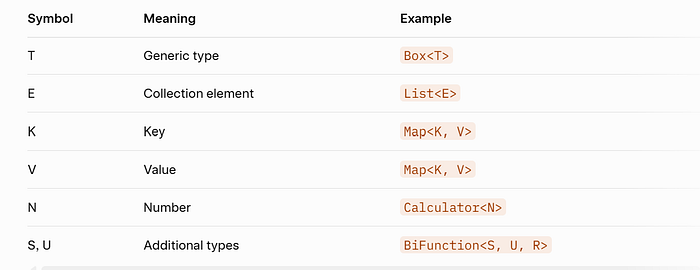
Naming Conventions
Avoid Overuse
// Bad: Over-genericized
public class OverGeneric<A, B, C, D> {
    public <E, F> E process(A a, B b, C c, D d, E e, F f) {
        // Hard to understand and maintain
        return e;
    }
}

// Good: Moderate use
public class UserService {
    public <T> T findUserById(String id, Class<T> type) {
        // Clear intent
    }
}
Dealing with Type Erasure
// Due to type erasure, cannot directly use T.class
public class TypeErasureExample<T> {
    // private Class<T> clazz = T.class; // Compile error!

    // Solution: Pass Class object
    private Class<T> clazz;

    public TypeErasureExample(Class<T> clazz) {
        this.clazz = clazz;
    }

    public T createInstance() throws Exception {
        return clazz.getDeclaredConstructor().newInstance();
    }
}
Summary
After the above introduction, I believe you have a deeper understanding of Java generic symbols.
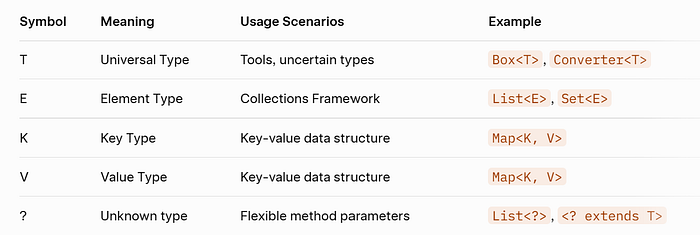
Symbol Comparison
Selection Principles
- Semantics first:
- E for collection elements
- Key-value pairs use K and V
- T for generic types
- Unknown type → ?
2. PECS principles:
- Producer → ? extends
- Consumer → ? super
3. Readability first:
- Avoid over-generalization
- Use meaningful symbol names
- Add documentation comments as appropriate
My Suggestions
Some people may find generics complex at first, but once you master the core concepts, you can write safer and more flexible code. Remember these key points:
- Type safety is the top priority: Expose errors at compile time
- Code is documentation: Good use of generics makes the code self-documenting
- Balancing flexibility and complexity: Don't use generics just for the sake of generics
- Understanding Type Erasure: Knowing how generics behave at runtime
Generics are an important part of the Java type system. Mastering these symbols will allow you to be at ease in framework design, tool development, and code refactoring.
Thank you for your patience in reading this article!
If you found this article helpful, please give it a clap 👏, and share it with your friends and follow me for more insights.
😊Your support is my biggest motivation to continue to output technical insights!