"I don't just run tools. I orchestrate recon like a symphony — tools are just my instruments."
Hey hackers 👋
I'm Abhijeet Kumawat, a passionate cybersecurity enthusiast, bug bounty hunter, and someone who started with literally zero technical background.
This write-up is the fourth part of my series: "Bug Bounty from Scratch", where I'll be posting 25+ deep-dive stories on everything you need to know to start and succeed in the world of ethical hacking.
"And the best part? Everything I share is something I wish — — — — — someone told me when I was starting." — — — —
Let's go into the real part -
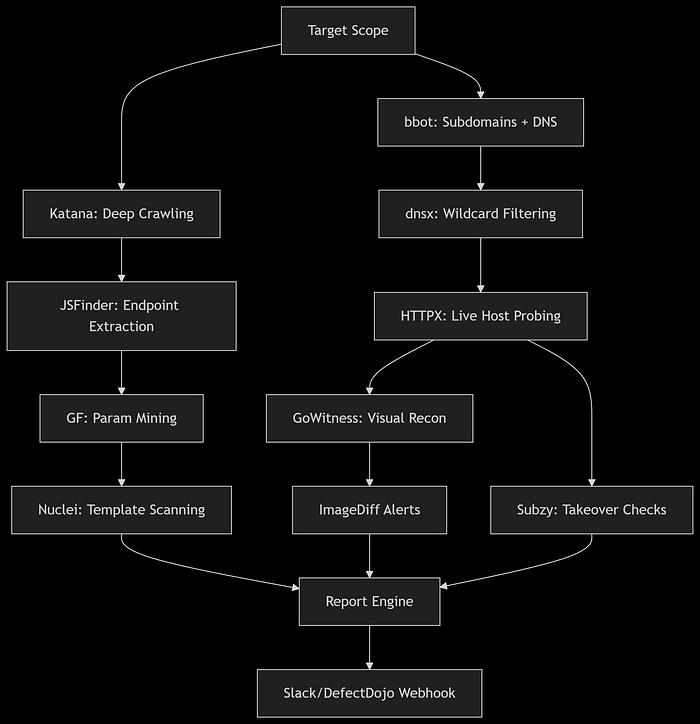
🔧 1. BBOT
BBOT is Passive & Active Recon Framework and one of my favourat tool.
Why I Use It:
- > Merges multiple recon tools in a single, orchestrated CLI.
- > Supports active/passive discovery, DNS brute-forcing, fingerprinting, and even port scanning.
Pro Tip: Configure multiple API keys in the
secrets.yamlfor better passive coverage using sources like SecurityTrails, Shodan, and Censys.
bbot -t example.com --modules subdomain-enum,dns,portscan,http🌐 2. Katana (Web Crawler)
Why I Use It:
- > Super fast JS-aware crawler.
- > Extracts endpoints and hidden paths even from dynamic sites.
Pro Tip: Feed Katana output into nuclei or custom scripts to fingerprint directories quickly.
katana -u https://example.com -jc -o katana_output.txtStealth Mode & JS Heuristics:
katana -u https://example.com -jc -d 5 -f qurl -c 10 \
       -proxy http://127.0.0.1:8080 -em "logout,reset-password"
You can also make little Key Upgrades in it, like:
- > Headless Crawling: Add
-hlfor sites requiring JS rendering. - > Auth Integration: Use
-H "Cookie: session=..."for authenticated crawling.
katana -u https://example.com -silent | nuclei -t ~/nuclei-templates/ -rate-limit 100🔎 3. httpx
Why I Use It:
- > Filters live hosts with status codes, technologies, and titles.
cat domains.txt | httpx -status-code -tech-detect -title -o live_hosts.txtPro Tip: Use the
-cdnflag to skip noisy results behind CDNs.
Multi-Tier Filtering:
cat domains.txt | httpx -sc -td -title -favicon -jarm -tls-grab \
       -match-string "admin" -match-code "200" -o live_hosts.json
Advanced Tactics:
- > JARM Fingerprinting: Identify services behind CDNs (
-jarm). - > Favicon Hashing: Detect frameworks via
shodanfavicon hashes. - > Parallelization: Boost speed with
-c 100(100 threads).
📸 4. GoWitness
Why I Use It:
- > Visualizes targets for easy triaging.
- > Useful for quickly spotting admin panels, exposed dashboards, etc.
gowitness file -f live_hosts.txt -P screenshots/Pro Tip: Combine with
httpxoutput for only HTTP services.
Automated Analysis:
gowitness file -f live_hosts.txt -P screenshots/ \
              --chrome-options "--headless --disable-gpu" \
              --db gowitness.sqlite3
Pro Tip:
ImageDiff Automation: Detect changes with
imagehash(Python):
from PIL import Image import imagehash hash1 = imagehash.average_hash(Image.open('img1.png')) hash2 = imagehash.average_hash(Image.open('img2.png')) print(hash1 - hash2) # Threshold: >5 = significant changeDashboard Integration: Serve screenshots via
gowitness report serve.
🧠 5. JSFinder (Modified)
Why I Use It:
- > Finds JS files that contain juicy parameters, API keys, and endpoints.
Pro Tip: Use grep and regex to auto-extract secrets:
cat jsfiles.txt | xargs -n1 curl -s | grep -Ei "apikey|token|secret"Automated Secret Extraction:
jsfinder -u https://example.com -o js_urls.txt
cat js_urls.txt | grep -Eo "(https?://[^\"]+)" | hakcheckurl | grep 200
cat js_urls.txt | waymore -i - -o js_waymore.txt
Toolchain Integration:
- > LinkFinder: Extract endpoints:
python3 linkfinder.py -i https://example.com/static.js -o cli. - > SecretFinder:
python3 secretfinder.py -i js_waymore.txt -o secrets.json.
🧭 6. Subzy
Why I Use It:
- > Actively checks for dangling DNS records or services.
subzy run --targets live_hosts.txtUnique Use: Automate this weekly on all your scope assets.
Continuous Monitoring:
subzy run --targets live_hosts.txt --verify --https \
         --concurrency 50 --output takeovers.json
🛠️ 7. dnsx
Why I Use It:
- > Fast DNS resolution.
- > Finds wildcarded domains, misconfigs, etc.
cat subdomains.txt | dnsx -a -resp -o resolved.txtWildcard & Cache Poisoning Checks:
dnsx -l subdomains.txt -a -aaaa -cname -mx -ptr -soa \
     -wd "*" -r 8.8.8.8 -resp -json -o dns_analysis.json
Advanced Use Cases:
- > DNSSEC Validation: Integrate
ldns-verify-zone. - > Subdomain Bruteforce: Pair with
puredns: - > puredns bruteforce all.txt example.com -r resolvers.txt | dnsx -silent
💥 8. nuclei
Why I Use It:
- > Customizable templates.
- > Helps in finding low-hanging bugs like open redirects, IDORs, or misconfigs.
nuclei -l live_hosts.txt -t cves/ -o nuclei_output.txtPro Tip: Always keep templates updated.
nuclei -update-templatesAI-Powered Scanning:
nuclei -l live_hosts.txt -tags cve,misconfig -etags noisy \
       -stats -si 100 -rl 150 -me critical_findings \
       -headless -proxy-url http://tor:9150
Next-Level Config:
- > Custom Templates: Generate via
nuclei-ai(GPT-powered) - > Risk-Based Scanning: Prioritize with
-impact critical - > Integrations: Push results to DefectDojo via
-report-defectdojo
🌍 9. gau + waybackurls
Why I Use It:
- > Collects old endpoints for testing legacy bugs.
- > Inputs for parameter fuzzing.
gau example.com >> urls.txt
waybackurls example.com >> urls.txt
Pro Tip: Remove duplicates and scan with
GFpatterns.
Predictive URL Harvesting:
gau example.com --threads 20 --blacklist png,jpg,css \
               --from 20220101 --to 20231231 | uro > urls.txt
Machine Learning Filter:
- > URO: Apply ML-based filtering (
uro). - > Time Machine: Use
waybackfor delta analysis:
wayback_machine_downloader -s https://example.com -d 2020–01–01📜 10. GF (Gf-Patterns)
Why I Use It:
- > Filters out potentially vulnerable endpoints from URL lists.
cat urls.txt | gf xss > xss_candidates.txtAdvanced Workflow:
- > Use custom patterns like
cloudflare_cache,debug_params, orcsrfto discover rare issues. - > Custom Attack Signatures:
# ~/.gf/cloudflare_cache.json
{
  "flags": "-i",
  "pattern": "cf-cache-status.*(HIT|DYNAMIC)"
}
Automated Fuzzing Pipeline:
cat urls.txt | gf ssti | qsreplace "{{7*7}}" | \
  httpx -match-string "49" -ms "SSTI Confirmed"
📂 Automation-Ready Folder Structure
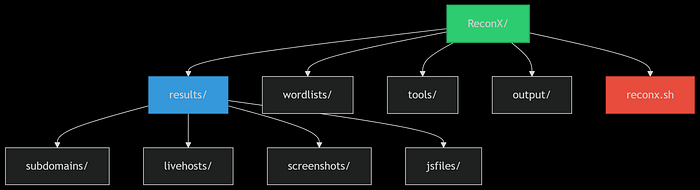
ReconX/ ├── results/ │ ├── subdomains/ │ ├── livehosts/ │ ├── screenshots/ │ └── jsfiles/ ├── wordlists/ ├── tools/ ├── output/ └── reconx.sh
🤖 reconx.sh Master Script
Hackers,
Tired of juggling multiple tools for reconnaissance?
Here is "ReconX" — my custom-built recon automation tool designed to streamline your entire process.
From subdomain enumeration with BBOT (powered by multiple APIs) to endpoint discovery with Katana, port probing with HTTPX, and subdomain takeover detection with Subzy.
And even automated screenshots via GoWitness — "ReconX" does it all.
It organizes every output into a single folder, saving you hours of manual effort.
If you're serious about finding real bugs and earning real bounties, "ReconX is your ultimate shortcut" to faster, cleaner, and more effective recon.
🔥Bonus: 34,000+ Bug Bounty Programs
Looking to skip the noise and dive straight into real bug bounty opportunities?
This exclusive list of 34,000+ Bug Bounty Programs is your shortcut.
You know what?
It includes top-tier targets from platforms like HackerOne, Bugcrowd, Intigriti, and many more ,and all help you focus on what's important:
finding bugs and earning bounties
Whether you're just starting or already hunting, this collection will save you hours of research and give you a clear path to real rewards.
🎯 Coming Up Next:
"Burp Suite for Beginners (and Why It's Your New Best Friend)"
"Master the art of reconnaissance, and you'll never have to guess where the cracks are."
❤️ Support My Work
If this helped you save money, time, or confusion: 👉 Buy Me a Coffee ☕❤️
Every cup fuels the next write-up.