In this guide, we will explore common vulnerabilities in the File Transfer Protocol (FTP) and demonstrate how attackers can exploit them to gain unauthorized access to networks and systems.
You will learn about misconfigurations, outdated software, anonymous login abuse, and weak authentication mechanisms. This guide aims to arm penetration testers with practical knowledge on identifying and exploiting these weaknesses, helping organizations strengthen their defenses against potential FTP-based attacks.

About the Author:
I'm Andrey, a penetration tester and cybersecurity researcher. My work and research focus on offensive security.
What is FTP?
FTP (File Transfer Protocol) is a standard network protocol used to transfer files between a client and a server over a TCP-based network, like the Internet. It operates on port 21 by default and is one of the oldest protocols still in use today for transferring files between systems.
Here's a deeper dive into how FTP works and why it's significant:
How FTP Works
- Client-Server Model: FTP uses a client-server architecture. The client initiates a connection to the server to either upload or download files.
- Control and Data Connection: FTP establishes two types of connections:
- Control Connection (Port 21): Used for sending commands from the client to the server and receiving responses.
- Data Connection (Port 20 or random port): Used for transferring the actual data (files) between the client and server.
- Active vs Passive Mode:
- Active Mode: The server initiates the data connection back to the client.
- Passive Mode: The client initiates both control and data connections. This mode is preferred in environments behind firewalls.
FTP Penetration Testing Checklist
1. Enumerate the FTP Service:
- You can ru Nmap scans to identify if the FTP service is open on target network
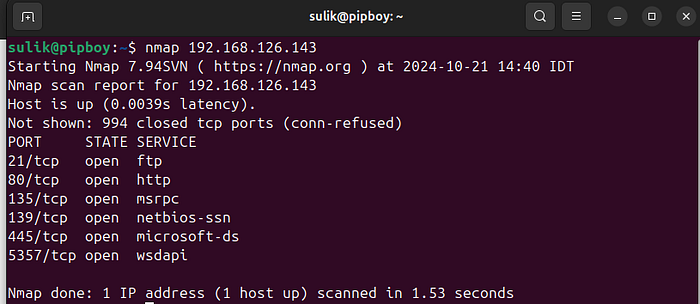
- You can try to connect with Anonymous strict
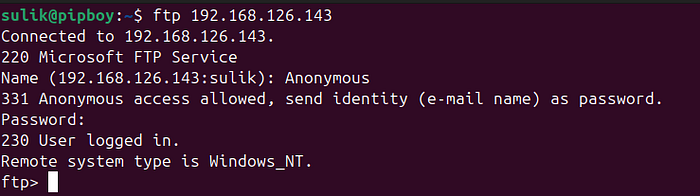
Nmap Script for FTP Enumeration.
nmap --script "ftp*" -p 21 <target-ip>Breakdown of the Scripts:
- ftp-anon: Checks if anonymous login is allowed.
- ftp-bounce: Checks if the FTP server is vulnerable to FTP bounce attacks.
- ftp-syst: Retrieves system information using the
SYSTcommand. - ftp-proftpd-backdoor: Checks for a backdoor vulnerability in ProFTPD servers.
- ftp-vsftpd-backdoor: Detects a backdoor in vsFTPd version 2.3.4.
- ftp-libopie: Detects vulnerable versions of FTP servers that use the OPIE authentication library.
- ftp-brute: Performs a brute-force attack against the FTP server.
Important Considerations:
- Noisiness: This approach is "noisy," meaning it can trigger alarms on intrusion detection systems (IDS) or firewalls due to the amount of activity generated by these enumeration scripts.
- Time: Running multiple scripts like this might take longer depending on the target system's response time and the number of services scanned.
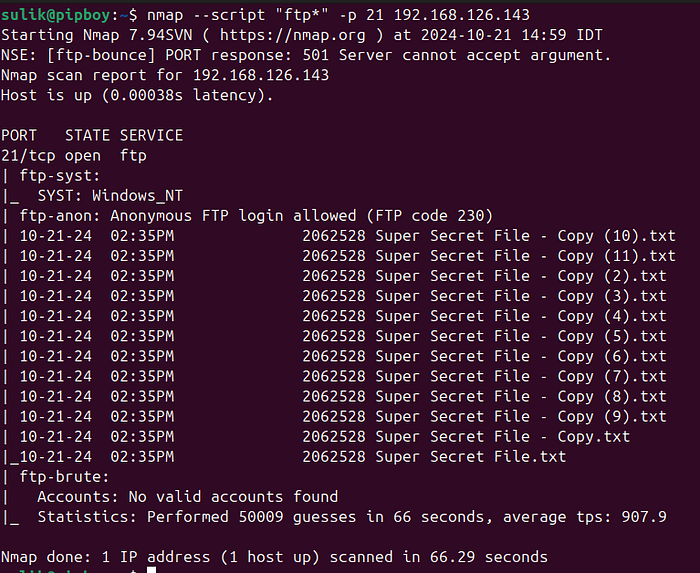
If Anonymous login disabled this script can do bruteforce.
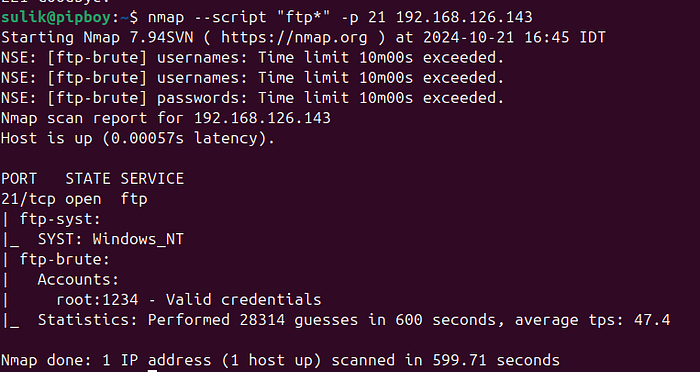
2. Test for Common Vulnerabilities:
- If Anonymous login failed:
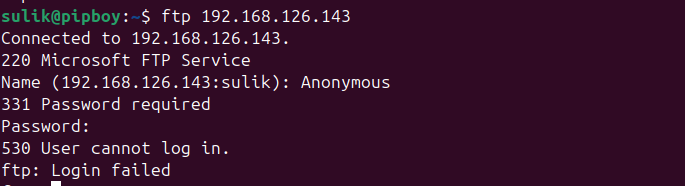
- Brute force login credentials using tools like Hydra or Medusa.
This Hydra command is designed to perform a brute-force attack on an FTP server by trying multiple username and password combinations. Here's a detailed breakdown of the command:
hydra -L Documents/PasswordCracking/Dictionaries/1000_usernames.txt -P Documents/PasswordCracking/Dictionaries/short_pass_list.txt ftp://192.168.126.143Breakdown:
hydra: This is the main command for the Hydra tool, which is used for conducting brute-force attacks against various services like FTP, SSH, HTTP, and more.-L Documents/PasswordCracking/Dictionaries/1000_usernames.txt:- The
-Loption specifies the path to a file that contains a list of usernames to be tested. - If you have the username use
-land username - In this case, the file
1000_usernames.txtcontains 1,000 potential usernames that Hydra will try against the FTP server. -P Documents/PasswordCracking/Dictionaries/short_pass_list.txt:- The
-Poption specifies the path to a password list file, in this case,short_pass_list.txt, which contains the passwords Hydra will attempt for each username. - How to gain password lists here
- Hydra will pair each username from
1000_usernames.txtwith each password fromshort_pass_list.txtto try and find a valid login. ftp://192.168.126.143:- This specifies the target protocol and IP address. In this case, it's pointing to an FTP service running on the machine at IP address
192.168.126.143. - The
ftp://part indicates that the attack is targeting an FTP service, and the IP address192.168.126.143is the location of the FTP server.

What the Command Does:
Hydra will systematically attempt to log in to the FTP server at 192.168.126.143 using all combinations of usernames from the 1000_usernames.txt file and passwords from the short_pass_list.txt file. If a valid combination is found, Hydra will display the correct username and password pair that successfully logs into the FTP server.
Important Notes:
- Brute-Force Attack: This command performs a brute-force attack by testing numerous combinations of usernames and passwords. It's highly noisy and can trigger alerts on security systems. Explanation about Brute-Force Attack here:
- Efficiency: The success of this attack depends on the quality and relevance of the username and password lists. A longer list will increase the likelihood of finding a valid combination, but it will also take more time.
3. Misconfigurations and Default Credentials
Verify whether the FTP server is utilizing default login credentials. Numerous FTP services are configured with preset usernames and passwords by default. Consult commonly available lists of default credentials for widely used FTP software, such as ProFTPD, vsftpd, or FileZilla.
4. Try to upload harmful files to writable directories and evaluate the potential impact.
Impact:
- On the Server: If the malicious file contains a reverse shell or similar payload, uploading it to a writable directory could allow you to gain remote access to the server. This would enable attackers to execute commands, manipulate data, or control the system entirely.
- On Other Users: If other users download and run the malicious file, their systems could be compromised as well. This might lead to unauthorized access to their machines, malware infections, or the installation of backdoors, spreading the attack across multiple users.
5. Check for directory traversal vulnerabilities to bypass directory restrictions.
Directory traversal vulnerabilities occur when an attacker can manipulate the file path to access files outside the intended directory structure. This typically happens when input validation on file paths is insufficient, allowing attackers to "traverse" up the directory tree using patterns like ../.
Example:
Assume an FTP server has a vulnerable file system, and an attacker is trying to access files outside the FTP root directory, such as /etc/passwd.
1. Without Directory Traversal:
Normally, an FTP client might try to access a file within the allowed directory, for example:
ftp> get /public/file.txtThis would fetch the file file.txt from the /public directory.
2. With Directory Traversal:
To exploit a directory traversal vulnerability, the attacker can manipulate the path to traverse outside the allowed directory by using ../ to move up the directory tree:
ftp> get ../../../../etc/passwdIn this example, the attacker attempts to retrieve the /etc/passwd file by moving up four directory levels (depending on the server's directory structure). If the server is vulnerable, it will grant access to sensitive system files that should be protected.
6. Search for Known Exploits:
Outdated Software Versions
After determining the version of the FTP server software, investigate known security flaws and exploits. Exploit-DB is a valuable resource for finding these. Look for CVEs associated with the specific FTP software and version.
For instance, vsftpd 2.3.4 is notorious for a backdoor vulnerability (CVE-2011–2523).
To find related exploits:
searchsploit vsftpd 2.3.4This will reveal possible exploitation methods, such as uploading a backdoored file or exploiting default login credentials.
How to exploit this in other post about Metasploit…
7. Escalate Privileges:
- Search for sensitive files such as password files or configuration details.
- Utilize any local privilege escalation exploits to gain higher-level access.
Conclusion:
This guide has explored several common vulnerabilities within FTP services that can be exploited by attackers. By learning how to identify and take advantage of these weaknesses, penetration testers can help organizations secure their FTP servers, preventing unauthorized access and potential data breaches. It's crucial to address misconfigurations, use strong authentication, and update software to mitigate the risks associated with FTP.
Thank you for reading
Andrey Pautov
1200km@gmail.com