🌟 Why this guide (and why it might change your week)
Let me paint a familiar picture. Your inbox is a swamp. You download invoices manually, rename files, drop them into a shared drive, and send a Slack "done" message. You copy data from a form into a spreadsheet, then into a CRM. You tell yourself it only takes five minutes — until you realize you did it 37 times this week. That's three hours you didn't spend on the work that actually moves the needle.
Enter n8n (pronounced "n-eight-n"): an open-source automation canvas where you connect services like Gmail, Google Drive, Notion, Slack, Airtable, Stripe, GitHub, and hundreds more. You place nodes on a flowchart, connect them with arrows, and voilà — your "five-minute chores" start doing themselves while you sip coffee. 🍪
This guide is your friendly, human first pass at mastering n8n workflows. It's written for complete beginners (even non-developers) and keeps things conversational. We'll build instincts step by step, share realistic examples, show you common pitfalls, and give you three pros and three cons for each big idea so you see the trade-offs clearly.
By the end, you'll:
- Understand how n8n thinks (triggers → data → actions → branching → error handling)
- Build three real workflows you can adapt immediately
- Learn best practices for naming, folders, credentials, and security
- Ship with confidence, using logging, alerts, and versioning
- Walk away with a summary table and starter playbook you can reuse
Grab a drink, open a fresh canvas, and let's ship your first "robot." 🚀
📂 The n8n Mental Model — How Workflows Flow
Think of n8n as a railway network:
- Triggers are stations where trains (data items) start.
- Action nodes are stops where we stamp tickets, transform cargo, or drop off packages.
- Branches are track switches (IF, Switch, Merge).
- Binary attachments ride in a special wagon.
- Executions are recorded journeys you can replay or debug later.
A workflow is just a graph of nodes. Each node receives one or more items, transforms or creates new ones, and passes them on. You can run a workflow manually, on a schedule, on incoming events (webhooks), or when another workflow calls it.
✅ Pros
- ✨ Visual: easier to reason about than code-only automations
- 📦 Integrates with tons of apps and any REST API
- 💾 Open source: self-host for control and privacy
❌ Cons
- ❗ First 30 minutes feel "new" if you've never touched automation
- 📂 Slight learning curve for expressions and item mapping
- 🔧 Self-hosting needs a tiny bit of DevOps if you go that route
👉 Beginner advice: Don't try to learn everything in an hour. Build one small workflow that pays you back today. Confidence compounds.
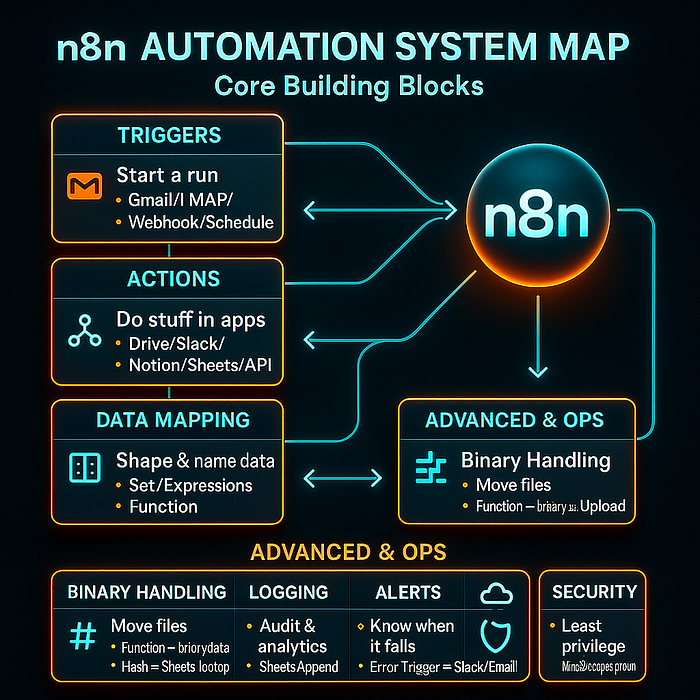
📋 The Five Building Blocks (What You'll Use Every Day)
- Triggers (Webhook, Schedule, Gmail, IMAP, Notion Trigger, Stripe, GitHub, etc.)
- Actions (Drive Upload, Slack Send, Notion Create, HTTP Request)
- Logic (IF, Switch, Merge, Split in Batches, Wait, Code/Function)
- Data (JSON fields, Binary data, Expressions like
{{$json.field}}) - Reliability (credentials, retry, error workflow, logging)
Let's turn those into real, useful habits.
📚 Workflow #1 — "Email → Google Drive" (Your first win)
Use case: When an email with attachments arrives (say, invoices), automatically save each file into a clean Drive folder with a consistent name, then notify Slack.
🎨 Steps (node by node)
- Gmail Trigger (or IMAP Read Email if Gmail API is locked down)
- Filters: Has Attachment = true, optional Label = invoices, optional From = vendor@
- Result: each email comes in as one item; attachments ride as binary properties like
attachment_0.
2. Function (split attachments)
We'll fan-out to one item per attachment and standardize the binary key to data.
const out = [];
for (const item of items) {
  const binaries = item.binary || {};
  const keys = Object.keys(binaries).filter(k => k.startsWith('attachment_'));
  for (const [idx, key] of keys.entries()) {
    const bin = binaries[key];
    out.push({
      json: {
        emailSubject: item.json.subject || 'no-subject',
        emailFrom: item.json.from || 'unknown',
        emailDate: item.json.date || new Date().toISOString(),
        originalFileName: bin.fileName || `attachment_${idx}`
      },
      binary: { data: bin }
    });
  }
}
return out;
3. Set (create a deterministic file name)
{{
  ($json.emailSubject || 'file')
    .toString()
    .replace(/[^\w\-]+/g, '_')
    .slice(0, 80) +
  '__' + (new Date($json.emailDate)).toISOString().slice(0,10) +
  '__' + ($json.originalFileName || 'attachment')
}}
4. Google Drive → Upload
- Binary Property:
data - File Name:
{{$json.fileName}} - Parent Folder: pick a stable folder (e.g.,
/Finance/Invoices)
5. Slack → Post Message (optional but delightful)
:inbox_tray: Saved *{{$json.fileName}}* from *{{$json.emailFrom}}* to Google Drive.✅ Pros
- ✅ Removes a daily chore instantly
- 🌳 Clean names, easy to search later
- 📤 Optional notifications keep humans in the loop
❌ Cons
- ❌ All files in one folder can get crowded later
- 📌 No de-duplication yet (duplicates if email re-sent)
- 🔍 Requires Gmail/Drive OAuth setup once
🏁 Conclusion & 👉 Advice: This is your "hello world" of n8n. Ship it first. Then iterate with smarter filing and de-duplication (next workflow).
🔧 Workflow #2 — "Smart Filing" (Routing by sender/keyword/date)
Use case: Route attachments automatically into subfolders based on the sender, subject keywords (e.g., "Invoice"), and month (e.g., 2025-09). Send a Slack alert on success. Add de-dupe to avoid saving duplicates.
🎨 Steps
- IF — sender routing
- Expression:
{{$json.emailFrom.toLowerCase()}}contains@trustedvendor.com - True → Finance branch; False → Intake branch
2. Set — build a dynamic folder path
{{ '/Finance/Invoices/' + (new Date($json.emailDate)).toISOString().slice(0,7) }}3. Google Drive (List) — check if the month folder exists under /Finance/Invoices; if not, Create Folder.
4. Function — compute a SHA-256 hash of the file to de-dupe
const crypto = require('crypto');
return items.map(item => {
  const bin = item.binary?.data;
  const buffer = Buffer.from(bin.data, bin.dataEncoding || 'base64');
  item.json.fileHash = crypto.createHash('sha256').update(buffer).digest('hex');
  return item;
});
5. Google Sheets (Lookup) — search your log sheet for fileHash. If found → Skip. Otherwise proceed.
6. Google Drive → Upload to the dynamic folder.
7. Google Sheets → Append a log row: timestamp, fileName, fileId, emailFrom, subject, fileHash, folderPath.
8. Slack → Post Message with file and folder details.
✅ Pros
- ✅ Scales: month folders + sender routing keep things sane
- 🔍 De-duplication saves storage and avoids confusion
- 📊 Log in Sheets = accountability and audit trail
❌ Cons
- ❌ A few more nodes (but worth it)
- 📂 Managing folder IDs/searches can feel fiddly once
- 🔧 Sheets lookup adds a tiny bit of latency
🏁 Conclusion & 👉 Advice: You've turned a basic flow into a production-grade pipeline. Use the same pattern for resumes, contracts, or design assets.
🍎 🐧 Hosting Options (Cloud vs Self-Hosted)
You can use n8n Cloud (fastest start) or self-host with Docker.
- n8n Cloud: no servers to maintain, SSL, easy OAuth — great for beginners.
- Self-host (Docker): full control, privacy, and customization. Example:
docker run -it --rm \
  -p 5678:5678 \
  -e N8N_HOST=your.domain.com \
  -e N8N_PORT=5678 \
  -e N8N_PROTOCOL=https \
  -v ~/.n8n:/home/node/.n8n \
  n8nio/n8n:latest
✅ Pros
- ✅ Cloud = zero ops; Self-host = full control
- 📦 Both support OAuth and secrets
- 🌳 Both can scale from tiny to enterprise
❌ Cons
- ❌ Self-host needs domain/SSL and backups
- 📌 Cloud has usage tiers and limits
- 🔐 OAuth redirect URI must match environment
🏁 Conclusion & 👉 Advice: Start on Cloud to learn fast. Move to self-host when you need privacy or heavy customization.
🔐 Credentials & Security (least privilege wins)
- Use minimal scopes:
gmail.readonlyinstead ofmodify(unless you add labels),drive.fileinstead ofdrive(unless you must browse the whole Drive). - Store secrets in Credentials, not in node fields.
- Restrict Drive folders to the smallest surface area.
- Think PII: invoices and resumes contain personal data — share only what you must.
- Backups: if you self-host, back up your n8n volume (credentials + workflows).
- Error isolation: build a separate Error Trigger workflow to alert you.
✅ Pros
- ✅ Reduces blast radius if a token leaks
- 🔐 Keeps compliance teams happy
- 💾 Recovery is easy when you have backups
❌ Cons
- ❌ Setup takes a few extra minutes
- 📌 Least privilege sometimes needs extra folder planning
- 🔍 Tokens expire; you'll occasionally re-connect OAuth
🏁 Conclusion & 👉 Advice: Security is a habit. Set it up once; it pays you back forever.
📤 Workflow #3 — "Form → Notion + Slack + Sheets" (Your first multi-app orchestration)
Use case: A potential client fills a form (Tally, Typeform, or Webflow). The data lands in Notion as a new lead, posts to Slack for your team, and logs into Google Sheets for reporting.
🎨 Steps (with Webhook)
- Webhook Trigger
- Method: POST
- Respond: 200 OK with a friendly message
- Copy the generated URL into your form's integration (Tally/Typeform supports webhooks).
2. IF — basic validation
- Check that
{{$json.email}}exists and includes@. False → route to a "reject" Slack message and end.
3. Notion → Create Page (Leads database)
- Map
Name,Email,Company,Budget,Notes - Optional: add tags like
source = Tally
4. Slack → Post Message
:sparkles: New lead: *{{$json.name}}* — {{$json.company}} — {{$json.email}}5. Google Sheets → Append
- Columns: timestamp, name, email, budget, notionPageId
6. Respond to Webhook (if not already) with "Thanks! We'll be in touch."
✅ Pros
- ✅ End-to-end: intake → CRM → team → analytics
- 📋 Central log in Sheets
- 🚀 Can be extended (auto-email, calendar scheduling, etc.)
❌ Cons
- ❌ Webhook must be public (use n8n Cloud or a domain/SSL if self-hosted)
- 📌 Notion API needs a connected integration with DB access
- 🔍 Data hygiene matters (validations, spam protection)
🏁 Conclusion & 👉 Advice: This is real orchestration, not just a single step. Clone it for hiring forms, support tickets, event RSVPs, and more.
🎨 Expressions & Data Mapping (the 20% you'll use 80% of the time)
- Grab a JSON field:
{{$json.email}} - Concatenate:
{{ $json.first + ' ' + $json.last }} - Date slice:
{{ (new Date()).toISOString().slice(0,10) }} - Safe default:
{{ $json.subject || 'no-subject' }} - Clean filename:
{{
  ($json.subject || 'file').toString().replace(/[^\w\-]+/g, '_').slice(0,80)
}}
✅ Pros
- ✅ Powerful without writing full code
- 🎨 Readable on the canvas
- 📦 Reusable snippets across nodes
❌ Cons
- ❌ Complex chains can get hard to read
- 📌 Mixed JSON/binary handling needs attention
- 🔍 Easier to debug slowly (add small Set nodes to inspect)
🏁 Conclusion & 👉 Advice: Keep expressions short and add Set nodes as "inspection windows." Your future debugging self will thank you.
📌 Reliability: Logging, Alerts, Retries
- Google Sheets log each successful action (timestamp, who/what/where).
- Error Trigger workflow: when any workflow fails, send a Slack/Email with execution ID, error message, and node name.
- Retry & backoff: some nodes support retries; for APIs, consider a tiny Function wrapper with
try/catchand simple retry. - Save failed executions: enable this so you can replay and inspect.
✅ Pros
- ✅ Fewer mysteries — failures page you with context
- 💾 Replays let you fix and re-run
- 📊 Logs make your work visible and auditable
❌ Cons
- ❌ A few more nodes/one extra workflow
- 📌 Slack noise if you alert on everything
- 🔍 Beware infinite loops — guard your triggers
🏁 Conclusion & 👉 Advice: Treat your workflows like small services. Observability is how they earn trust.
📁 Versioning & Collaboration
- Export workflows as JSON and keep them in Git.
- Add a README with environment notes (cloud vs self-host) and credential scopes.
- Name nodes clearly (
Gmail: Watch Invoices,Drive: Upload (Finance/2025-09)), not "Node 2."
✅ Pros
- ✅ Easy rollbacks and reviews
- 📦 New teammates onboard faster
- 💾 You own your automation assets
❌ Cons
- ❌ Requires a simple process ("export → commit")
- 📌 JSON diffs are noisy (use PR descriptions)
- 🔍 Keep secrets out of exported files
🏁 Conclusion & 👉 Advice: Even solo, version your flows. Two months from now, you'll be grateful.
❓ Troubleshooting Cheat Codes
- No items? Check trigger filters (label/from/has attachment).
- Binary not found? Ensure your Upload node reads the same property name you set (e.g.,
data). - Permission denied? Reconnect OAuth; verify scopes and folder access.
- Duplicates? Add the hash + Sheets lookup step.
- Weird encodings? Confirm binary
dataEncodingor use "Move Binary Data" to rebuild correctly.
📊 Summary Table — Functions & Where They Shine
| 📌 Point        | 📚 What it does    | 🔧 How to use it                 | ✅ Pros             | ❌ Cons                  |
| --------------- | ------------------ | -------------------------------- | ------------------ | ----------------------- |
| Triggers        | Start a run        | Gmail/IMAP/Webhook/Schedule      | Real-time or timed | Filters can be tricky   |
| Actions         | Do stuff in apps   | Drive/Slack/Notion/Sheets/API    | Useful fast        | Need credentials/scopes |
| Logic           | Branch & merge     | IF/Switch/Merge/Split            | Smart routing      | More nodes to manage    |
| Data Mapping    | Shape & name data  | Set/Expressions/Function         | Clean outputs      | Expressions can sprawl  |
| Binary Handling | Move files         | Function → `binary.data`, Upload | File-safe flows    | MIME quirks sometimes   |
| De-dupe         | Avoid dupes        | Hash + Sheets lookup             | Clean history      | Extra I/O step          |
| Logging         | Audit & analytics  | Sheets Append                    | Visibility         | Another integration     |
| Alerts          | Know when it fails | Error Trigger → Slack/Email      | Fast recovery      | Alert fatigue           |
| Hosting         | Run n8n            | Cloud or Docker                  | Flexibility        | Setup vs cost           |
| Security        | Least privilege    | Minimal scopes, folder perms     | Compliance         | Setup takes time        |
🏁 Big Picture Conclusion
Automation isn't about replacing humans. It's about giving humans back their time. With n8n, you can turn small chores into quiet background processes that execute the same way at 3 pm on a Tuesday or 3 am on a Sunday. The canvas teaches you to think in repeatable steps: trigger → transform → deliver → log → alert.
Start with a single workflow that saves you 15 minutes this week. That alone is a win. Then compound: add routing, add logging, add alerts, add de-duplication. In a month, your "robots" will be saving hours you didn't know you had.
👉 Beginner Roadmap (copy this into your notes)
Week 1
- Day 1: Build Email → Drive (basic).
- Day 2: Add clean naming + Slack ping.
- Day 3: Add month subfolders + sender routing.
- Day 4: Add hash de-dupe + Sheets log.
- Day 5: Create Error Trigger workflow with Slack alert.
- Day 6: Export your workflow JSON to Git (versioning).
- Day 7: Write a short README: credentials, scopes, folders.
Week 2
- Day 8–9: Build Form → Notion + Slack + Sheets.
- Day 10: Add validations + rate limit safety (Wait node).
- Day 11: Try an HTTP Request node to call a public API.
- Day 12: Add a Function node to transform arrays/objects.
- Day 13: Create a Schedule trigger for a daily report.
- Day 14: Audit all credentials, tighten scopes, document everything.
You've made it this far 👏 — which means you're serious about learning and leveling up your skills. If you want to dive deeper into related topics, I've created several CheatSheet series and curated lists on Medium. These collections are like mini roadmaps designed for beginners and self-learners who want step-by-step guidance.
Here's where you can explore more:
- HTML CSS CheatSheet 👉 Read Here
- HTML CSS JavaScript CheatSheet 👉 Read Here
- NextJS CheatSheet 👉 Read Here (coming soon)
- ReactJS CheatSheet 👉 Read Here
- TypeScript CheatSheet 👉 Read Here
- Web3 👉 Read Here
- Git CheatSheet 👉 Read Here
- JavaScript CheatSheet 👉 Read Here (coming soon)
- Visual Studio Code 👉 Read Here
- Front-End 👉 Read Here
- Informative Stories 👉 Read Here
- JavaScript 👉 Read Here
- HTML 👉 Read Here
- Tailwind CSS 👉 Read Here
- NodeJS Series 👉 Read Here
✅ Final Takeaways
- ✨ Start small, ship today, iterate tomorrow.
- 📂 Name nodes clearly and keep flows readable.
- 🔐 Use least privilege — the right scopes and folders.
- 📊 Log and alert — trust grows when you can see what happened.
- 🔄 Re-use patterns — hash de-dupe, dynamic folders, Sheets logging, Error Trigger.
You've got this. Build your first robot, watch it run, and give yourself that quiet smile when a task completes without you lifting a finger. Then build the next one. 👉