Controlling UAVs using Hand Gestures is a pretty common theme. But most of that solutions are focused on the good old OpenCV. Hence, that is the fast solution (in case you want to run it directly on the drone), but it's pretty hard to add custom gestures or even motion one. In this article, I want to introduce the solution which is based on the Hand Keypoint detection model by MediaPipe and simple Multilayer perceptron (Neural Network).
Introduction
This project relies on two main parts — DJI Tello drone and MediaPipe fast hand keypoints detection.
DJI Tello is a perfect drone for any kind of programming experiments. It has a rich Python API (also Swift and JS APIs are available) which helps to almost fully control a drone, create drone swarms and utilise its camera for Computer vision.
MediaPipe is an amazing ML platform with many robust solutions like Face mesh, Hand Keypoints detection and Objectron. Moreover, their model can be used on mobile platforms with on-device acceleration.
Here is a starter-pack that you need:
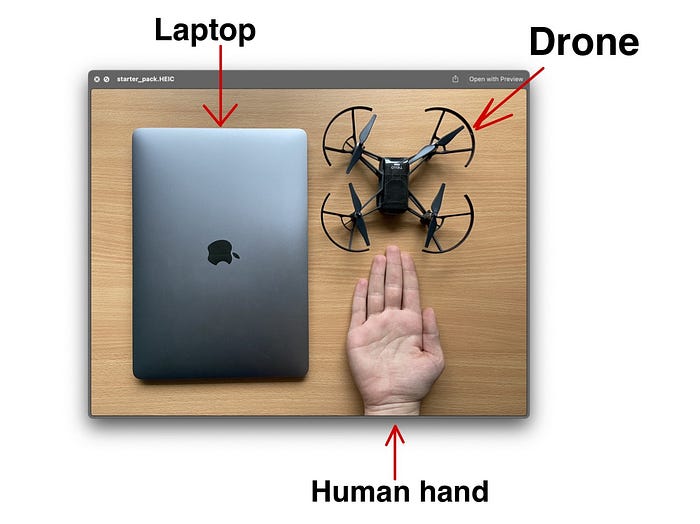
Approach description
The application is divided into 2 main parts: Gesture recognition and Drone controller. Those are independent instances that can be easily modified. For example, to add new gestures or change the movement speed of the drone.
Let's take a closer look at each part!
Gesture recognition
Of course, the main part of this project is devoted to the Gesture detector. The idea for the recognition approach in this project was inspired by this GitHub repo. Here is a quick overview of how it works.
MediaPipe has a python implementation for their Hand Keypoints Detector. It is returning 3D coordinates of 20 hand landmarks. Like this:

In this project, only 2D coordinates will be used. Here you can see all of 20 key points.
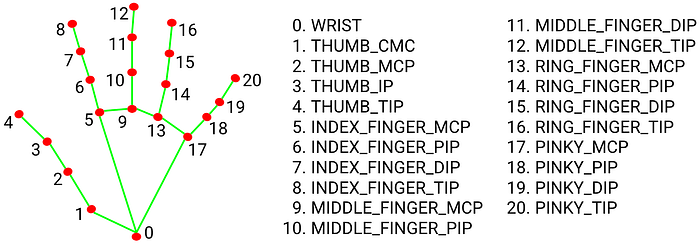
Then, these coordinates are flattened and normalized. To each list of points, the ID of gesture is added.

When we have collected about 20–100 examples for each gesture, we can start training our neural network.
MLP is just a simple 5 layers NN with 4 Fully-connected layers and 1 Softmax layer for classification.

Because of such a simple structure, we can get excellent accuracy with a small number of examples. We don't need to retrain the model for each gesture in different illumination, because MediaPipe takes over all the detection work.
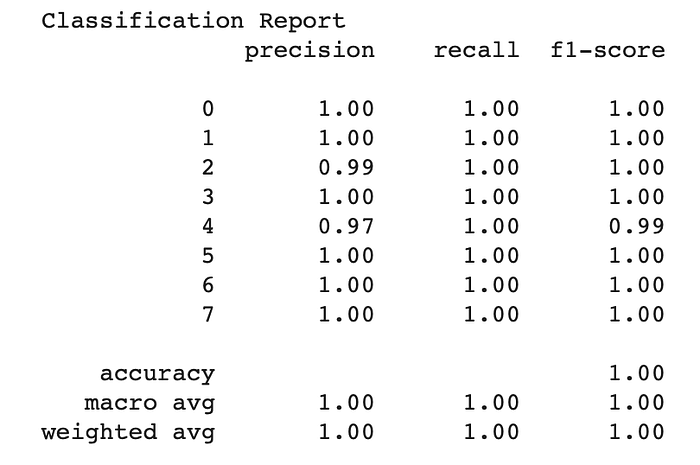
During my experiments, I could get more than 97% accuracy for each of 8 different gestures.
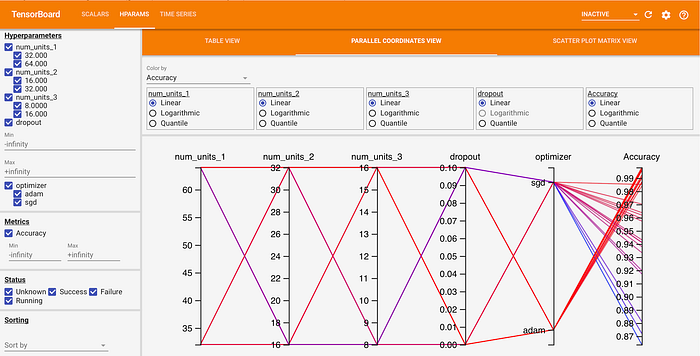
Because the structure of the network is pretty simple, you can easily use Grid Search to find the best-suited hyperparameters for the Neural network.
Here is an example from Tensorboard that I used in this project:
Drone controller
So, ok, we have an image from the drone and the model that returns Gesture ID based on detected keypoints. But how to control our drone?
Well, the nicest part about Tello is that he has a ready-made Python API to help us do that. We just need to set each gesture ID to a command.
Nevertheless, in order to eliminate the situation of false recognition, we will create a gesture buffer. And when this buffer mostly contains one particular gesture ID — we can send a command to move the drone.
Here is an example of function implementation from the project`s code:
Here can be seen that we just set the desired velocity for different direction according to each ID. This enables the drone to fly in a direction without jerking.
Demo
Here is the sweetest part 🔥
But firstly, some preparation is needed to run the project:
Setup
Firstly, clone the repository
# Using HTTPS
git clone https://github.com/kinivi/tello-gesture-control.git
# Using SSH
git clone git@github.com:kinivi/tello-gesture-control.git
1.MediaPipe setup
Then, install the following dependencies:
ConfigArgParse == 1.2.3
djitellopy == 1.5
numpy == 1.19.3
opencv_python == 4.5.1.48
tensorflow == 2.4.1
mediapipe == 0.8.2
OpenCV is needed for Image processing and djitellop is a pretty useful wrapper for the official Python API from DJI
2.Tello setup
Turn on drone and connect a computer to its WiFi
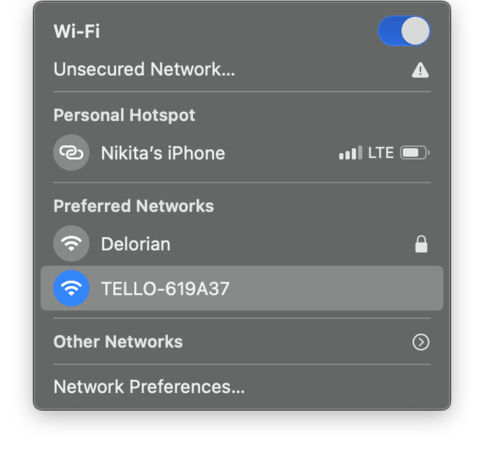
Next, run the following code to verify connectivity
On a successful connection, you will see this
1. Connection test:
Send command: command
Response: b'ok'
2. Video stream test:
Send command: streamon
Response: b'ok'
Run the application
There are 2 types of control: keyboard and gesture. You can change between control types during the flight. Below is a complete description of both types.
Run the following command to start the tello control :
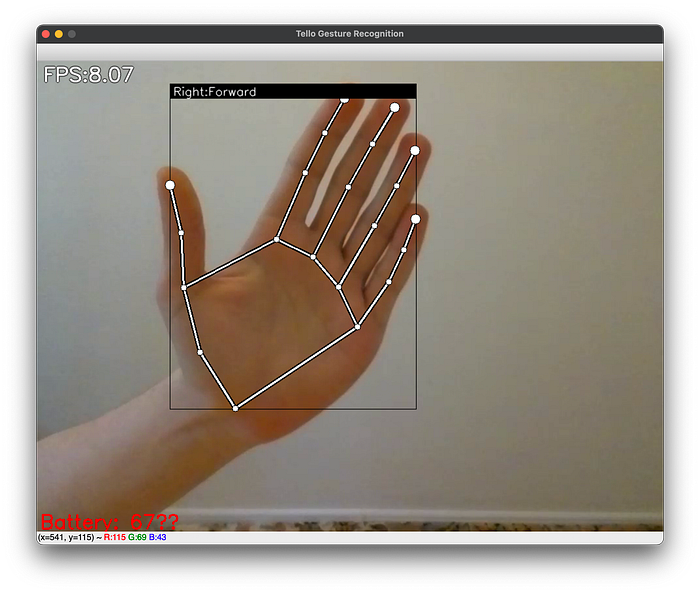
python3 main.pyThis script will start the python window with a visualization like this:
Keyboard Control
In order to position your drone to a perfect place or in case of emergency, you can use keyboard control. By default, after the take off, keyboard control mode is On
Check the following list of keys and action descriptions:
k-> Toggle Keyboard controlg-> Toggle Gesture controlSpace-> Take off drone(if landed) OR Land drone(if in flight)w-> Move forwards-> Move backa-> Move leftd-> Move righte-> Rotate clockwiseq-> Rotate counter-clockwiser-> Move upf-> Move downEsc-> End program and land the drone
Gesture Control
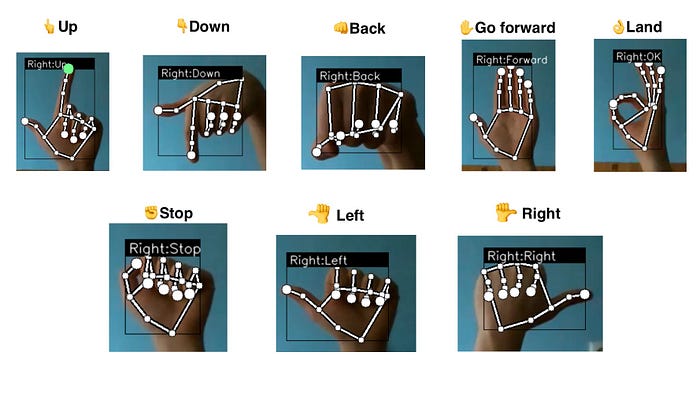
By pressing g you activate gesture control mode. Here is a full list of gestures that are available now in my repo:
Flight 🚀
Now you are ready to fly. Press Space to take off and have fun 🛸

Project Repo
References
- MediaPipe Hand Keypoint detector
- DJI Tello API wrapper repository
- Gesture recognition using Hand Keypoints(by Kazuhito00)
P.S. This project has also the functionality to easily add your own gestures. Just check this part of README.
P.S.S. In the nearest future, I am going to use a Holistic model to detect gestures at big distances and TensorFlow JS to utilise WebGPU acceleration on smartphones (control the drone with camera on the smartphone). So, if it's interesting for you, follow me on GitHub.