To many readers, this endeavor must be sacrilege, a cardinal sin against art objects. Physicality and immutability lie at the core of how we define fine art photos. Prints are signed, numbered, each mounted, each a unique original, not a mechanical "photo" copy. Hahnemühle, one of the premier paper manufacturers, sells a "photo signing pen" for $31.47 a pair. I am a sucker for Japanese pens and pencils; still, the most expensive I own is a $2.07 from SAKURA. This one also uses archival black ink, which is important, and it does not smear.
Prints on acid-free archival paper preserve images for centuries, so we can enjoy them long after current computer operating systems have become obsolete. By comparison, digital raw files live as fleeting electron flows on our hard drives or lately, the cloud. One drop of coffee, a little power spark, and they could be purged from history.
Carravagio would have repainted his works once aniline dyes became available a century later.
In fact, many of the Renaissance greats painted multiple versions of the same subject, often decades apart, to fix an imperfection and to avail themselves of the latest technologies. His Supper at Emmaus exists in two versions, an early one from 1601 and a later one, dated 1606. That is just five years apart!
Caravaggio's paintings are defined by his dramatic chiaroscuro — the stark interplay of chiaro (light) and scuro (dark) that makes his figures leap out of shadow as if caught in a spotlight. We, photographers, call it dodging and burning: he "dodged" faces, hands, and key symbols to pull them into focus, while "burning" the background into deep obscurity to eliminate distractions.
With Photoshop/Lightroom's new object identification tool, we can dodge and burn much more accurately than even a year ago. With Photoshop/Lightroom's new AI-driven noise reduction, every color DNG file, not a scanned negative, becomes clearer than ever before. The new noise reduction preserves sharpness better than any program I used before.
With Photoshop generative Upscale, low-resolution analog film scans can be improved to the resolution of drum scanners. This is important for large prints, as all scanning is limited by the negative's resolution and the unique signal-to-noise ratio of the particular shot. Generative Upscale lets you scale to almost any print size. Usually, I print 8x12 from a 2,000 by 3,000 pixel analog scan ($3 more than a regular 4x6 scan). With Generative Upscale, the same scan resolution can now be printed at 16x24 and 300 dpi. Twice the size with the touch of a button.
These new tools are the reason to reprint your favorite photographs today. Let's remind ourselves that even Ansel Adams printed multiple versions of Moonrise, Hernandez, New Mexico, whenever he was in the mood (or needed money). He suggests treating the film negative (now digital raw files) as a musical score to be interpreted in the darkroom for ever-new performances, i.e., prints.
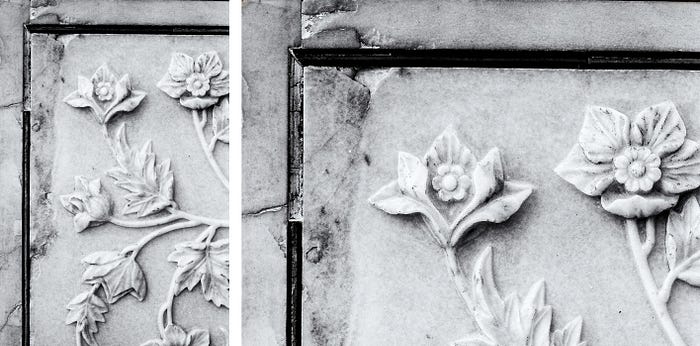
No one can change the original pixel record, but prints are seldom done at the original resolution. Most are upsampled or downsampled to fit specific dimensions, viewing distances, and printer capabilities. I had written about that before. The new algorithms are simply better than anything the general public had access to five years ago.
Scanners, today, are better than they ever were. Yet, you are still the same artist as you were decades ago. If you direct the reprinting of your own art, as opposed to dropping it into some service, you won't sell out its soul.
George Lucas releases a new, remastered version of Star Wars every decade. Martin Scorsese, too, is obsessed with restoring "old master tapes" before they vanish. He supervises restorations of his own works (e.g., Taxi Driver, Raging Bull) to ensure they look as he originally intended, rather as he remembers his past intentions today.
One of the few movies I bought outright is the 2012 full 4K digitally restored version of Lawrence of Arabia, which I watch on an Apple Pro XDR with 6,016 × 3,384 pixels (~20.4 million total), at 218 ppi, and which can resolve contrast ratios of up to ratio: 1,000,000:1. The result is breathtaking — desert vistas, skies, and shadowed interiors all rendered with the kind of precision and depth David Lean dreamed of.
It is difficult to see the full effect of upscaling if you are reading this on your iPhone, as MEDIUM limits image size and requires JPG compression.
I print at least two versions of every original
The first print version only deploys digital DNG denoising, and I will brighten the image by 5% overall. On my older prints, I did not account for the difference between reflected light on a print and translucent light when the image is displayed on a monitor. Also, my current monitor is much brighter and has much higher contrast than my old one. I do not change the color gamut or engage in selective, local changes. This is the documentary print at original resolution.
The second print version changes the intent of the image, as my artistic vision has changed, dare I say matured, over the years. I suffer from split personality disorder when it comes to color print. Some weekends, I am in KODAK Porta 1600 mode. I enjoy the subdued colors that represent reality as it appeared on the day I took the picture. On other weekends, I morph into "Fuji Velvia Guy." I want to see larger-than-life colors and make the subjects pop.
Your iPhone uses the Apple P3 gamut, which has approximately 25% more color volume than the sRGB that most printers use. Apple wanted pictures to pop when viewed on an iPhone (and hide the imperfections of their early lower lower-resolution, lower-bandwidth cameras).
Now add Photoshop's generative upsample using Firefly, and you can print at twice the size with no loss of detail. There is one hitch, however. The dimension has to be less than 6144 × 4096 pixels. That is a 25 MP image to start with, equivalent to a high-quality 35 mm scan or a 20.5 × 13.7 inch print at 300 dpi. Apply 2x generate upscale to that, and you can print at 40 × 28 inches at 300 dpi. Since everyone looks at large prints from farther away, we can print at 150 dpi, which gives us 82 × 54.6 inches (≈ 6.8 × 4.6 feet), from a twenty-year-old 35 mm analog negative, which is absolutely mind-boggling.
All this works best with low-ISO film stock: Delta 100, Ferrania P30, Porta 150. At higher ISO, the grain becomes unnaturally sharp. On digital sensors, ISO 400 or below is best for upscaling.