I was using Claude, Codex, Cursor, Gemini, Copilot, or Junie every day, but I still could not point to the exact line where "chatbot" turns into "agent", I couldn't explain what made them agents, So I wrote the naive version myself from scratch to find out.
For me, the best way to understand a new concept is to build it and explain it to someone. This article does both. I combined the story of the experiment with a practical tutorial, and I promise you'll find it useful.
We'll start with just 50 lines of Python, connect it to OpenAI, swap to local models via Ollama, build a mixed mode that uses both, add tools, implement MCP, and finally compare it to Claude CLI. By the end, you'll see exactly what's happening under the hood.
No LangChain. No LangGraph. No CrewAI. Just Python, an LLM, and a while loop.
What We're Building (The Spec)
Before you build something, you have to define what it is and spec what it does.
An AI agent is a program that:
- Accepts a high-level task from a user
- Reasons about what to do next
- Takes an action (calls a tool, searches the web, reads a file)
- Observes the result
- Decides whether to continue or return a final answer
- Maintains conversation history so each decision builds on previous ones
A regular LLM call is a one-shot operation: you send a prompt, you get a response, done. An agent is different because it loops. It takes a high-level task, reasons about what to do next, takes an action, observes the result, and keeps going until the task is finished.
That repeating cycle of think, act, observe, decide is what turns a language model into an agent.
Most agents today follow a pattern called ReAct (Reason + Act). The LLM doesn't jump straight to a final answer. It produces a thought about what to do, then an action (a tool call), then waits to observe the result before deciding what to do next.
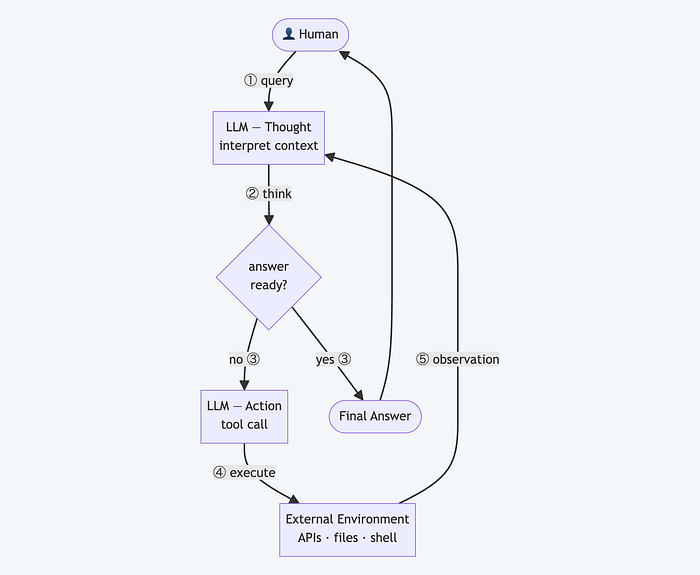
The model has no consciousness. No self-reflection in any meaningful sense. What it has is the conversation history, every action it took and every result it got, sitting in the context window. The ReAct pattern turns that into something that behaves like self-reflection and self-correction. And it works.
Here's what happens on every cycle:
- You send the current conversation to the LLM: system prompt, user message, and any prior tool results
- The LLM returns either a final answer or a list of tool calls it wants to make
- If it's a final answer, you're done
- If it's tool calls, you execute them, append the results to the conversation, and go back to step 1
That's the entire architecture.
The Minimal Implementation (Cloud API as the Brain)
First, we use a cloud API as the brain. I chose OpenAI because it has the cleanest tool-calling interface, but this works with any OpenAI-compatible API. Gemini, Anthropic, and others all support it.
The core agent mechanism is just this:
def run_agent(task: str, client: OpenAI, model: str = "gpt-4o-mini") -> str:
    messages = [
        {
            "role": "system",
            "content": (
                "You are a helpful assistant. Use tools when needed. "
                "When you have a final answer, respond without calling any tools."
            ),
        },
        {"role": "user", "content": task},
    ]

    while True:
        response = client.chat.completions.create(
            model=model,
            messages=messages,
            tools=TOOLS,
            tool_choice="auto",
        )

        message = response.choices[0].message
        messages.append(message)

        # This is the decision point: does the model have an answer, or does it need tools?
        if not message.tool_calls:
            return message.content

        # If we reach here, the model called one or more tools
        for tool_call in message.tool_calls:
            name = tool_call.function.name
            args = json.loads(tool_call.function.arguments)

            print(f"  > calling {name}({args})")

            fn = TOOL_FUNCTIONS.get(name)
            result = fn(**args) if fn else f"Unknown tool: {name}"

            messages.append({
                "role": "tool",
                "tool_call_id": tool_call.id,
                "content": result,
            })
        # End of iteration — go back to the top of the while loop
The critical line is if not message.tool_calls. If the model returns text without requesting any tools, it's signaling that it has everything it needs to answer. The agent exits and returns that text. If the model requests tools, the agent executes them, appends the results to the conversation history, and sends everything back to the model for another round.
The messages list is the agent's short-term memory. Every tool call and every result gets appended to it. By the time the LLM decides it's done, it has seen everything it did and everything it learned from doing it.
The system prompt matters too. It is the steering wheel. It tells the model when to use tools, when to stop, and what a final answer should look like. In real production agents, this system prompt is often quite large, as we've seen in the occasional leaks from Anthropic, Apple, and others.
Defining Tools
Three simple ones to make it concrete: current date/time, a calculator, and a weather stub. In a real agent you'd replace the stub with an actual API call.
import json
import os
from datetime import datetime
from openai import OpenAI


def get_current_date() -> str:
    return datetime.now().strftime("%Y-%m-%d %H:%M:%S")


def calculate(expression: str) -> str:
    try:
        result = eval(expression, {"__builtins__": {}}, {})
        return str(result)
    except Exception as e:
        return f"Error: {e}"


def get_weather(city: str) -> str:
    # Replace with a real weather API call
    return f"Weather in {city}: 72°F, partly cloudy"


TOOL_FUNCTIONS = {
    "get_current_date": get_current_date,
    "calculate": calculate,
    "get_weather": get_weather,
}
The tool schemas tell the LLM what's available. This JSON is what the model sees when it decides which tool to call and with what arguments:
TOOLS = [
    {
        "type": "function",
        "function": {
            "name": "get_current_date",
            "description": "Returns the current date and time",
            "parameters": {"type": "object", "properties": {}, "required": []},
        },
    },
    {
        "type": "function",
        "function": {
            "name": "calculate",
            "description": "Evaluates a math expression and returns the result",
            "parameters": {
                "type": "object",
                "properties": {
                    "expression": {
                        "type": "string",
                        "description": "A Python math expression, e.g. '2 + 2' or '100 * 0.15'",
                    }
                },
                "required": ["expression"],
            },
        },
    },
    {
        "type": "function",
        "function": {
            "name": "get_weather",
            "description": "Gets current weather for a city",
            "parameters": {
                "type": "object",
                "properties": {
                    "city": {"type": "string", "description": "City name"}
                },
                "required": ["city"],
            },
        },
    },
]
Run it:
if __name__ == "__main__":
    client = OpenAI(api_key=os.environ["OPENAI_API_KEY"])

    task = "What's today's date? Also, what is 15% of 847? And what's the weather in Tokyo?"
    print(f"Task: {task}\n")
    answer = run_agent(task, client)
    print(f"\nAnswer: {answer}")
Output:
Task: What's today's date? Also, what is 15% of 847? And what's the weather in Tokyo?

  > calling get_current_date({})
  > calling calculate({'expression': '847 * 0.15'})
  > calling get_weather({'city': 'Tokyo'})

Answer: Today is 2026-04-30 09:14:22. 15% of 847 is 127.05.
The weather in Tokyo is 72°F and partly cloudy.
On the first turn, the LLM identified all three tools it needed, called them one by one, got the results, and assembled the final answer. No framework. No orchestration layer.
Swapping the Cloud API with Local LLM via Ollama
Ollama exposes an OpenAI-compatible API, which means the same agent code runs on a local model with exactly one change:
ollama_client = OpenAI(
    base_url="http://localhost:11434/v1",
    api_key="ollama",  # required by the client library, ignored by Ollama
)

answer = run_agent(task, ollama_client, model="qwen2.5")
That's it. The code has no idea whether it's talking to OpenAI's servers or a model running on your machine.
To get Ollama running:
# install from ollama.com, then:
ollama pull qwen2.5
ollama serve
After that, the agent runs entirely offline. I use this for testing new tools without burning API credits, and for cases where the data involved shouldn't leave my machine.
Not all local models support tool calling
This will bite you. I tried mistral (Mistral 7B) first, which is widely recommended as a capable local model. The agent ran without errors, but the output was something like:
Answer: I need to call get_current_date() to find today's date.
Let me use the calculate tool: calculate(expression="847 * 0.15")...
Plain text describing tool calls. No actual tool calls. response.tool_calls was empty on every turn so it exited immediately with whatever the model wrote.
This is not a bug in the agent code. It worked exactly as written: it checked for tool calls, found none, and returned. The issue is that Mistral 7B does not support OpenAI-style structured function calling. It was trained to describe actions in prose, not emit them as structured JSON. The model hallucinated the syntax it thought I expected.
The models that reliably support function calling through Ollama:
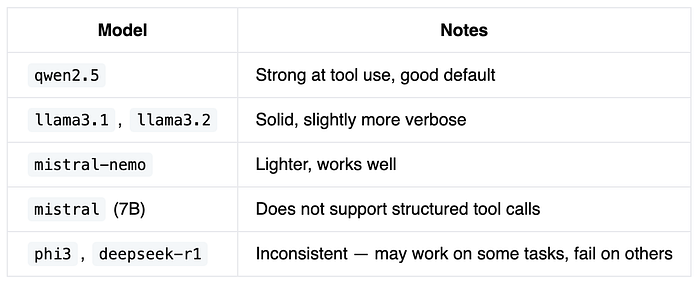
If your agent returns immediately without calling any tools, suspect the model first, not the code. Swap to qwen2.5 and see if the behavior changes.
Building Mixed Mode (Local Orchestration, Cloud Delegation)
You can orchestrate locally and only pay for cloud calls when a task actually needs it. Run the agent with a local model by default, but give it a tool that calls a cloud model for complex reasoning tasks. The local model handles the loop and simple tools. When it hits something that needs deeper reasoning, it delegates.
def ask_cloud_expert(question: str) -> str:
    """Delegate complex questions to a cloud model."""
    cloud_client = OpenAI(api_key=os.environ["OPENAI_API_KEY"])
    response = cloud_client.chat.completions.create(
        model="gpt-4o",
        messages=[{"role": "user", "content": question}],
    )
    return response.choices[0].message.content
Add this to your TOOL_FUNCTIONS and its schema to TOOLS. Now when you run:
answer = run_agent(
    task="What's 2+2? Also, explain the philosophical implications of the Ship of Theseus paradox.",
    client=ollama_client,
    model="qwen2.5"
)
The local model handles 2+2 (via the calculator tool), realizes the philosophy question is beyond its depth, and calls ask_cloud_expert() to get a proper answer from GPT-4. You pay for one cloud API call instead of dozens.
Adding More Tools
Let's extend the agent with tools that demonstrate real-world capabilities: web_search, read_file, and write_file.
from pathlib import Path

def web_search(query: str) -> str:
    # Stub — replace with Brave Search API, SerpAPI, or Tavily
    return (
        f"Search results for '{query}':\n"
        f"1. Wikipedia: comprehensive overview\n"
        f"2. Recent article: explained in 5 minutes\n"
        f"3. Official docs"
    )

def read_file(path: str) -> str:
    # Safe path validation omitted for brevity
    return Path(path).read_text()

def write_file(path: str, content: str) -> str:
    Path(path).write_text(content)
    return f"wrote {len(content)} chars to '{path}'"

TOOL_FUNCTIONS = {
    "get_current_date": get_current_date,
    "calculate": calculate,
    "get_weather": get_weather,
    "web_search": web_search,
    "read_file": read_file,
    "write_file": write_file,
}
Add their schemas to TOOLS, and the agent can now search the web for information and persist results to disk. The implementations above are stubs for web_search and simplified versions for file operations. The full project at github.com/sergenes/mini_agent includes proper path validation and error handling.
With these six tools, the agent can now:
- Answer questions requiring current information (date/time)
- Perform calculations
- Look up weather
- Search the web
- Read and write files
That's enough to do real work. The remaining gap: every tool is hardcoded into the script. There's no way to share tools with another agent, or use tools someone else built.
MCP Client: Discovering Tools from External Servers
One thing the agent above is missing: any way to share or reuse tools across projects. Everything is hardcoded into the script. If I want another agent to use the same tools, I copy and paste. If I want to use someone else's tools, I rewrite.
MCP (Model Context Protocol), launched by Anthropic in November 2024, is the standard that addresses this. It defines a uniform way for any agent to discover and call tools from any server: yours, or third-party ones for GitHub, Slack, Postgres, Google Drive, and hundreds of others.
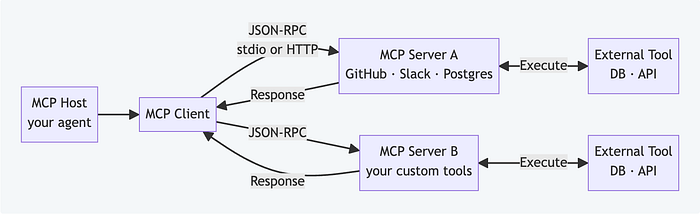
Your DIY agent becomes an MCP client. Instead of hardcoding tool definitions, you call the server and get back whatever tools it exposes: already discovered, already described, ready to pass to your LLM.
The agent logic doesn't change. What changes is where the tools come from and who maintains them.
The companion project includes mcp_client.py, which starts an MCP server as a subprocess and calls tools via JSON-RPC. From the agent's perspective, MCP tools are no different from locally-defined ones. They show up in TOOLS, get called the same way, return results the same way.
The key insight: the agent doesn't care whether a tool is a Python function in the same file or a service running on the other side of the internet. As long as it speaks the MCP protocol, it works.
MCP Server: Exposing Your Tools to Any Agent
The flip side: if you want to expose your tools so any MCP-compatible agent can use them, you build an MCP server.
Here's a complete MCP server that exposes two tools — to_uppercase and count_words:
# mcp_server.py — a real MCP server in 10 lines
from mcp.server.fastmcp import FastMCP

mcp = FastMCP("mini-tools")

@mcp.tool()
def to_uppercase(text: str) -> str:
    """Convert text to uppercase."""
    return text.upper()

@mcp.tool()
def count_words(text: str) -> int:
    """Count the number of words in a string."""
    return len(text.split())

if __name__ == "__main__":
    mcp.run()
It's trivial on purpose. The point is the boundary: mcp_server.py is a separate process. An agent calls a tool, a subprocess starts, the JSON-RPC handshake happens, the result comes back. You could replace this with a server running on the other side of the internet and the agent code wouldn't change at all.
Any MCP-compatible agent can now use your tools — Claude Desktop, Cursor, your DIY agent, anyone. You publish the server, they point their config at it, and it just works.
This is how the ecosystem scales. Instead of every agent reimplementing "call GitHub API" or "query Postgres," someone writes an MCP server once and everyone uses it.
Comparing to Claude CLI
Claude Code is a production tool. My agent is a learning tool. That's the honest comparison, and it's worth understanding exactly why.
Claude Code does things my agent can't: it starts subagents with isolated context windows when a task is large, prompts for confirmation before running destructive commands, maintains persistent memory across sessions, retries failed tool calls with adjusted parameters, and compresses prior messages when approaching context limits. My agent does none of that. It has six tools, one messages list, and no safety net. If a tool throws an exception, it crashes.
What my agent has: I can read every line of it. When something goes wrong, I know exactly where to look. I can run it entirely offline with Ollama, or wire up mixed mode and pay for only the cloud calls that need it. Claude Code bills per message. My agent costs nothing until I tell it to call GPT-4.
If I need to ship something reliable, I use Claude Code. If I need to understand what's happening under the hood, or prototype something I'd have to fight a framework to implement, I start from the loop.
Where Frameworks Come In
You do not need LangGraph to learn what an agent is. You need it when retries, checkpoints, and approval gates stop being optional.
The code above has no error handling. If a tool throws an exception, the agent crashes. No retry logic. No way to pause for human approval before a risky action. No memory beyond a single conversation. No ability to spawn sub-agents for parallel work.
LangGraph solves these by modeling the agent as a state machine with explicit nodes and edges. You define what happens at each step and what conditions trigger the next one. More setup, but you get checkpointing, structured error handling, human-in-the-loop steps, and full observability into what the agent is doing and why.
CrewAI and AutoGen focus on multi-agent coordination. Instead of one agent with many tools, you define multiple agents with specialized roles (researcher, writer, critic) and orchestrate how they communicate. Useful for complex tasks where different steps need different prompts or different models.
Claude Agents SDK and OpenAI Assistants API are managed runtimes where you hand off state management, tool routing, and threading to the platform. Less control, but faster to ship.
The 50-line version is a sketch. LangGraph is the same sketch turned into a building with proper load-bearing walls.
For production: use a framework. For understanding what's actually happening: write the loop yourself.
What Building This Taught Me
I wanted to understand how AI agents work. Now I do.
Building this gave me the complete mental model I was missing. I can see exactly where an agent might get stuck, why it picks one tool over another, and when adding more tools actually makes things worse. I know what's happening when Claude Code starts a subagent, or when Cursor decides to retry a failed operation.
I have projects where I need agentic behavior. Some of them will use LangGraph or the Claude Agents SDK — those frameworks solve real problems I don't want to reimplement. But some of them will start from this 50-line version, because I know exactly what it does and I can modify it without fighting abstractions I don't understand.
You've now seen the same thing. There's no magic. The model observes the conversation history, decides whether it has enough to answer or needs a tool, and repeats until it's done. Everything else — retry logic, human-in-the-loop, memory, multi-agent orchestration — is built on top of that cycle.
When you reach for a framework, you'll know what it's doing for you. When you don't need one, you won't pull in a dependency you can't debug.
Build the naive version first. Then decide.
References
Code:
- Full companion project: github.com/sergenes/mini_agent
Documentation:
- OpenAI Function Calling: platform.openai.com/docs/guides/function-calling
- Ollama API: github.com/ollama/ollama/blob/main/docs/api.md
- Model Context Protocol (MCP): modelcontextprotocol.io
- FastMCP: github.com/jlowin/fastmcp
Frameworks:
- LangGraph: langchain-ai.github.io/langgraph
- CrewAI: crewai.com
- AutoGen: microsoft.github.io/autogen
- Claude Agents SDK: docs.anthropic.com/en/docs/agents
- OpenAI Assistants API: platform.openai.com/docs/assistants
Papers:
- ReAct: Synergizing Reasoning and Acting in Language Models (Yao et al., 2022): arxiv.org/abs/2210.03629
Follow me on LinkedIn for more on AI tools, mobile development, and whatever I'm currently building to understand how it works.
Tags: #AIAgents #Python #LLM #OpenAI #Ollama #MCP #SoftwareEngineering #LangGraph #ReAct