RETROCOMPUTING
Viewed in the context of humankind's entire history, computer technology has been around for little more than the time it takes to blink an eye. And yet we have been so careless of what becomes our heritage that when we talk about the earlier periods of computing we frequently need to resort to terms like 'archaeology'.
Every generation is defined by its technology — and derided for it by those who come later. What seemed breathtakingly futuristic and almost magical soon becomes quaint. Cassette tape? Minidisc? CD-ROM? Dial-up modems? All fodder for the museum.
There are heroic efforts to preserve our technological past (although that's probably best done when it's still technologically present). Bitsavers is a treasure trove of software, documentation, magazines and more, if a tad clumsy to navigate. Archive.org does its best to save what it can, although some have accused it over being rather over-zealous. There are some excellent computer institutions such as The National Museum of Computing (TNMOC) and the Computer History Museum (CHM).
Nonetheless, things fall through the gaps, heading for oblivion. And, on the whole, this is fine. It's natural for the past to fade. We don't live in a museum. But it can be frustrating when you're trying to run some old software.
Emerald Bay
Somewhere back in the mists of time, also known as the late-1980s, I became terminally obsessed with aviation, both as a hobby and — in my roles as a freelance journalist and photographer — professionally. Naturally, I subscribed to a number of magazines, including Aviation Week, Pilot, Aeroplane Monthly and too many more. And it occurred to me that it would be useful to have an index of the publications' articles for when I needed to research topics for my own stories.
I was also, at that time, a dedicated computer geek with strong OCD tendencies, so the obvious thing to do was create my own database.
Remember, this was a pre-internet age. If you wanted access to a database you either had to pay exorbitant fees for something like Dialog (and hope it contained the information you needed, which it often didn't) or make it yourself.
And it just so happened that I had the very tool I needed. Emerald Bay.
dBase killer
Emerald Bay was a client/server database system written by Wayne Ratliff (the prime mover behind dBase) and sold in the later 1980s by Migent. It was briefly touted as a dBase killer, but seems to have largely vanished into obscurity.
It used a core server engine, called Emerald Bay. This was available in two versions: a single-user program that ran locally on your PC as a TSR (Terminate and Stay Resident) program — basically sitting in the top 130KB of memory; or as a network-based server that provided multi-user operations, transactional processing and other bells and whistles.
The other main part of the solution was Eagle, a front-end client that you used to write and run database applications. There were other packages too — developer libraries so that that you could write applications in languages such as C; a form designer; a report generator and more. But, at first, the Emerald Bay engine matched with Eagle was the main offering.
You could distribute your applications with the single-user, royalty-free Emerald Bay engine, so that they were effectively standalone.
I was given a review copy of Emerald Bay when it appeared. I also visited Migent's offices in Incline Village, on the North Shore of Lake Tahoe (I was in Nevada to cover the Reno Air Races). I think I interviewed someone but can't remember if that ever resulted in an article. But I did review the software (see below).
Bug-ridden
Other reviews at the time spoke of Emerald Bay's frailty. It was riddled with bugs and felt like it had been pushed out the door in a rush to pre-empt the much-anticipated arrival of dBase IV.
In the July 1988 issue of PC Magazine, Gene Smilgiewicz mentioned that, "Migent has vowed to support purchasers of early releases 'like kings' … with a steady stream of free bug fixes, upgrades, and hot-line support, not to mention an ISV program for developers."
And so it proved, for a while. Indeed, Smilgiewicz was moved to describe Emerald Bay as, "the shape of database management systems to come", and concluded: "All in all, the intrinsic merits of the initial release of Eagle, with its single-user Emerald Bay engine, far outweigh its deficiencies. The inherent superiority of Migent's distributed approach, coupled with the inspired coding of an older and wiser Wayne Ratliff, make Emerald Bay and Eagle worth wrestling with."
Powerful solution
The product certainly held a lot of promise, which is why I was surprised to find so little information about it on the web.
A plea for people's recollections of Emerald Bay on the usually knowledge-crammed Retrocomputing Forum spurred only a couple of responses.
"I was a beta user in 88–91," wrote one forum member. "I used it for a variety of tasks. Huge subscriber list, a program to keep track of repairs, lists of parts and their locations, etc. Also did a program for a non-profit that held every copy of correspondence, check book, all money, in or out. It printed all the checks, the whole shebang!"
All of this, and much more, was carried out on a humble 80286-based PC XT.
Another forum member recalled using Emerald Bay in 1993, but found that it wasn't quite up to the job.
"We were testing it for a systems migration from a mainframe to PCs so I wrote code to read a data dictionary and port the fixed-width files to XBase files and also wrote a query builder tool. It did look promising at the time but DBXL Quicksilver and FoxPro were better in the long run and we never did the migration in the end."
Ease of use
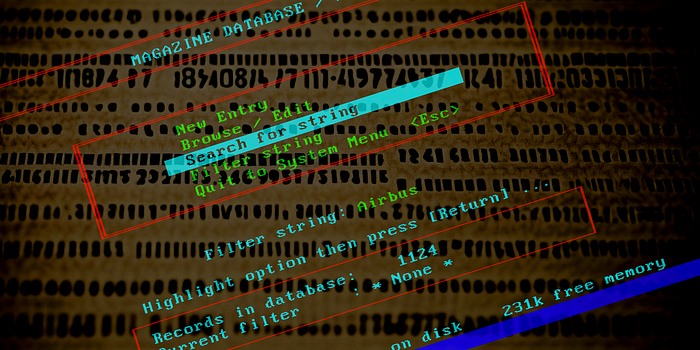
Although not a professional programmer, I found it easy to get a worthwhile application up and running very quickly. This is the menu page from my magazine article database.

The language used by Eagle felt comfortably like the Turbo Pascal I was then using on the PC and Basic on the BBC Micro. Here's a sample just to give you a taste of the syntax. This is the main program file for the database:
* MAG.PGM

LOAD avalanch.lib
LOAD mag.lib

SET DATABASE TO REFERENC
PUBLIC LOGICAL New
PUBLIC BoxCol, LabelCol, ErrorCol
PUBLIC total_recs, valid_recs, filter_string
PUBLIC CHARACTER defpub, defdate
defpub = "*"
defdate = "*"
USE magazines
Set INDEX to MagMain
SET Beep 0 to 250,0.15     && Beep command
SET Beep 6 to 150,0.2      && Data Item Full warning
CLS
DO avacol
* System colours - retrieve these from file at later date
BoxCol   = 2    && Green on black
LabelCol = 3    && Cyan on black
ErrorCol = 78   && Bright yellow on red
filter_string = "* None *"
Out = .F.
WHILE .not. out
CLS
DO banner with 'MAGAZINE DATABASE / MAIN MENU'
DO Status
Clear gets
@ 5,17 double box to 11,61
@ 6,25 prompt '  New Entry                  ' NAMED "new";
                                          message " Enter a new record";
                                          right "new";
                                          left "new";
                                          up "Sysquit"
@ 7,25 prompt '  Browse / Edit              ' NAMED "edit";
                                          message " Browse and Edit records in current section";
                                          left "edit";
                                          right "edit"
@ 8,25 prompt  '  Search for string          ' NAMED "search" message " Get a string and search for it";
                                               left "search";
                                               right "search"
@ 9,25 prompt '  Filter string              ' NAMED "find" message " Set Search Filter - Press <RETURN> to CLEAR";
                                            left "find";
                                            right "find"
@ 10,25 prompt '  Quit to System Menu  <Esc> ' NAMED "Sysquit";
                                           message " Close database and return to Top Level Menu";
                                           left "Sysquit" right "Sysquit";
                                           down "new"
do OptionPrompt
READ
keyopt = readget()
KeyPressed = readkey()
If keypressed <> 271
 SWITCH
  CASE keyopt = 'new'
       New = .T.
       Do NewFeature with New
  CASE keyopt = 'edit'
       @ 14,26 say 'SEARCHING...                                      '
       New = .F.
       Current_Error = .F.
       Do DisplayFeature
  CASE keyopt = 'find'
       Do Set_Filter
  CASE keyopt = 'search'
       Do Set_Filter
       @ 14,26 say 'SEARCHING...                                      '
       New = .F.
       Current_Error = .F.
       Do DisplayFeature
       Do Clear_Filter
  CASE keyopt = 'Sysquit'
       Out = .T.
 ENDSWITCH
Else
  Out = .T.
EndIf
ENDWHILE
CLS
Close Database
QUIT
I'd vaguely remembered using Emerald Bay's own code editor to create the app, but that's probably my memory playing tricks on me. I'm likely getting confused with Turbo Pascal. According to my own 1988 review (below) I used both WordStar in nondocument mode and the text editor in Sidekick. Who knew?
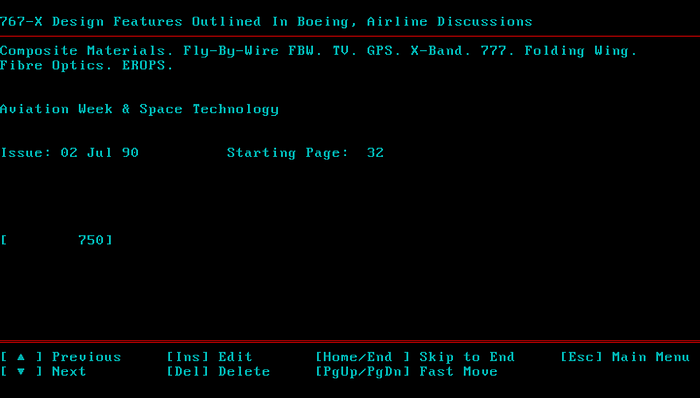
It's something of a tribute to Emerald Bay's design — in particular, the way you could create standalone apps — that I'm still able to run this app today (via DosBox X on an M1 Macbook Air). I could even add new entries if I felt like it.
And having the motivation to do that turned out to be the problem. I'm astonished to see that I created 1,124 records. That's a lot of typing! I guess being OCD pays off sometimes. But eventually it became too much of a chore. And by the time I needed to create my next database app I'd received a review copy of dBase IV and had defected to that.
Emerald Bay was a fine database created by one of the best in the field — Wayne Ratliff. But that's not always enough to ensure success of the product or secure any kind of lasting legacy. Which is a shame.
There are thousands of pieces of commercial software that have vanished into well-deserved oblivion, because of their mediocrity. This wasn't one of them.
Review (1988)
This is the review I wrote at the time of Emerald Bay's release. I think this was written for PC Amstrad magazine, although I'm having trouble finding any references to that publication online. It seems to have vanished without a trace, much like Emerald Bay. The only thing I'm sure of is that the publication's initials were 'PCA', because that's what it says in the catchline.
I also recently discovered that I have the text for a review I wrote for What PC? at the same time. I haven't bothered posting that because it (ahem!) 'borrows' quite liberally from this one. It wasn't unusual back then to write reviews for multiple magazines with essentially the same content. It\s called being a freelance.
( PCA / MANSFIELD / EAGLE / # )
EAGLE / EMERALD BAY by MIGENT
When a company goes up against a product leader, and one whose name is virtually synonymous with the genre, it has to have a lot of confidence in its product. Ashton-Tate's dBase is to database management what Hoover is to vacuum cleaners — well, almost. Few companies have launched products in direct competition and lived to tell the tale.
The dBase range has traditionally been the one corporates and other serious users have turned to for developing database applications. Yet this hasn't deterred Migent. The company, which is best known for the inexpensive and sometimes quirky Ability range, has launched its Emerald Bay database system at the top end of the market — at corporates who want to develop large and flexible database systems. And it has started the ball rolling with not one, but four, products.
As you might guess, the complete system is not small and easily digestible. It would be foolish to try to attempt a comprehensive review in the space we have here. Instead, I'll try to give some idea of the overall structure of the system, as well as having a slightly closer look at what I think will become the most important package. Perhaps, once I have more experience of the system, the editor will let me bring you up to date.
Emerald Bay is the generic name given to a suite of packages built around a common base. The first to hit the streets — and the one in direct competition to dBase — is Eagle. This is a database language from which custom-made applications can be built with, Migent hopes, comparative ease.
For those who need more flexibility, a series of Developer's Toolkits is being produced. Each consists of code libraries which provide the necessary access to the Emerald Bay database files; the first is for the C language, but others are promised, including Pascal and Basic libraries. Summit is a database add-on for Lotus 1–2–3. And finally, there is the Database Server for running Emerald Bay applications across a local area network.
Migent has managed to achieve this variety by splitting the database system into two parts. With each of the packages comes the core of the system, the 'personal engine', which is responsible for keeping the database file and its indexes in order. The system is common to all the packages, so that if you buy all four products you will get the personal engine software and documentation four times.
Eagle, Summit and programs written using the language libraries become what Migent calls 'surfaces', sitting above the engine and accessing it in a way invisible to the end user. And this has several advantages. Not least of these is the fact that you can use the language most suitable to the kind of work you're doing. You could quite easily have applications based on C, Pascal, Eagle and 1–2–3 all accessing the same database file, and manipulating it in different ways.
Emerald Bay has been designed with networks in mind, although it can be used on single PCs too. It's designed so that everything is handled by the server — security, data integrity and data handling. The remote terminal simply issues a request for data, and receives the results — there's no mass downloading of data files, so network traffic is minimised. Multi-level password security is provided, too.
Migent claims that converting applications written on single-user system to run on networks is a simple matter of buying and installing the Database Server. This communicates with the Personal Engine to handle network traffic and maintain database integrity.
The Personal Engine has three main components. The Database Administrator is a menu-driven program which enables you to create and define databases, specifying tables, fields and indexes, as well as field types and configurations. All of this can be done from within Eagle and the toolkit surfaces too, but this program is a faster and easier way of setting things up.
Likewise with the forms generator. Creating screens is simple enough in Eagle, but the forms program does help you maintain a certain consistency in your screen designs. Using the cursor, fields can be quickly positioned on the screen, lines and boxes drawn, text added and so on. The form is then saved and can be called with a DOS program or from within Eagle.
Finally, there's Report Writer for extracting information from a database. This is a C-like language, giving full printer and page control. By separating out the reporting facilities from Eagle, it allows a single report system irrespective of which languages are used to create or edit the database.
After defining a database, the next step for most people will be to turn to Eagle to enter and manipulate the data. Eagle has several things going for it, even before you look at the software in detail. For a start, it's written by Wayne Ratliff, the original author of dBase, and the one person who should know where that software's weaknesses lie. Second, the latest version of dBase, called dBase III Plus, is already looking long in the tooth. It lacks much of the advanced network support which the larger customers need. Emerald Bay was launched while dBase IV was still being discussed in vague terms, and incorporates many of the features promised in Ashton- Tate's upgrade.
Learning to use a new package is always intimidating, especially if it is large and complex. When the package is (in effect) a new computer language, the task is particularly difficult. All those things you can do without thinking in your favourite language — such as entering lines of text, reading menu selections from the keyboard, and error trapping — suddenly have to be discovered again.
Existing dBase whizz-kids will have less of a problem than most. Eagle is essentially a superset of the dBase commands, and experienced users of Ashton- Tate's product will spend the first few hours wading through the manual, nodding their heads sagely at all the familiar commands and occasionally licking their lips in pleasurable anticipation of using the new facilities.
But not me. I never had the time or the courage to wade into dBase. I was always content to use off-the- shelf, card index style programs. And to be fair (to myself) there was no reason to do anything else. If you application calls for maintaining simple lists, with reasonable reporting facilities and search options, then you're well advised to avoid the pain and slog of learning dBase or Eagle.
There are two ways of working. You can type all the commands directly at the system prompt, or you can write programs in the Eagle language to manipulate the database — or both. Indeed, one of the strongest features of the package is the way you can mix both methods. Programs are written in plain ASCII text and can be run directly from the main prompt by typing 'DO' followed by the program name. This means you can write small sections of code and test them before including them in the main program. Or, if you prefer to work with the command line interpreter anyway, you can write short programs to perform common keystroke sequences.
A text editor is included in the package, and this can be called from within Eagle. However, it does raise the problem of learning yet another set of editor commands. For a while I used WordStar in nondocument mode. In the end, I found the best method was to pop into Sidekick and use its notepad. This had the advantage of letting me slip immediately back into Eagle, to try out a command or retrieve some information, and then go directly into the text again. The only drawback was Sidekick's tendency to reformat my text for me. In the end I learned to keep the lines of code quite short.
Once your Eagle program is written, it can be put through the supplied compiler to create a stand-alone application. Migent has decided against charging a licence for such programs. Unfortunately, at the time of writing, the compiler was still not ready.
Emerald Bay features strong data typing of fields. There are ten datatypes, including character, date, time, decimal, integer and so on. One of them, called binary, can cope with data of up to two billion bytes, and can be used for storing documents, programs, digitised pictures, screens — indeed, almost anything. There's also excellent control of data format. For example, if you want entries in a character field to be in the format of three numerals and three upper case characters separated by a space, then you can say so, and only that format will be allowed. As this is done at the definition stage, it's a once-only task, and saves enormous amounts of time and effort writing verification routines in he programs which use the database.
Numeric fields can a fixed number of digits before and after the decimal point. And dates can be entered and displayed in a wide variety of formats. However they are stored internally in a fixed way which allows you to change the format at any time, no matter how it was originally entered.
If simple data entry and extraction are all you want, then you don't need to write programs at all. Typing APPEND at the Eagle prompt offers a blank record for data entry, with proper full screen editing facilities. It's not pretty, but it works. EDIT does a similar job with the current record.
For the person who want to be more sophisticated, Eagle provides a well-structured language, with constructs such as WHILE and FOR loops, and keywords which make the construction of menus a two-minute job.
You need to be a programmer. Although you can use Eagle direct from the system prompt, it requires extensive knowledge of the language and a lot of typing. With the compiler and lack of royalties on applications, Eagle is a natural choice for commercial software developers, particularly those working in vertical and bespoke software markets. And those people are likely to be programmers anyway.
There are holes in Eagle. For example, there seems to be no way of permanently relating fields, so that a change in one is automatically incorporated in another. And I'd like a NEXT command, which would move the record pointer to the next record, as defined by the current index; it's in the C toolkit, so why not Eagle? And there are still a few bugs to be worked out. But Migent is honest and diligent in its efforts to upgrade and fix the software; I'm currently on my third copy of Eagle, as Migent supplies free upgrades. And in that time several new commands have been added.
There is one other question mark. The corporate database world is heading steadily towards SQL (structured query language) as a way of providing a standard interface and data retrieval system. As it stands, Emerald Bay is incompatible with SQL, which might be seen as a problem, especially by larger companies. However, Migent has promised that it will provide software tools — some time in the future — that will add SQL capability to Emerald Bay.
There's no doubt that Emerald Bay must be considered an attractive alternative to dBase. And for people developing software for networks, it must now be the main contender.
FOR: Very powerful; good screen handling and menu construction; very sophisticated data handling and formatting; excellent network support.
AGAINST: No ability to link fields; requires programming expertise; difficult to use straight from the box.
PRICES (excluding VAT):
- Eagle £395
- Summit £159
- Developer's Toolkit £395
- Database Server £595
All the files I found in my archive, including the Emerald Bay single-user server and my database files, are available on GitHub.
Steve Mansfield-Devine is a freelance writer, tech journalist and photographer. You can find photography portfolio at Zolachrome, buy his books and e-books, or follow him on Bluesky or Mastodon.
You can also buy Steve a coffee. He'd like that.