Buying the Neo as a second Mac wasn't about replacing my $3000 MacBook Pro. It was about discovering unexpected ways to enhance my workflow.
Every once in a while, I try to review my screen time for all my devices, just to get an idea of how I spend my time across different apps and platforms.
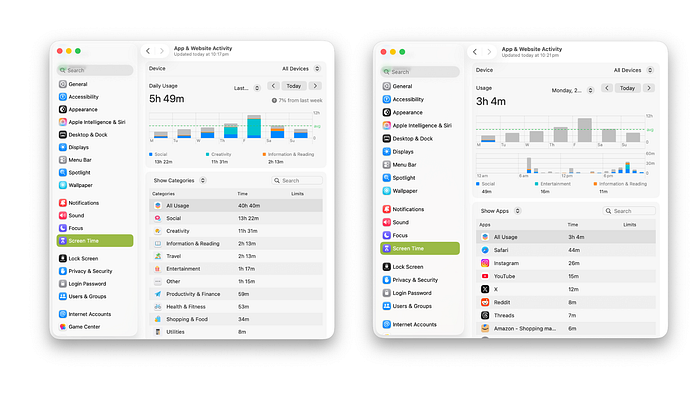
As a cybersecurity postgrad student and a Medium writer, my workflow is poles apart when it comes to the apps, websites, and platforms I use. The former requires me to use VMs, draft reports, take notes, and work on assignments, while the latter mostly revolves around web surfing, using a good word processor like Pages, and light image editing.
And of course, my $3000 16" M3 Pro-powered MacBook Pro can handle it all. No doubts there. In the last two years of daily driving this Mac, I haven't heard its fans spin even once. Not even while running heavy tasks within a Kali Virtual Machine. No major app crashes, memory overflow, or sluggish behaviour — and that's what you come to expect too when you spend that kind of money. Apart from this Pro machine, I also have an iPad Air with a Magic Keyboard that handles all the writing workflows I need for my Medium page. In short: I am a content, beaming sunflower in Apple's Walled Garden.
Yet on March 11th, 2026, at a few hours past dawn, I set foot inside an Apple Store to buy the MacBook Neo.
Non-Members can read this story from the link provided in my Socials — X| Threads| Instagram| Bluesky 🔗
👉 TABLE OF CONTENTS 👈
Why the MacBook Neo Made Sense for Me 🧑🏽💻
Why the Neo's Trade-Offs Feel Worth It 🙆🏽♂️
From Purchase to Setup: My MacBook Neo Experience ✨
What I'll Be Testing in My First Week With the MacBook Neo 🧪Why the MacBook Neo Made Sense for Me 🧑🏽💻
I know what you are thinking, "The marketing got to you, Aditya. You just wasted $500 on a distasteful machine!"
And now I will have to prove how it's better than my MacBook Pro. Right?
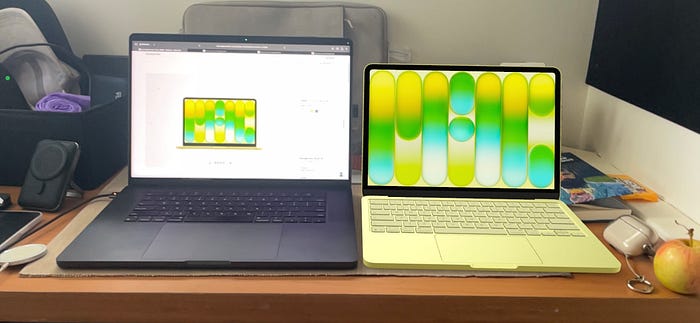
This is precisely the stance I do not wish to take with this story. I'm not here to tell you to buy the Neo as your first and only Mac, or to replace your Pro machine with it. I haven't done that myself. My $3000 Mac won't be replaced by the Neo. Instead, I'll use the Neo as my second Mac — not a backup, but a machine that handles 80% of my workflow.
That's right. I started this story by sharing a screenshot of my weekly screen time across all devices. Turns out I am spending 80% of my time on tasks like browsing, checking email, using Pages or Notes, and using social media websites — tasks that don't require the high-end performance my 5-pound Mac is capable of, yet weigh down my backpack with their sheer presence.
And that is the case with many Mac users, not just me. We refuse to accept that we carry machines that we future-proofed with top-of-the-line specs at the time of purchase. But how long does it take one to realise it was just an overkill of a purchase? For me, that record is two years — since my M3 Mac.
But then, why not just outsource those low-end 80% tasks to the iPad? After all, didn't you just say that it got a second life with the new update? Yup, I did. And I stand by that view even today.
But there are two obvious bottlenecks to using the iPad:
- iPadOS is still not as stable as macOS, despite the great multi-tasking features it just gained.
- The Magic Keyboard accessory isn't a wholesome experience. It wobbles in your lap because of the lighter base, and my older keyboard case, with a rubbery polyurethane exterior, has started to wear off after three years of use.
Sure, I could solve the keyboard issue by spending more (~$1300) on a new iPad Pro and its better Magic Keyboard, but that still wouldn't address the iPadOS bottleneck. That just isn't a smart tradeoff for me.
And that's when the Neo's unique value becomes clear. It bridges the gap between a high-powered Pro and a less flexible iPad, offering a compact macOS experience perfectly tailored for most of my day-to-day computing needs.
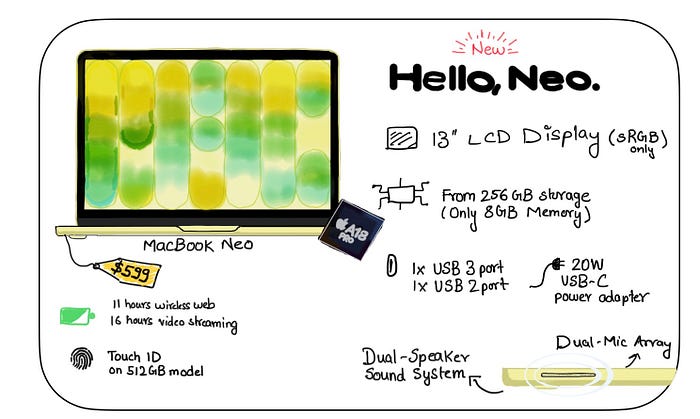
By spending $600 (~$500 if you are a student), you can get a 13" Mac with an all-metal chassis and, most importantly, a machine that runs macOS with no compromises. I know some of you want me to focus on the A18 Pro SoC, since it's an iPhone processor, but let's hold off on that until the next section.

While Apple is simply marketing this to students as an entry-level Mac at a much more affordable price, I think it's going to prove more valuable to creators and heavy Mac users as well.
If you are a writer like me, you know how 80–90% of our tasks are just keyboard-centric and word-processor-based. For research purposes, we might have eight to ten tabs open in our browser. Image editing software is probably the peak we might climb to make our machines feel the heat. And even if you were, say, a YouTuber, you would still be writing scripts for your videos with the same or more amount of research and using social media platforms to connect with your audience. The filming and editing are just 20% of the remaining workflow.
How much processing power do you think the above workflow requires?
Moreover, would you not prefer a lightweight, portable machine that you can carry around while doing these tasks? Mind you, I am not talking about just creators now. This is for everyone who uses word processors, checks emails, browses webpages, attends video conferences, and occasionally does light photo/video editing for personal and semi-professional scenarios.
I don't want a heavy-weight, do-it-all Mac with an n-core CPU and n*2-core GPU whose potential I would hardly end up reaching. Rather, I want a lightweight machine that can travel with me and just live up to my workflow. I want a machine that can be my equal and not tower over me and laugh at my puny workflow.
I bought the Neo with a purpose. I wanted a machine that could be my dedicated writing machine — writing for Medium, writing assignments for my coursework, writing emails, researching on the web, etc. And that's why Apple's most affordable MacBook Neo made sense to me.
Why the Neo's Trade-Offs Feel Worth It 🙆🏽♂️
Needless to say, with the $600 price tag, Apple has made some cuts that don't actually bruise, assuming you know how you'll use the Neo.
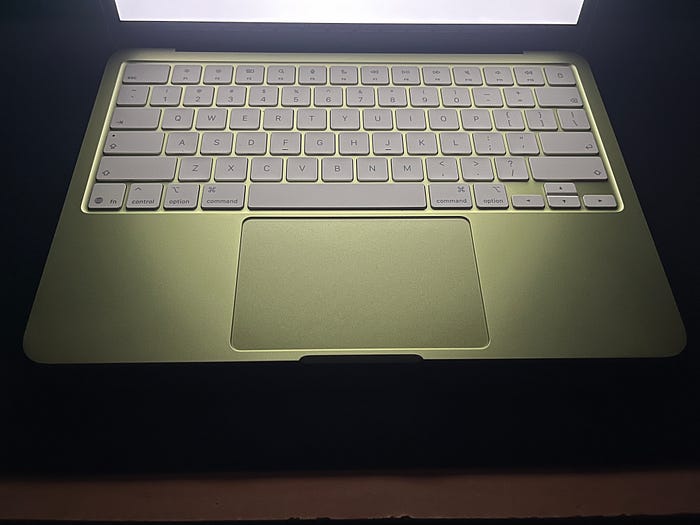
Let's start with the keyboard — there's no backlight on it. So in a dark room, you are left at the mercy of the display's brightness to illuminate the keys. That, along with the muscle memory of having typed on a QWERTY keyboard for the past fifteen years, has become my saving grace.
I went for the 256GB model, so apart from a lower storage, I also get to type in my password every single time to log in and authenticate because there's no TouchID on it — that's just for the 512GB model. Having used TouchID on my MacBook Pro for the last three years, I thought I would miss it, but it turns out that if you have an Apple Watch, as I do, you can log in/authenticate with a simple double-click of the side button. If I didn't have the watch, I would have opted for the TouchID model for an extra $100. One more thing we need to appreciate is how Apple has managed to bring Secure Enclave onto this 256GB Neo model despite lacking the TouchID button — no security compromises despite the lacking hardware and lower price tag.
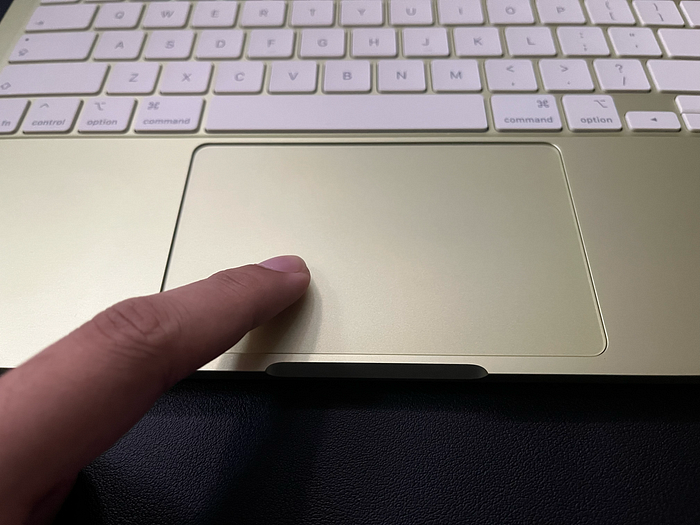
Another trade-off Apple has made is the trackpad. It's not a haptic Force Touch trackpad but rather a Multi-Touch one. What does that mean? Well, it feels like a mechanical trackpad similar to what we have on the iPad's Magic Keyboard — you can not only feel every click, but also see the trackpad going all the way down during the click. Since I have used that version of the Magic Keyboard too, the Neo's trackpad didn't bother me much either. It was familiar territory. And just as some users love the nostalgic, retro mechanical keyboards that go click-click-click, I love the mechanics of this Multi-Touch trackpad — the trackpad click sound makes me feel like I am doing some serious productive work.
Now, depending on your workflow, you might also complain about the lack of Thunderbolt ports, a 12MP camera, a True Tone display, and upward-firing speakers next to the keyboard. But as I said, the Neo is meant to complement my primary machine, not replace it. The trade-offs simply remind me and keep me on track with my dedicated workflow.
- I am not going to be editing any 4K photos/videos off my external SSD, so I don't really need a faster port or a crisper display. I leave the Thunderbolt -fast work for my MacBook Pro.
- The speakers are surprisingly good with the new side-firing design, and for crisper audio, I just plug in my earphones into the audio jack. EarPods For The Win!
- As for the 12MP webcam, it's a relatively new camera upgrade that came with the M4 Macs onwards, so I haven't experienced it. And even if someone on the other end complained about my webcam quality, I could just use my iPhone with Continuity Camera — those have got 48MP now, I have heard.
In short, if you are in for the Neo, you are not going to complain about these trade-offs once you start using it. The trade-offs are going to seem like a boon in disguise. And the biggest trade-off — the one of housing an iPhone processor rather than an M-processor, is going to surprise you with all the heavy-lifting it's actually capable of.
I have a short Apple Store story just about that. You are going to love this.
👋 Hey Readers!
Aditya here. Before we step into the Apple Store, I would just like to take a quick moment to remind you that if you enjoy stories like this, do consider leaving a clap or two 👏(or fifty — it helps more than you think), highlight your favourite bits 🖍️, and drop a comment about what resonated with you 💬R
. I'd genuinely love to know which part of this experience resonates most with you.
From Purchase to Setup: My MacBook Neo Experience ✨
When I walked into the Apple Store at 10 a.m. on the morning of March 11th, I was just mentally debating between two colours I had fallen in love with (from all the Instagram reels I had watched) — Citrus 🍋🟩 and Blush 🌸.
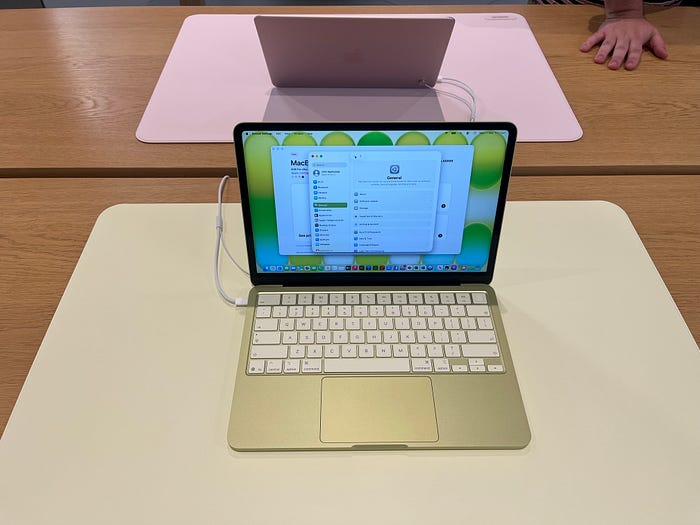
After playing around with Neos in the store for about 10 minutes, an Apple Store employee walked up to me and asked if I wanted to know more about them. I told her I was looking to buy a Neo but was confused between the two colours. She made it much easier for me.
"Sorry, we don't have the Blush available right now for the 256GB model. You might have to wait for a day or two."
And that was about it. I didn't want to wait even a day longer, so I just went for the Citrus Neo. But it was surprising how the Blush went out of stock within an hour of the store opening on launch day. Not only does that tell you how popular the blush is, but also how popular the Neo was for one of the four colours to just be unavailable this soon.
But that's not the part of the story that piqued my interest. It's the part during checkout when I was chatting with the store employee. She told me that she and her husband got the Neo too. She started telling me that the Neo's performance is on par with that of the M1 Macs. Again, that's something I had heard on social media over the last week.
After a little back-and-forth about our Mac workflows, where I mentioned using VMs on my MacBook Pro, she told me something interesting.
She told me that her husband, who previously owned an M1 MacBook Air with 8GB of memory, ran a virtual machine on it for work with no issues. After his upgrade, when he did the same with his Neo, the VM ran just as smoothly.
This got my attention. I had heard about how Apple had made the M1 Macs an absolute powerhouse at the time of the Apple Silicon launch — so much so that M1 users are still holding on to their machines after five successive M-generation launches. So if the Neo did actually perform close to the M1, it would be interesting to see if I could actually push the A18 Pro to run VMs for my postgrad coursework.
I know I just said that the Neo is supposed to complement your primary Pro machine, but the tech enthusiast wouldn't let go of this opportunity, now that I have the Neo on my desk.
The moment that made me realise that Apple hadn't just recycled some old MacBook chassis for this lower-priced Neo was when I unboxed and tried to set up the MacBook Neo. Right from the colour-matched keyboard, color-matched feet, color-matched Apple Logo to the color-matching aesthetic of macOS — the attention to detail that Apple has done here is crazy good!

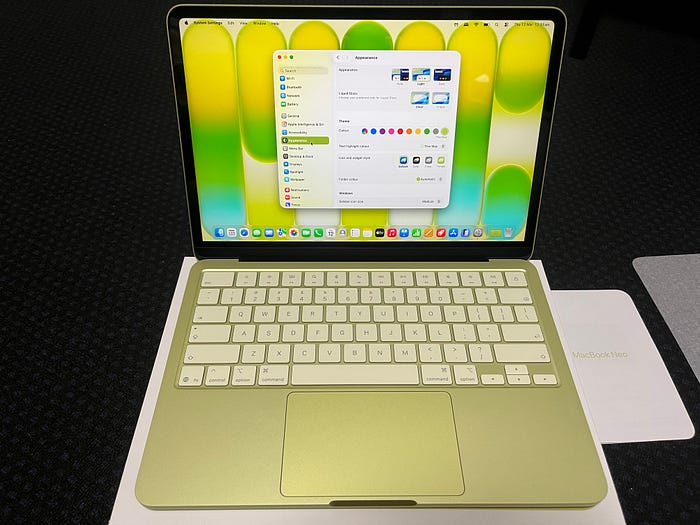
A noteworthy unboxing update is the mention of the "hello" typography on the packaging pull tab — neatly done there, Apple. The new side-firing speaker design, along with the more rounded exterior corners, gives off a cooler-than-the-convention vibe. And dare I mention the new fun colours — Citrus, Indigo, and Blush?
When was the last time Apple put so much effort into an entry-level device? Say what you want about the tech specs, but Apple has shipped a premium device right here. Forget the competitors; they have probably outdone themselves.
What I'll Be Testing in My First Week With the MacBook Neo 🧪
This story is not a full review of the Neo.
It was more of an excited rant, having got a fun-coloured Mac at a price tag that doesn't hurt my wallet yet covers a major chunk of my workflow. I wanted to discuss how it made sense to me, why the trade-offs shouldn't matter much given the value it offers, and how the buying, unboxing, and setup experience genuinely make you believe this is a premium device. Pinch me, because I still refuse to believe it's an entry-level Mac for just $500.
But the honeymoon phase ends right here. I want to do some real tests now. In fact, they have already begun, as I write this story. I want to put the Neo through light, medium, and some heavy workflows to see if the A18 Pro is actually a worthy M1 opponent. During my first week, I would be:
- Testing out its battery performance (drain test)
- Checking off the regular tasks — writing, surfing the web, emails, and Canva photo editing.
- Doing some basic coding on Jupyter Notebook (on the cloud) as well as Xcode (local)
- Editing some 4K footage (Shot on iPhone) on iMovie/FCP
- Trying to run a Kali VM
I have a feeling it should easily pass the first three tests and pass through the last two somewhat as well. If you think these tasks are too basic or want to suggest additional tests for the Neo (before making your Neo purchasing decision), get involved in the comments and let me know.
Thanks for reading! If you would like to be notified about the Neo review in the upcoming weeks, do consider following me here on Medium🙋🏽♂️ and subscribe to my email newsletter 📨 — no algorithms, just good reads.
-Aditya Darekar