
My article on Staggering Returns with PyCryptoBot did amazingly well. Thanks to all of you who read the clapped for the article, and left comments. It's really appreciated.
Many of you have requested that I explain how to do the same thing with Binance. It took some time to lab it up as it doesn't work with Google Colab. After troubleshooting I realised that Binance only permits API requests from certain countries. You don't have any control where your Jupyter notebook is instantiated from so it was a bit hit and miss if it worked or not.
I've prepared all the Python code which I'll walk you through now.
The first step is to import your libraries.
import time
import math
import hmac
import hashlib
import requests
import numpy as np
import pandas as pd
import matplotlib.pyplot as plt
from datetime import datetime
Then you will want to set your constants.
BINANCE_URL = "https://api.binance.com"  # or https://api.binance.us
BINANCE_KEY = "<YOUR_API_KEY>"
BINANCE_SECRET = "<YOUR_API_SECRET>"

ORDERS_FROM = "2023-01-01 00:00:00"
ORDERS_TO = "2023-12-31 23:59:59"
This code will work for Binance EU and US. Include the appropriate URL above.
You will need to use your own API key and secret. It only needs to have read-only access.
The order range is really up to you. I had test bots running earlier this year, and I wanted to select those orders for this demonstration.
I created one utility function to convert the UNIX timestamp / Epoch to a Python datetime.
def convert_time(self, epoch: int = 0):
    if math.isnan(epoch) is False:
        epoch_str = str(epoch)[0:10]
        return datetime.fromtimestamp(int(epoch_str))
The test bot I was running for Binance was ADAUSDT. The code below shows you how to make the request to the API.
params = {"symbol": "ADAUSDT", "timestamp": int(time.time() * 1000), "recvWindow": 5000}
query_string = "&".join([f"{k}={v}" for k, v in params.items()])
signature = hmac.new(BINANCE_SECRET.encode("utf-8"), query_string.encode("utf-8"), hashlib.sha256).hexdigest()
headers = {"X-MBX-APIKEY": BINANCE_KEY}
params["signature"] = signature

# send the request
resp = requests.get(f"{BINANCE_URL}/api/v3/allOrders", headers=headers, params=params)
If you want to select another market, just replace "ADAUSDT" with whatever you prefer.
Binance has an option called, "recvWindow". It tells the API how long the request should take. I set it to 5000 but if you have a slower connection you can increase this value.
If all has gone to plan the response back from the API will be stored as "resp".
# check the response
if resp.status_code == 200:
    df = pd.DataFrame.from_dict(resp.json())
    df["time"] = pd.to_datetime(df["time"], unit="ms")
    df = df[(df["time"] >= ORDERS_FROM) & (df["time"] <= ORDERS_TO)]

    df["size"] = np.where(
        df["side"] == "BUY",
        df["cummulativeQuoteQty"],
        np.where(df["side"] == "SELL", df["executedQty"], 222),
    )
    df["fees"] = df["size"].astype(float) * 0.001
    df["fees"] = df["fees"].astype(object)
    df["side"] = df["side"].str.lower()

    df.rename(
        columns={
            "time": "Date",
            "symbol": "Market",
            "executedQty": "Filled",
        },
        errors="raise",
        inplace=True,
    )

    def calculate_price(row):
        if row["type"] == "LIMIT" and float(row["price"]) > 0:
            return row["price"]
        elif row["side"] == "buy":
            return float(row["cummulativeQuoteQty"]) / float(row["Filled"])
        elif row["side"] == "sell":
            return float(row["cummulativeQuoteQty"]) / float(row["Filled"])
        else:
            return row["price"]

    df["price"] = df.copy().apply(calculate_price, axis=1)

    df = df[["side", "Market", "cummulativeQuoteQty", "Filled", "price", "fees", "Date"]]
    df.columns = ["Side", "Market", "Size", "Filled", "FilledPrice", "Fees", "Date"]
    df["Side"] = df["Side"].str.title()

    # print the results
    print(df)

else:
    # failed to retrieve orders
    print(f"Failed to retrieve orders. Status code: {resp.status_code}, Message: {data['msg']}")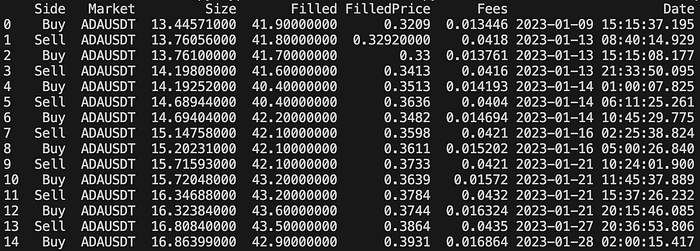
If you read my previous article…
You will notice that I've standardised the output for both Coinbase Pro and Binance. If you would like to combine your orders from multiple exchanges, you can just merge the results.
If you look at the orders above from one of my test bots, you will see that I started with $13.45 on the 9th of January 2023, and increased that to $16.86 by the 28th of January 2023. 25.35% in 20 days!
In January, I was testing a major release so I assigned minimal amounts to a large number of bots to "kick the tyres" before releasing it.
If you want to see what this looks like visually you can replace this…
# print the results
    print(df)
With this…
    df.set_index(["Date"], inplace=True)

    plt.figure(figsize=(30, 10))
    plt.plot(df["Size"], color="black", label="Balance")
    plt.ylabel("Balance")
    plt.xticks(rotation=90)
    plt.title("ADA-GBP Balance")
    plt.legend()
    plt.show()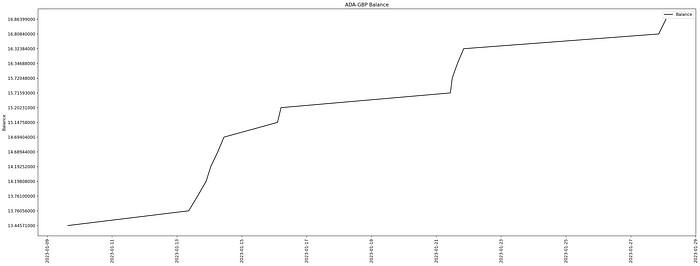
I know some of you have asked for a write up for KuCoin as well. I'll try and find some time to prepare a solution for that. I assume there will be some interest for Coinbase Advanced Trade, but I don't have any test bots running on that exchange so it's difficult to demonstrate.
Conclusion
A tip I've learned over the years with bot trading, it's better to trade the "penny stocks" rather than the major cryptos. The movements tend to be much more dramatic which the bot will take advantage of. You can trade Bitcoin, Ethereum, and the like if you want but you want to make it a bit more exciting don't you? Actually all crypto markets are volatile no matter the size so I personally think if you are going to deal with the risk and stress of big movements, you might as well go for ones with bigger returns. Another tip is don't trade markets where the cryptos are really new, the volume is low, or they have not been around at least 5 years. It's better to stick with the mainstream altcoins. It's a bit safer (well as safe as safe is when it comes to crypto trading — so not at at all basically).
I hope you found this article interesting and useful. If you would like to be kept informed, please don't forget to follow me and sign up to my email notifications.
You may be interested in the previous article…
Michael Whittle
- If you enjoyed this, please follow me on Medium
- For more interesting articles, please follow my publication
- Interested in collaborating? Let's connect on LinkedIn
- Support me and other Medium writers by signing up here
- Please don't forget to clap for the article :) ← Thank you!