Hello everyone, Aman Kumar (ak) here.
I remember my first day in cybersecurity. I installed Kali Linux on my old laptop. I changed the wallpaper to the cool dragon. I opened a terminal with green text on a black background.
I felt like a hacker. I felt like I was in a movie. I felt like I could take down the NSA with a single command.
But wait.
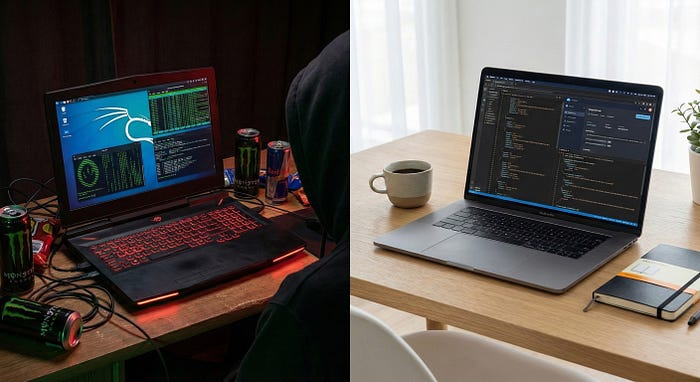
5 years later, if I walk into a client meeting or a serious pentest engagement with a desktop full of "Hacking Tools" and a scary dragon wallpaper… whatttt?
It doesn't look professional. It looks like a toy. It looks like I just watched Mr. Robot and installed an OS I don't understand.
This might upset some people (especially the die-hard fans), but it needs to be said: Kali Linux is a liability.
It is fantastic for a bootable USB stick when you are in a pinch. It is great for a Capture The Flag (CTF) game on the weekend. But as a daily driver for a professional Bug Bounty Hunter? Huuh? No way.
Here is why I deleted Kali, and what I use instead to make my workflow more better.
1. The Day Kali Failed Me (A True Story)
Let me tell you the exact moment I quit.
I was working on a critical engagement. I had finally found a foothold, a potential Remote Code Execution (RCE). I needed to run a specific Python exploit script quickly before the session timed out. The clock was ticking.
I opened my terminal. I ran the script. Error: Module 'requests' not found.
Seriously? Okay, fine. I tried to install it. pip install requests
Error: Externally managed environment... use apt install python3-requests
Huuh? Okay, fine. I tried apt. sudo apt install python3-requests
Error: Could not get lock /var/lib/dpkg/lock-frontend.
I sat there, staring at my screen. My session timed out. The shell died. I lost the hack.
Not because I wasn't skilled. Not because the target was patched. But because my own Operating System was fighting me over a Python package. That was the moment I said: "Enough."
2. The "Franken-Debian" Disaster
This is the number one reason beginners quit Linux, and they don't even realize it's Kali's fault.
Kali is highly specialized. It is based on Debian Testing. It is fragile. But people try to treat it like Ubuntu. They try to install Chrome, Spotify, VS Code, Discord, and their Nvidia drivers. They add random PPAs (Personal Package Archives) meant for Ubuntu because a tutorial told them to.
And then? Boom.
Dependency Hell. You run sudo apt upgrade, and suddenly libc6 conflicts with python3. Your package manager breaks. You reboot, and you get a black screen.
Instead of hunting bugs, you spend the next 4 hours googling dpkg --configure -a errors and trying to rescue your Xorg server.
The Reality: A hacking OS should be disposable. If you are installing your music player and your personal files on your hacking machine, what are you doing? You are doing it wrong.
3. The "Boardroom Test" (Professionalism)
This is something beginners don't think about, but professionals do.
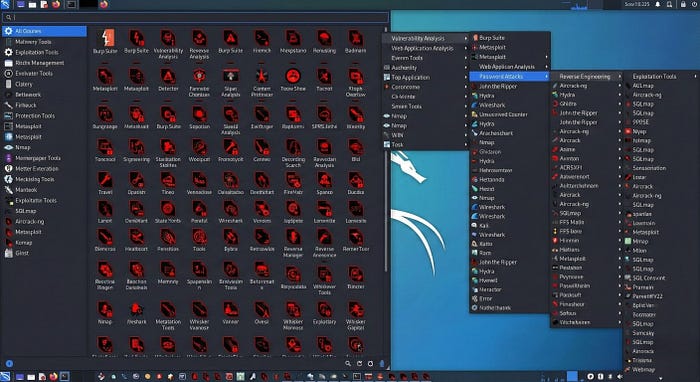
Imagine you are a CISO (Chief Information Security Officer) at a bank. You hired a consultant to test your network. The consultant walks in, plugs his laptop into the projector, and his desktop pops up. It's a mess of aggressive red icons, a jagged dragon logo, and a "Matrix" terminal.
What do you think? You think: "This guy is playing a game."
Now imagine another consultant. He opens a clean, minimal MacBook or a standard Ubuntu ThinkPad. He opens a terminal. He runs his tools efficiently.
What do you think? You think: "This is an engineer."
Perception matters. Kali screams "Hacker Culture." A custom environment screams "Engineering."
4. The Laptop Heater (Whirrrrrrrrr)
This is a practical problem no one talks about.
"Whirrrrrrrrrrrrr."
That is the sound of your laptop fan when you try to run Amass or Masscan locally on Kali. It destroys your battery life and turns your machine into a heater.
I see people buying $2,000 Gaming Laptops just to run Kali. Why? You are limited by your hardware. You can't run huge wordlists or multi-threaded scans without your fans screaming and your internet connection choking.
Moving to the cloud isn't just about speed; it's about saving your hardware (and your ears).
5. The "GUI Addiction" Trap
This is the biggest reason I tell people to switch. Kali makes you lazy.
Kali has a beautiful menu system. You click "Applications," go to "Vulnerability Analysis," and click "Burp Suite." It feels convenient. But it is a trap.
When you rely on the menu, you stop understanding where the tool lives. You don't know if it's in /usr/bin or /opt. You don't know how to update it manually. You don't know how to run it on a headless server.
If you install a tool manually (from GitHub/Source) on a clean Ubuntu server, you learn how it works.
- You learn what libraries it needs.
- You learn how to compile Go binaries.
- You learn how to fix it when it breaks.
Building your own environment forces you to understand Linux. Using Kali allows you to ignore it. Don't be that guy.
The Solution: My "Commando" Setup
So, if not Kali, then what?
For the last few years, I have moved my entire workflow to the Cloud.
I don't hack from my laptop. I hack from a reliable Cloud VPS (Virtual Private Server).
And before you say 'I can't afford that' you can get a VPS for $5 a month.
Personally, I use DigitalOcean. It's cheap, fast, and doesn't require a degree to set up. If you want to try my setup for free, you can use this link to get $200 in free credit. That will last you months.

It is literally cheaper than buying a new battery for your laptop.
My Stack:
- OS: Ubuntu 22.04 LTS (Rock solid stability. Drivers never break).
- Tools: I install only what I need (Go, Python, Docker).
- Management: I use a simple bash script to update my specific tools.
Why this is better:
- Persistence: I can start a scan on my VPS using
tmux. I can close my laptop lid, go to a coffee shop, or go to sleep. The scan keeps running. On Kali (laptop), if you close the lid, the scan dies. - Speed: My Cloud VPS has gigabit internet. My home Wi-Fi does not.
- Focus: No bloat. No 590 useless tools. Just the weapons I chose.
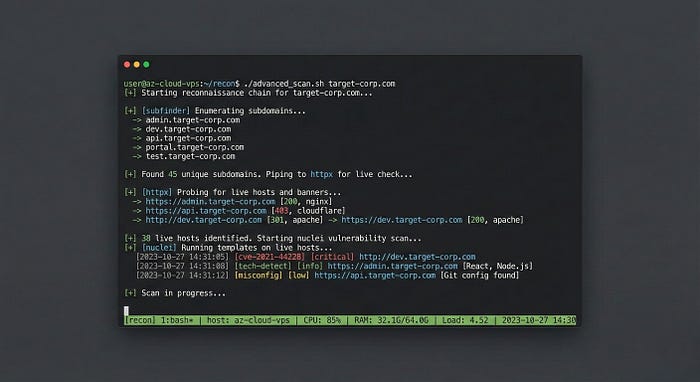
"But Aman, how do you handle Subdomains?"
I know what you are thinking. "If I don't use Kali, how do I install all those recon tools easily?"
I have written a custom bash script that automates my entire recon workflow. It installs the exact versions of the tools I need and chains them together to find subdomains that other hunters miss.
I am polishing the code right now. In my next writeup, I will share the full script and explain my methodology for Subdomain Enumeration.
Conclusion
Kali Linux has its place. It is great for learning basics. It is great for taking exams like OSCP. But if you want to be taken seriously as a consultant or a professional hunter, stop relying on the dragon.
Build your own armory. Customize your own tools. Once you switch to a clean, custom environment, you will never go back to the bloat.
Want to hack more?
I am building LeetSec, a collective for the breakers and defenders. We don't post fluff; we post payloads.
1. Follow the Publication so you don't miss the upcoming guide (and my custom script). 2. Connect: LinkedIn | X (Twitter) | Instagram
(P.S. If you disagree and love Kali, tell me why in the comments. I read them all. Let's debate.)