"Recon is 80% of the game. If you skip it, you're hacking blind." — Every top bug bounty hunter, ever.
Why Most Bug Hunters Fail Before They Even Start
Here's the truth nobody wants to say out loud:
Most bug bounty hunters lose at recon — not because they're dumb, not because they don't know the tools, but because they do it slowly, manually, and inconsistently.
They spend hours on crt.sh. They manually type commands one by one. They forget to check old subdomains. They miss hidden APIs. Meanwhile, the top hunters on HackerOne and Bugcrowd are running automated pipelines while they sleep, waking up to a goldmine of attack surface their competitors never even knew existed.
The difference? One-liner bash scripts.
A single, well-crafted bash one-liner can do in 10 seconds what takes most hunters 30 minutes. Chain a few together? You've just automated 80% of your entire recon phase — subdomains, live hosts, URLs, parameters, JS files, secrets, misconfigs, and more.
This article gives you exactly 30 of those one-liners, organized by recon phase, explained in plain English so even a total beginner can understand what each one does and why it works. Every single script here is real, tested, and used by actual hunters.
Let's get into it. 🚀
⚡ Before We Start — Install Your Arsenal
These one-liners use tools from the ProjectDiscovery ecosystem and a few other community favorites. Install them all with this setup block:
# Install Go first if you haven't
wget https://go.dev/dl/go1.22.0.linux-amd64.tar.gz
sudo tar -C /usr/local -xzf go1.22.0.linux-amd64.tar.gz
export PATH=$PATH:/usr/local/go/bin

# Install the core toolkit
go install -v github.com/projectdiscovery/subfinder/v2/cmd/subfinder@latest
go install -v github.com/projectdiscovery/httpx/cmd/httpx@latest
go install -v github.com/projectdiscovery/nuclei/v3/cmd/nuclei@latest
go install -v github.com/projectdiscovery/naabu/v2/cmd/naabu@latest
go install -v github.com/projectdiscovery/dnsx/cmd/dnsx@latest
go install -v github.com/projectdiscovery/katana/cmd/katana@latest
go install -v github.com/lc/gau/v2/cmd/gau@latest
go install -v github.com/tomnomnom/assetfinder@latest
go install -v github.com/tomnomnom/waybackurls@latest
go install -v github.com/tomnomnom/anew@latest
go install -v github.com/tomnomnom/gf@latest
go install -v github.com/tomnomnom/qsreplace@latest
go install -v github.com/hahwul/dalfox/v2@latest
go install -v github.com/haccer/subjack@latest
pip3 install uro
Set your target as an environment variable — every script below uses this:
export TARGET="example.com"📡 PHASE 1: Subdomain Enumeration (Scripts #1–7)
Subdomains are your attack surface. More subdomains = more potential bugs. The goal here is to find everything — especially the things the company forgot they even own.
#1 — The Passive Subdomain Mega-Sweep 🌐
subfinder -d $TARGET -silent | anew subdomains.txtWhat it does: Quietly queries dozens of passive sources (VirusTotal, crt.sh, Censys, Shodan, and 40+ more) and dumps unique subdomains into a file. The anew at the end only adds new lines — so you can re-run it daily and it won't create duplicates.
Why it works: This single command hits sources it would take you hours to manually check. Instead of visiting each database one by one, subfinder does it simultaneously in seconds.
Pro tip: Add API keys to ~/.config/subfinder/provider-config.yaml for 10x more results. Even free API keys for VirusTotal and SecurityTrails make a huge difference.
#2 — The Certificate Transparency Goldmine 🔍
curl -s "https://crt.sh/?q=%25.$TARGET&output=json" | jq -r '.[].name_value' | sed 's/\*\.//g' | sort -u | anew subdomains.txtWhat it does: Hits crt.sh (the certificate transparency log database), pulls every SSL certificate ever issued for your target domain, extracts subdomain names, removes wildcards (*.), deduplicates, and saves.
Why it works: Companies can't hide SSL certificates. Every time they spin up a new subdomain with HTTPS, a record gets logged in the public CT logs forever. This catches subdomains that passive DNS tools miss entirely — especially old staging servers and forgotten apps.
#3 — AssetFinder + Deduplication Combo 🎯
assetfinder --subs-only $TARGET | sort -u | anew subdomains.txtWhat it does: Runs assetfinder (by the legendary Tom Hudson) to pull subdomains from sources like crt.sh, certspotter, HackerTarget, and more. The sort -u removes duplicates before saving.
Beginner tip: sort -u = sort + unique. It removes duplicate lines. You'll use it constantly in bug bounty bash scripting.
#4 — Juicy Subdomain Filter (Find the Interesting Ones Fast) 💎
cat subdomains.txt | grep --color -E 'api|dev|stg|test|admin|demo|stage|pre|vpn|internal|beta|uat|backup|old|legacy'What it does: Takes your full subdomain list and highlights only the high-value targets — API endpoints, developer environments, staging servers, admin panels, VPNs, and internal tools.
Why it matters: Most critical bugs live on forgotten dev/staging environments. These subdomains often skip the security review process that production servers go through. admin.target.com misconfigured = critical finding.
#5 — Live Subdomain Checker ✅
cat subdomains.txt | httpx -silent -o live_hosts.txtWhat it does: Takes your full list of subdomains and checks which ones are actually alive and responding to HTTP/HTTPS. Dead subdomains get filtered out. Only live targets end up in live_hosts.txt.
Why it matters: You can't hack a dead server. Always filter your subdomain list to live hosts before doing anything else. This saves you hours of hitting dead ends.
#6 — Tech Fingerprinting (Know What You're Attacking) 🔬
cat live_hosts.txt | httpx -silent -title -tech-detect -status-code -content-lengthWhat it does: For every live host, shows you: the page title, what technologies it's running (React, WordPress, Laravel, nginx, etc.), the HTTP status code, and content length.
Sample output:
https://api.target.com [200] [API Gateway v2.1] [Express, Node.js] [1240]
https://admin.target.com [403] [Admin Panel] [Apache, PHP] [512]
Why it works: Knowing the tech stack tells you exactly what vulnerabilities to look for. WordPress = check plugins. Laravel = check debug mode. Express API = check for IDOR and mass assignment.
#7 — Subdomain Takeover Scanner 💀
subjack -w subdomains.txt -t 100 -timeout 30 -ssl -c ~/go/pkg/mod/github.com/haccer/subjack*/fingerprints.json -vWhat it does: Checks every subdomain for signs of subdomain takeover. If a subdomain points to a third-party service (like Heroku, GitHub Pages, AWS S3, Fastly) that's no longer registered, you can claim it yourself.
Why it's high value: Subdomain takeover vulnerabilities regularly pay out $500–$3,000+ bounties. Many companies have hundreds of old subdomains pointing to cloud services they cancelled years ago. This script finds them in minutes.
🔎 PHASE 2: Port Scanning & Service Discovery (Scripts #8–11)
Subdomains only run on ports. Ports run services. Services have vulnerabilities. This phase maps exactly what's open and listening.
#8 — Fast Port Discovery with Naabu ⚡
cat live_hosts.txt | naabu -p 80,443,8080,8443,3000,4000,5000,8000,8888,9000 -silent | anew open_ports.txtWhat it does: Scans your live hosts for the most common web ports. Naabu is blazing fast — written in Go, it can scan thousands of hosts in the time nmap takes to finish one.
Why not just use port 80 and 443? Developers love to hide stuff on weird ports. An admin panel on port 8080. A dev API on port 3000. A test dashboard on port 9000. Standard scanners miss all of it.
#9 — Full Web Port Scan (The Thorough Version) 🔭
cat subdomains.txt | naabu -p - -rate 1000 -silent -o all_ports.txtWhat it does: Scans all 65535 ports on every subdomain. The -rate 1000 keeps it fast without being too noisy. Use this when you want full coverage.
Warning: This is louder than script #8. Use only on programs where active scanning is allowed. Always read the program scope before scanning aggressively.
#10 — HTTP Probe All Discovered Ports 🌐
cat all_ports.txt | httpx -silent -title -status-code -o web_services.txtWhat it does: Takes your raw IP:PORT output from naabu and checks which ones actually serve web content. An open port doesn't always mean a web app — this filters to just the HTTP/HTTPS services.
#11 — Screenshot All Live Targets (Visual Recon) 📸
cat live_hosts.txt | aquatone -ports large -out screenshots/What it does: Opens every live URL in a headless browser and takes a screenshot. Saves them all in an organized folder with an HTML report you can open in your browser.
Why this is underrated: Visual recon is incredibly fast for triage. Instead of visiting 200 URLs manually, you scroll through 200 screenshots in 5 minutes and immediately spot anything interesting — login panels, exposed dashboards, error pages leaking stack traces, default credentials pages.
🕰️ PHASE 3: URL & Parameter Discovery (Scripts #12–17)
The internet never forgets. Wayback Machine, CommonCrawl, and other archives have cached every URL your target ever had — including the ones they deleted.
#12 — The Wayback Machine Time Machine ⏰
echo $TARGET | waybackurls | sort -u | anew wayback_urls.txtWhat it does: Pulls every URL the Wayback Machine has ever indexed for your target. This can return tens of thousands of historical URLs — old endpoints, deprecated APIs, forgotten parameters, deleted admin panels.
Real example: A hunter found an old /admin/export endpoint via waybackurls that the company had disabled in the frontend but forgotten to remove from the backend. Direct access still worked. $2,500 bounty.
#13 — GAU: Get ALL URLs from 4 Sources at Once 🗄️
gau $TARGET --threads 5 --subs | sort -u | anew all_urls.txtWhat it does: Queries Wayback Machine, CommonCrawl, OTX (AlienVault), and URLScan simultaneously. --subs also includes subdomains. Returns a comprehensive URL list across all sources at once.
GAU vs waybackurls: GAU hits more sources. Use both and merge the results for maximum coverage.
#14 — Extract Only the Parameters (XSS/SQLi Gold) 💰
cat all_urls.txt | grep "?" | sort -u | uro | anew params.txtWhat it does: Filters your URL list down to only URLs that have query parameters (?key=value). uro then deduplicates similar-looking URLs by normalizing parameters. The result: a clean list of injection points.
Why this matters: Parameters are where 90% of XSS, SQLi, SSRF, and Open Redirect bugs live. This list is your primary target for injection testing.
#15 — Filter for High-Value Parameter Patterns with GF 🎣
cat params.txt | gf xss | anew xss_params.txt
cat params.txt | gf sqli | anew sqli_params.txt
cat params.txt | gf ssrf | anew ssrf_params.txt
cat params.txt | gf redirect | anew redirect_params.txt
What it does: GF (grep patterns by Tom Hudson) filters your URL list using pattern files that match known vulnerable parameter names. gf xss finds URLs with parameters named things like q=, search=, input=, data=. gf sqli finds id=, user_id=, order=, etc.
This is pure recon intelligence. Instead of fuzzing 10,000 URLs blindly, you now have categorized lists of the most likely vulnerable endpoints.
#16 — JavaScript File Harvester 📜
cat live_hosts.txt | katana -js-crawl -d 3 -silent | grep "\.js$" | sort -u | anew js_files.txtWhat it does: Uses Katana (ProjectDiscovery's fast web crawler) to crawl all your live hosts to depth 3, then filters the results to only JavaScript files.
Why JS files are gold: Developers often hard-code API endpoints, authentication keys, internal URLs, and debug routes directly in JavaScript files. These files are public, but most security teams forget to audit them.
#17 — Secret Finder in JS Files 🔑
cat js_files.txt | while read url; do curl -s "$url" | grep -E "(api_key|apikey|secret|token|password|passwd|auth|bearer|AWS|S3|firebase)" ; doneWhat it does: Downloads every JavaScript file and grep-searches it for common secret patterns — API keys, tokens, passwords, AWS credentials, Firebase configs.
Real impact: This type of search has uncovered AWS access keys, Stripe API keys, Firebase database credentials, and internal API tokens worth thousands of dollars in bounties.
🧬 PHASE 4: DNS & Infrastructure Intelligence (Scripts #18–21)
#18 — DNS Resolution + Wildcard Detection 🌍
cat subdomains.txt | dnsx -silent -a -resp | anew resolved_ips.txtWhat it does: Resolves every subdomain to its IP address using dnsx. Shows you the actual infrastructure — what IPs the target owns, whether they're using cloud providers (AWS, GCP, Cloudflare), and which subdomains are real versus wildcards.
#19 — ASN (IP Range) Discovery — Map the Entire Network 🗺️
whois -h whois.radb.net -i origin -T route $(whois -h whois.radb.net $(dig +short $TARGET | tail -1) | grep origin: | awk '{print $NF}' | head -1) | grep "route:" | awk '{print $NF}' | sort -uWhat it does: Finds the Autonomous System Number (ASN) for your target, then maps out the entire IP range they own. This is how you find assets that don't have DNS records at all — servers that only have IP addresses.
Why it's powerful: Companies often have entire IP ranges of test servers, internal tools, and backup systems that never get a DNS record assigned. This script finds the invisible infrastructure.
#20 — Find Related Domains via Certificate Transparency 📋
curl -s "https://crt.sh/?q=$TARGET&output=json" | jq -r '.[].name_value' | grep -v "\*" | sort -u | grep -v "$TARGET"What it does: Pulls certificate data for your target organization and extracts domain names that are not the target domain itself — sister companies, acquisitions, related brands, and development domains all sharing the same SSL certificates.
Real-world use: A company might have target.com in scope, but their acquired subsidiary acquiredcompany.io shares the same SSL cert and runs on the same infrastructure — with way less security hardening.
#21 — Shodan One-Liner (Internet-Wide Exposure Check) 🌐
shodan search "ssl.cert.subject.cn:$TARGET" --fields ip_str,port,org,hostnames | head -50What it does: Searches Shodan for any internet-connected device that has your target domain in its SSL certificate. Returns IP addresses, ports, and organizations — exposing servers that aren't in DNS at all.
Requires: Free Shodan account + API key in ~/.shodan/api_key
🧪 PHASE 5: Vulnerability Discovery (Scripts #22–27)
This is where your recon pays off. You've mapped everything — now you scan it.
#22 — The Holy Trinity Pipeline (Subfinder → HTTPx → Nuclei) ⚡🔥
subfinder -d $TARGET -silent | httpx -silent | nuclei -t ~/nuclei-templates/ -severity critical,high -silent -o nuclei_results.txtWhat it does: This three-command pipeline is the most powerful automated vulnerability scan in bug bounty. Subfinder finds subdomains. HTTPx confirms they're alive. Nuclei runs 8,000+ community-maintained vulnerability templates against every live host.
What Nuclei finds: CVEs, default credentials, exposed admin panels, cloud misconfigs, SQL injection, XSS, SSRF, path traversal, JWT vulnerabilities, and hundreds more.
This one command has found P1 critical bugs for hunters worldwide. Run it. Read the results carefully.
#23 — XSS Parameter Testing with Dalfox 💉
cat xss_params.txt | dalfox pipe -o xss_found.txtWhat it does: Takes your pre-filtered XSS parameter list (from script #15) and runs Dalfox against each URL. Dalfox is the fastest XSS scanner available — it tests reflection, DOM-based XSS, blind XSS, and more automatically.
Beginner tip: pipe mode means Dalfox reads targets from stdin (standard input), which is what the | sends it. This is how bash pipelines work — the output of one command becomes the input of the next.
#24 — Open Redirect Hunter 🔁
cat redirect_params.txt | qsreplace "https://evil.com" | httpx -silent -location -mc 301,302 | grep "evil.com"What it does: Takes URLs with redirect parameters, replaces the parameter value with https://evil.com, sends the request, and checks if the server redirects to your evil.com. If it does — open redirect confirmed.
Why open redirects matter: Alone they're P4/P3. Chained with OAuth flows? P1. Chained with SSRF? P1. Open redirects are a stepping stone to much bigger bugs.
#25 — SSRF Probe (Server-Side Request Forgery) 🕳️
cat ssrf_params.txt | qsreplace "http://169.254.169.254/latest/meta-data/" | httpx -silent -mc 200 | grep "meta-data"What it does: Replaces SSRF-prone parameter values with the AWS metadata endpoint URL. If a server fetches that URL and returns AWS metadata, you have SSRF — and potentially access to AWS credentials, instance roles, and cloud infrastructure.
This is a P1 critical vulnerability. AWS metadata via SSRF has led to full cloud account takeovers worth $10,000–$50,000+ in bounties.
#26 — LFI (Local File Inclusion) Scanner 📂
cat params.txt | gf lfi | qsreplace "/etc/passwd" | httpx -silent -mc 200 | grep -v "Content-Length: 0"What it does: Finds LFI-prone parameters, injects the classic Linux password file path, and checks which servers respond with non-empty 200 responses — a strong indicator of LFI.
Note: Combine this with out-of-band monitoring (Burp Collaborator / interactsh) for blind LFI cases where the response doesn't directly show the file contents.
#27 — .git Folder Exposure Check 🗂️
cat live_hosts.txt | httpx -path "/.git/config" -mc 200 -silent | anew git_exposed.txtWhat it does: Appends /.git/config to every live host and checks for a 200 response. If a server has an exposed .git folder, you can often download the entire source code of the application.
Impact: Exposed .git directories regularly contain database passwords, API keys, secret keys, and full application source code. This is an instant critical finding on most bug bounty programs.
🤖 PHASE 6: Automation Chains & Power Combos (Scripts #28–30)
These are the big guns — multi-step pipelines that string everything together.
#28 — The Complete Recon Mega-Pipeline 🚀
subfinder -d $TARGET -silent | httpx -silent -title -tech-detect -status-code | tee live_tech.txt | awk '{print $1}' | nuclei -t ~/nuclei-templates/ -severity critical,high,medium -silent -o vuln_report.txt && echo "[+] Scan complete! Found $(wc -l < vuln_report.txt) potential vulnerabilities."What it does: Runs the complete recon-to-vuln pipeline in one command. Subdomains → live check + fingerprint → nuclei scan → results saved → summary printed.
This is a pipeline you can run every single day on a program. New subdomains appear. New vulnerabilities get templates. What wasn't vulnerable yesterday might be vulnerable today.
#29 — Continuous Monitoring Cron Job ⏱️
(crontab -l ; echo "0 6 * * * subfinder -d $TARGET -silent | anew ~/recon/$TARGET/subdomains.txt | notify -provider slack -id recon-alerts") | crontab -What it does: Sets up a cron job that runs subfinder every morning at 6 AM, compares results to your existing list, and sends only new subdomains to your Slack via the ProjectDiscovery notify tool.
Why this is elite-level: Top hunters don't just do recon once. They monitor targets continuously. When a company spins up a new subdomain, you want to be the first hunter testing it — before anyone else even notices it exists.
Requires: notify tool installed (go install github.com/projectdiscovery/notify/cmd/notify@latest) and configured with your Slack webhook.
#30 — HackerOne & Bugcrowd Scope Grabber (Find Programs with New Targets) 🎯
curl -sL https://github.com/arkadiyt/bounty-targets-data/raw/master/data/hackerone_data.json | jq -r '.[].targets.in_scope[] | [.asset_identifier, .asset_type] | @tsv' | grep "URL" | awk '{print $1}' | head -50What it does: Pulls the live HackerOne program scope data directly from a constantly updated GitHub repository. Filters for URL-type assets and shows you 50 active in-scope targets across all public HackerOne programs.
Bonus: Replace hackerone_data.json with bugcrowd_data.json for Bugcrowd programs. This is how you find fresh targets with wide scope before they get crowded.
🧠 The Mental Model Behind These Scripts
Before you copy-paste your way to glory, understand this: these scripts are not magic.
They are tools that work because of a simple principle — the pipe (|).
In bash, the pipe takes the output of one command and feeds it as the input of the next. That's it. That's the whole secret.
subfinder finds subdomains
    → httpx filters live ones
        → nuclei scans vulnerabilities
Each step narrows the target. Each step adds intelligence. By the time nuclei runs, it's not scanning the entire internet — it's scanning exactly the live, fingerprinted, in-scope hosts. Precision > volume.
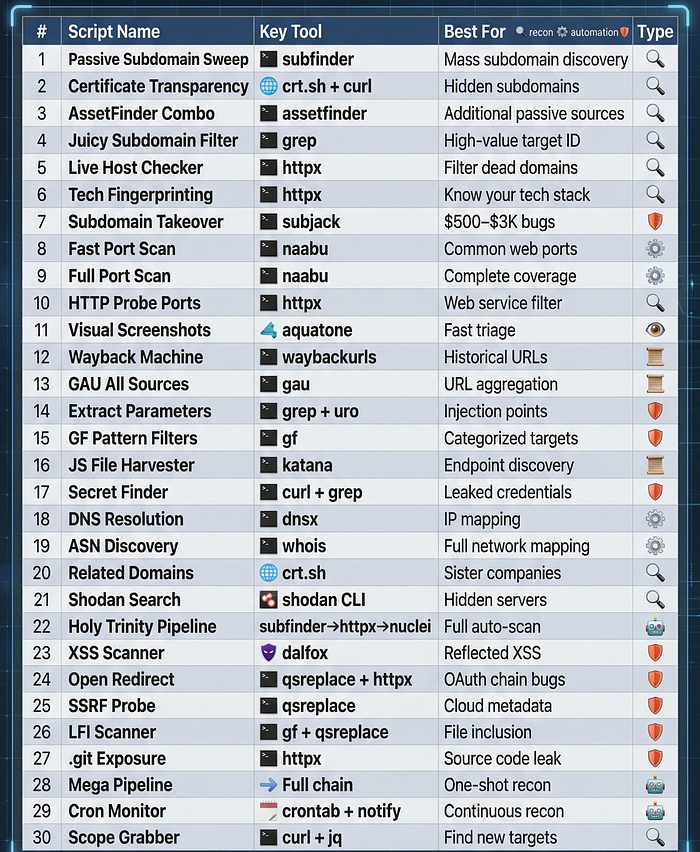
🛠️ Quick Reference — All 30 Scripts at a Glance
🎓 Learning Path — Start Here If You're a Beginner
Don't try to use all 30 scripts at once. Here's a structured path:
Week 1 — Foundation: Scripts #1, #5, #6, #12, #13 Get comfortable with subdomain enumeration and URL collection.
Week 2 — Surface Mapping: Scripts #2, #3, #4, #8, #14, #15 Learn to find parameters and map the attack surface intelligently.
Week 3 — Vulnerability Scanning: Scripts #22, #23, #24 Run your first automated vulnerability scans. Read every result carefully.
Week 4 — Full Automation: Scripts #28, #29, #30 Build your first continuous recon pipeline. Wake up to alerts.
📚 Resources to Go Deeper
- 🔗 ProjectDiscovery Tools Docs — the official home of subfinder, httpx, nuclei, katana
- 🔗 Awesome One-Liner Bug Bounty — GitHub — 3,000+ star community collection
- 🔗 KingOfBugBountyTips — GitHub — constantly updated real-world tips
- 🔗 Bug Hunter Handbook — comprehensive methodology guide
- 🔗 SecLists — GitHub — wordlists for every fuzzing scenario
- 🔗 PayloadsAllTheThings — payload reference for every vuln type
- 🔗 Nuclei Templates — 8,000+ community vulnerability templates
- 🔗 HackerOne Hacktivity — read real bug reports for inspiration
🔑 The Final Truth
Automation is not cheating. Every professional hunter automates recon. The goal is not to replace your brain — it's to free your brain for the creative, human parts of bug hunting: chaining vulnerabilities, understanding business logic, crafting the perfect exploit, and writing the report that gets you paid.
These 30 scripts are not the destination. They're the launchpad.
The hunter who finds the P1 bug isn't the one who typed the most commands. It's the one who understood the output, connected the dots, and went one step further than everyone else.
Now go build your pipeline. The bugs are waiting. 🏆
🏷️ Tags
#BugBounty #Hacking #CyberSecurity #Bash #InfoSec #EthicalHacking #PenTesting #BugBountyTips #Recon #WebSecurity #HackerOne #Bugcrowd #Subfinder #Nuclei #Automation #Linux #Security #Learning
Happy hunting. 🎯