
The Repository That Changed Everything
A researcher was stuck. Three weeks hunting on a program, nothing but duplicates and low-severity bugs.
Then they tried a single GitHub search:
org:target-company "api_key"One result. An old developer repository from 2022. Inside a config file:
{
  "production": {
    "api_key": "sk_live_xxxxxxxxxxxxxxxxxx",
    "database_url": "postgresql://admin:SuperSecret@prod-db.company.com:5432/main",
    "aws_access_key": "AKIAIXEXAMPLE...",
    "aws_secret_key": "wJalrXUtnFEMI/K7MDENG..."
  }
}
Still active. Full database access. AWS credentials working.
Severity: Critical Impact: Complete system compromise
According to GitGuardian's 2024 report, over 10 million secrets were exposed on GitHub that year. Most were never discovered by the companies themselves — only by attackers or security researchers.
GitHub isn't just a code repository. It's a goldmine of information that most bug bounty hunters completely overlook or use ineffectively.
This guide will show you exactly how to mine that gold.
Why GitHub Recon Works for Bug Bounty Hunters
According to Intigriti's research, GitHub reconnaissance is "invaluable as some companies accidentally push secrets in their public code bases, often providing access to admin portals with elevated privileges."
Even when companies delete sensitive data, it stays in git history forever (unless they force-push and rewrite history — which most don't know how to do).
Understanding GitHub Search: The Foundation
Before diving into advanced techniques, you need to understand how GitHub search actually works.
Basic Search Operators
Think of GitHub search like asking a librarian very specific questions:
Instead of: "Do you have books about cats?" Ask: "Show me books about cats, written in 2023, by authors from Japan, in the Japanese language."
GitHub equivalent:
cat language:Japanese created:2023 user:japanese-author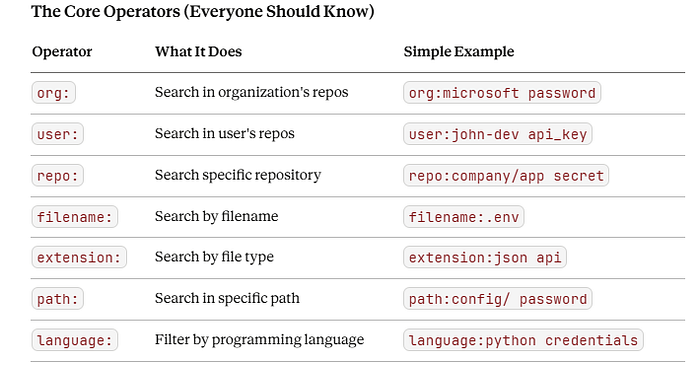
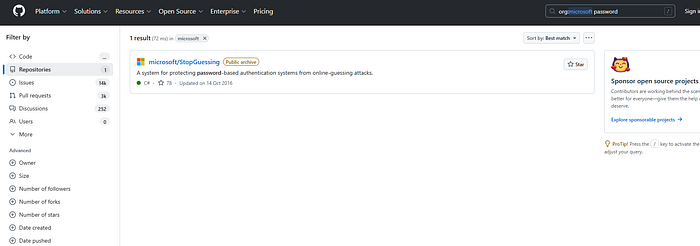
Combining Operators (Where Power Begins)
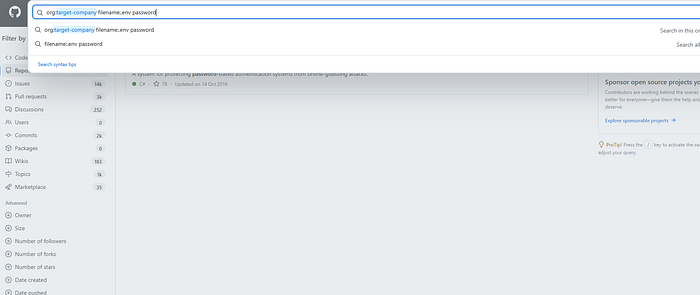
Single operators are good. Combined operators are powerful:
org:target-company filename:.env passwordTranslation: "Show me all files named .env containing the word 'password' in all repositories owned by target-company organization."
Secret Technique #1: Mining GitHub Commit History for Deleted Secrets
Most hunters search current code. Smart hunters search deleted code.
Why This Works
When developers realize they pushed a secret, they delete it:
# Developer notices mistake
git rm config/secrets.json
git commit -m "Remove secrets file"
git push
Problem: The secret still exists in commit history!
How to Find Deleted Secrets
Method 1: Using GitHub Web Interface
- Find a repository:
org:target-company - Click on "Commits"
- Use browser search (Ctrl+F) for:
password,api_key,secret - Look through old commits
Method 2: Using GitHub API (Automated)
#!/bin/bash
# Script: github_history_hunter.sh

ORG="target-company"
KEYWORDS=("password" "api_key" "secret" "token" "aws_access" "database_url")
# Get all repositories for organization
curl -s "https://api.github.com/orgs/$ORG/repos?per_page=100" | \
jq -r '.[].name' | while read repo; do

  echo "[*] Scanning: $repo"


  # Get all commits
  curl -s "https://api.github.com/repos/$ORG/$repo/commits?per_page=100" | \
  jq -r '.[].sha' | while read commit; do

    # Get commit diff
    diff=$(curl -s "https://api.github.com/repos/$ORG/$repo/commits/$commit")

    # Search for keywords in diff
    for keyword in "${KEYWORDS[@]}"; do
      if echo "$diff" | grep -qi "$keyword"; then
        echo "[!] FOUND: $keyword in $repo commit $commit"
        echo "https://github.com/$ORG/$repo/commit/$commit" >> findings.txt
      fi
    done
  done
done
What this finds:
Commit: abc123def456
Date: 2023-05-15
Author: developer@company.com
Message: "Remove database credentials"

- DB_PASSWORD="SuperSecret123!"
- AWS_KEY="AKIAI..."
+ # Credentials removed
The - line shows what was deleted—but it's still visible in history!
Real Example Pattern
# Search for removed .env files
org:target-company "removed .env" OR "delete .env" OR "rm .env"
Look through these commits — often the file contents are still visible in the diff.
Secret Technique #2: The Developer Personal Repo Pivot
Companies have private repos. Developers have public personal repos. Developers sometimes copy code between them.
The Strategy
Step 1: Find company developers
# Method A: Search for email patterns
"@company.com" language:any

# Method B: Look at organization members

# Go to: https://github.com/orgs/target-company/people
Step 2: Investigate their personal repositories
For each developer you find:
user:developer-username "company.com"
user:developer-username "companyname"
user:developer-username "production" OR "staging" OR "api"
What You'll Find
Developers often:
- Test code snippets from work in personal repos
- Fork company repos to personal accounts (might expose private code)
- Create "notes" repos with company API documentation
- Build personal tools that call company endpoints
Real search example:
user:john-dev "company.com/api" extension:pyFinds:
# john-dev's personal repo: api-tester/test.py
import requests

# Testing company API
API_URL = "https://internal-api.company.com/admin/users"
API_KEY = "sk_live_abc123xyz789..."  # ← EXPOSED!
response = requests.get(API_URL, headers={"Authorization": f"Bearer {API_KEY}"})
Secret Technique #3: The Subdomain Discovery Method
Most hunters use Subfinder and Amass for subdomain enum. Smart hunters use GitHub too.
Why GitHub Has Subdomains
Code references internal domains:
- API endpoints in JavaScript files
- Database connection strings
- Internal tool URLs
- Staging/dev environments
The Search Queries
# Basic subdomain search
org:target-company "company.com" -site:company.com

# Find dev/staging environments
org:target-company "dev.company.com" OR "staging.company.com" OR "test.company.com"

# Find internal services
org:target-company "internal" "company.com"

# API endpoints
org:target-company "api" "company.com" extension:js
Advanced: Regex Subdomain Extraction
#!/bin/bash
# Extract all subdomains from org's code

ORG="target-company"
DOMAIN="company.com"

# Clone all org repos (if small enough)
# OR use GitHub API to search code

# Search for domain patterns
rg -oIN "[a-zA-Z0-9][-a-zA-Z0-9]*\.$DOMAIN" . | \
sort -u > discovered_subdomains.txt
Example output:
admin-panel.company.com
beta.company.com
dev-api.company.com
internal-tools.company.com
staging-db.company.com
Many of these won't appear in public DNS or certificate transparency logs!
Secret Technique #4: The Configuration File Gold Mine
Configuration files are treasure chests. Here's how to find them systematically.
High-Value Filenames
# .env files (most common)
org:target-company filename:.env

# Docker configurations
org:target-company filename:docker-compose.yml
org:target-company filename:Dockerfile

# Kubernetes configs
org:target-company filename:configmap.yaml
org:target-company filename:secret.yaml

# Application configs
org:target-company filename:config.json
org:target-company filename:settings.py
org:target-company filename:application.properties
org:target-company filename:web.config

# Database configs
org:target-company filename:database.yml
org:target-company filename:db.config

# AWS/Cloud configs
org:target-company filename:.aws
org:target-company filename:credentials
The Secret Technique: Extension Stacking
Instead of searching one extension at a time:
org:target-company extension:env OR extension:ini OR extension:conf OR extension:config OR extension:yml OR extension:yaml password OR secret OR key OR tokenThis searches multiple file types simultaneously for sensitive keywords.
Configuration Pattern Mining
Look for patterns specific to technologies:
Django (Python):
org:target-company filename:settings.py SECRET_KEY
org:target-company filename:settings.py DATABASES
Node.js:
org:target-company filename:package.json "scripts"
org:target-company path:config/ extension:js
Rails (Ruby):
org:target-company filename:database.yml
org:target-company filename:secrets.yml
Secret Technique #5: The API Key Pattern Matching
Instead of searching for the word "api_key," search for actual key patterns.
Common Key Formats
AWS Keys:
# AWS Access Key ID pattern
org:target-company "AKIA[0-9A-Z]{16}"

# More precise regex
/AKIA[0-9A-Z]{16}/
Stripe Keys:
# Stripe Secret Key
org:target-company "sk_live_[0-9a-zA-Z]{24}"

# Stripe Publishable Key
org:target-company "pk_live_[0-9a-zA-Z]{24}"
Google API Keys:
org:target-company "AIza[0-9A-Za-z-_]{35}"GitHub Personal Access Tokens:
org:target-company "ghp_[0-9a-zA-Z]{36}"Slack Tokens:
org:target-company "xox[baprs]-[0-9]{10,12}-[0-9]{10,12}-[a-zA-Z0-9]{24}"JWT Tokens:
org:target-company "eyJ[a-zA-Z0-9_-]*\.eyJ[a-zA-Z0-9_-]*\.[a-zA-Z0-9_-]*"The Master Search (All Patterns)
org:target-company /AKIA[0-9A-Z]{16}|sk_live_[0-9a-zA-Z]{24}|AIza[0-9A-Za-z-_]{35}|ghp_[0-9a-zA-Z]{36}/Secret Technique #6: The Gist Mining Technique
Most hunters ignore GitHub Gists. That's a mistake.
What Are Gists?
Gists are like "quick notes" on GitHub. Developers use them to:
- Share code snippets
- Store personal notes
- Test code quickly
- Document API usage
The problem: They often paste sensitive data and forget about it.
How to Search Gists
Method 1: GitHub Web Search
# Search gists for company secrets
target-company password OR secret site:gist.github.com

# Or use GitHub's gist search
company.com api_key site:gist.github.com
Method 2: Using GitHub API
import requests

def search_gists(keyword):
    url = f"https://api.github.com/search/code?q={keyword}+in:file"
    headers = {"Accept": "application/vnd.github.v3.text-match+json"}

    response = requests.get(url, headers=headers)
    return response.json()

# Search for company secrets in gists
results = search_gists("target-company password")
What You Find in Gists
# Gist by: former-employee
# Title: "Quick API test"
# Created: 2023-06-12

curl -X POST https://company.com/api/v2/admin/users \
  -H "Authorization: Bearer sk_live_abc123xyz..." \
  -H "X-API-Secret: supersecret123" \
  -d '{"email":"test@test.com","role":"admin"}'
Boom. Admin API endpoint + valid credentials.
Secret Technique #7: The Fork Forensics Method
When someone forks a repository, they get a complete copy — including all history. Even if the original repo goes private or gets deleted, forks remain.
The Strategy
Step 1: Find popular company repositories
org:target-company stars:>50Step 2: Check their forks
Click on "Forks" for each repository. Look through the forked versions.
Step 3: Search forks for sensitive data
Forks often have:
- Commits the main repo doesn't have
- Branches with test data
- Configuration changes
- Developer notes
Automated Fork Scanning
#!/bin/bash
# Scan all forks of a repository

REPO="target-company/main-app"

# Get all forks
curl -s "https://api.github.com/repos/$REPO/forks?per_page=100" | \
jq -r '.[].full_name' | while read fork; do

  echo "[*] Checking fork: $fork"


  # Search for secrets in this fork
  keywords=("password" "secret" "api_key" "token")

  for keyword in "${keywords[@]}"; do
    results=$(curl -s "https://api.github.com/search/code?q=repo:$fork+$keyword")

    if echo "$results" | jq -e '.total_count > 0' > /dev/null; then
      echo "[!] FOUND $keyword in $fork"
      echo "$fork" >> interesting_forks.txt
    fi
  done
done
Secret Technique #8: The Language-Specific Secret Hunt
Different programming languages store secrets differently. Search accordingly.
Python Projects
# Django settings
org:target-company filename:settings.py SECRET_KEY
org:target-company filename:settings.py DATABASE

# Flask configs
org:target-company filename:config.py SECRET_KEY
org:target-company filename:config.py SQLALCHEMY

# Python .env usage
org:target-company "os.environ.get" password
org:target-company "os.getenv" api_key
JavaScript/Node.js Projects
# Environment variables
org:target-company "process.env." password
org:target-company filename:.env.production

# Hardcoded keys in JS
org:target-company extension:js "apiKey:" OR "api_key:"
org:target-company extension:js "Bearer "

# package.json scripts
org:target-company filename:package.json "scripts"
PHP Projects
# Database connections
org:target-company extension:php "mysql_connect"
org:target-company extension:php "$db_password"

# Config files
org:target-company filename:config.php password
org:target-company filename:wp-config.php DB_PASSWORD
Java Projects
# Properties files
org:target-company extension:properties password
org:target-company filename:application.properties

# XML configs
org:target-company extension:xml password
Ruby Projects
# Rails configs
org:target-company filename:database.yml
org:target-company filename:secrets.yml

# Environment configs
org:target-company filename:.env.production
Secret Technique #9: The Time-Based Discovery Method
Search for secrets by when they were added, not just what they contain.
Recent Commits (Fresh Secrets)
# Secrets added in last week
org:target-company password pushed:>2026-01-20

# Secrets added this month
org:target-company api_key created:2026-01

# Recently modified config files
org:target-company filename:.env pushed:>2026-01-15
Why this works: New repos and recent commits often have developers rushing, making mistakes.
Old Repos (Forgotten Secrets)
# Repos not updated in years (forgotten)
org:target-company password pushed:<2022-01-01

# Old configs that might still work
org:target-company filename:.env created:<2023-01-01
Why this works: Companies forget about old repos. Credentials might still be activ
Secret Technique #10: The Filename Typo Mining
Developers make typos. Especially when creating config files.
Common Typos
# .env typos
org:target-company filename:.envs
org:target-company filename:.env.local
org:target-company filename:.env.backup
org:target-company filename:.env.old
org:target-company filename:.env.copy
org:target-company filename:env
org:target-company filename:environment

# Config typos
org:target-company filename:confg
org:target-company filename:cofig
org:target-company filename:config.bak
org:target-company filename:config_backup
Backup Files
org:target-company extension:bak
org:target-company extension:old
org:target-company extension:backup
org:target-company extension:~
org:target-company extension:swp
Secret Technique #11: The Issue & Pull Request Mining
GitHub Issues and Pull Requests often contain secrets accidentally pasted during debugging.
Searching Issues
# Direct GitHub search
is:issue org:target-company password
is:issue org:target-company api_key
is:issue org:target-company token

# Issues with error messages (might contain config)
is:issue org:target-company "connection refused"
is:issue org:target-company "authentication failed"
Searching Pull Requests
is:pr org:target-company password
is:pr org:target-company credentials
is:pr org:target-company "remove secret"
What you find:
Issue #234: "Database connection not working"

User: @developer
Posted: 2025-05-10
"I'm getting this error:
Connection failed: Unable to connect to database at:
postgresql://admin:SuperSecret123@prod-db.company.com:5432/main
Can someone help?"
Boom. Production database credentials.
Secret Technique #12: The README.md Intelligence Gathering
README files are documentation. Developers document Everything.
What READMEs Reveal
# API endpoint documentation
org:target-company filename:README "api" "endpoint"

# Internal tools
org:target-company filename:README "internal"

# Authentication methods
org:target-company filename:README "authentication" OR "auth"

# Environment setup (often has example credentials)
org:target-company filename:README "setup" OR "installation"
Example Finding
# Company Internal API Documentation

## Setup
1. Get API key from admin panel
2. Set environment variables:
```bash
export API_URL="https://internal-api.company.com"
export API_KEY="sk_live_abc123..."  # Use your own key
```
## Endpoints
### Admin Endpoints (Requires elevated access)
- POST /api/v2/admin/users
- DELETE /api/v2/admin/users/{id}
- GET /api/v2/admin/secrets
This README just told you:
- Internal API URL
- Admin endpoints
- An example API key (might still work!)
Secret Technique #13: The Code Comment Secret Hunt
Developers leave TODO comments and debug notes containing sensitive info.
Search Patterns
# TODO comments with secrets
org:target-company "TODO" password
org:target-company "FIXME" api_key
org:target-company "HACK" credentials

# Debug comments
org:target-company "// debug" password
org:target-company "# testing" api_key
org:target-company "/* temp */" secret
Example finding:
// TODO: Remove this before production!
// Temporary admin key for testing
const ADMIN_API_KEY = "sk_live_abc123xyz789...";

function testAdminAPI() {

  // FIXME: This shouldn't be hardcoded
  const dbPassword = "SuperSecret123!";
  //...
}
Secret Technique #14: The Workflow File Exploitation
GitHub Actions workflows (.github/workflows/) often contain secrets or reveal how secrets are used.
What to Search
org:target-company path:.github/workflows/

org:target-company filename:deploy.yml
org:target-company filename:ci.yml
org:target-company filename:build.yml
What You Find
# .github/workflows/deploy.yml

name: Deploy to Production
on:
  push:
    branches: [main]
jobs:
  deploy:
    runs-on: ubuntu-latest
    steps:
      - name: Deploy
        env:
          API_KEY: sk_live_abc123...  # ← EXPOSED!
          DATABASE_URL: postgresql://admin:password@db.company.com/prod
        run: |
          curl -X POST https://internal-deploy.company.com/deploy \
            -H "Authorization: Bearer $API_KEY"
Even if secrets are supposed to be in GitHub Secrets, developers sometimes hardcode them temporarily and forget.
Staying Ahead: Advanced Techniques for 2026

Technique #15: The CI/CD Secret Extraction
Many companies use GitHub Actions. Secrets are supposed to be encrypted, but look for:
org:target-company path:.github/workflows/ "env:"
org:target-company filename:gitlab-ci.yml "variables:"
org:target-company filename:Jenkinsfile "credentials"
Technique #16: The Dependency Confusion Hunt
Find internal package names:
org:target-company filename:package.json "dependencies"
org:target-company filename:requirements.txt
org:target-company filename:Gemfile
Look for packages with company-specific names — might indicate internal packages.
Technique #17: The Mobile App Reverse Engineering Prep
Find mobile app repos:
org:target-company language:Swift
org:target-company language:Kotlin
org:target-company filename:AndroidManifest.xml
org:target-company filename:Info.plist
Often contain hardcoded API endpoints and keys.
The Complete GitHub Recon Workflow (Step-by-Step) for bug bounty hunter
Phase 1: Organization Discovery (15 minutes)
# Find organization on GitHub
https://github.com/target-company

# Check if organization exists
# Note: Number of public repos, members
Phase 2: Repository Enumeration (30 minutes)
# List all repos
org:target-company

# Identify interesting repos:
- Config/infrastructure repos
- Old/archived repos
- Forked repos
- Repos with <10 commits (often test/dev repos)
Phase 3: Developer Mapping (20 minutes)
# Find organization members
https://github.com/orgs/target-company/people

# Search for company emails in commits
"@company.com"

# Create list of developer usernames
Phase 4: Automated Secret Hunting (1–2 hours)
Use these searches systematically:
# Run each search, document findings

# 1. API Keys
org:target-company "api_key" OR "apikey" OR "api-key"
org:target-company /AKIA[0-9A-Z]{16}/
org:target-company "sk_live_"

# 2. Passwords
org:target-company "password" OR "passwd" OR "pwd"
org:target-company "db_password" OR "database_password"

# 3. Tokens
org:target-company "token" OR "auth_token"
org:target-company "bearer"

# 4. AWS Credentials
org:target-company "aws_access_key_id"
org:target-company "aws_secret_access_key"

# 5. Database URLs
org:target-company "database_url" OR "db_url"
org:target-company "postgresql://" OR "mysql://"

# 6. Private Keys
org:target-company "BEGIN RSA PRIVATE KEY"
org:target-company "BEGIN PRIVATE KEY"

# 7. Configuration Files
org:target-company filename:.env
org:target-company filename:config
Phase 5: Manual Verification (1–2 hours)
For each potential secret found:
- Validate it's real (not a placeholder like "YOUR_API_KEY_HERE")
- Test if it works (API call, database connection)
- Assess impact (what can you access?)
- Document properly (screenshot, steps to reproduce)
- Report responsibly (don't abuse access)
Phase 6: Deep Dive Techniques (2–4 hours)
# Commit history analysis
# Fork investigation
# Gist searching
# Issue/PR mining
# Developer personal repos
Tools to Automate GitHub Recon for bug bounty hunters
GitHound
Finds secrets across GitHub at scale.
# Install
go install github.com/tillson/git-hound@latest

# Usage
echo "target-company" | git-hound --dig-files --dig-commits
TruffleHog
Scans git repositories for secrets.
# Install
pip install trufflehog

# Scan organization
trufflehog github --org=target-company
Gitrob
Finds sensitive files in GitHub organizations.
# Install
go get github.com/michenriksen/gitrob

# Scan
gitrob target-company
GitLeaks
Detect hardcoded secrets.
# Install
brew install gitleaks

# Scan
gitleaks detect --source https://github.com/target-company/repo
Common Mistakes to Avoid
Mistake #1: Searching Only Current Code
❌ Wrong: org:target-company password
✅ Right: Include commit history, forks, gists
Mistake #2: Ignoring Developer Personal Repos
❌ Wrong: Only search organization repos ✅ Right: Map developers, search their personal accounts
Mistake #3: Not Validating Findings
❌ Wrong: Report every "api_key" you find ✅ Right: Test if credentials actually work
Mistake #4: Missing Typos and Variations
❌ Wrong: Search only .env
✅ Right: Search .envs, .env.backup, env, etc.
Mistake #5: Forgetting About Issues/PRs
❌ Wrong: Only search code files ✅ Right: Search issues, PRs, wiki, gists
Your GitHub Recon Checklist
Print this and use it for every target:
✅ Search organization repos for secrets
✅ Search organization repos for config files
✅ Check commit history for deleted secrets
✅ Enumerate organization members
✅ Search member personal repos
✅ Search gists (both org and personal)
✅ Search issues and pull requests
✅ Examine README files for documentation
✅ Check workflow files (.github/workflows/)
✅ Scan forks of popular repos
✅ Look for typo'd config files (.envs, cofig.php)
✅ Search code comments for TODOs with secrets
✅ Validate all findings (test if credentials work)
✅ Document everything properly
✅ Report responsibly
Final Thoughts
GitHub reconnaissance isn't about running one search. It's about:
- Systematic methodology (follow the checklist)
- Creative thinking (typos, forks, personal repos)
- Persistence (dig through history, issues, gists)
- Automation (use scripts to scale your searches)
- Validation (test before reporting)
That's your opportunity.
The techniques in this guide aren't theoretical. They're used by researchers finding critical vulnerabilities right now.
The question is: Will you be one of them?
Transparency Note
This guide is based on research from Intigriti, GitGuardian reports, documented bug bounty case studies, GitHub's official documentation, and community techniques shared on Twitter, Medium, and Reddit. All search examples use publicly available information. No company-specific secrets or private data were disclosed. Always follow responsible disclosure practices and bug bounty program rules when applying these techniques.
Tags: #GitHub #Reconnaissance #BugBounty #GitHubDorking #OSINT #CyberSecurity #EthicalHacking #InfoSec #SecretScanning #BugBountyHunting #GitHubSecurity #Recon