In 2026, the number one essential skill is Skills — and this applies to everyone, not just programmers. If you want to leverage AI to boost your productivity, mastering Skills is a must.
This article will give you a clear breakdown of what Skills actually are, what they're useful for, and how you can apply them in real-world scenarios.
What is Skills
Skills is a standard established by Claude — literally meaning "skill," which is exactly what it is. Defining a Skill means defining a capability.
It was originally designed to work with Claude's web interface and Claude Code. As adoption grew, much like MCP, it evolved into an industry standard. Now various AI agent tools and IDEs — such as Codex, OpenCode, Gemini CLI, and Cursor — all support it.
Think of it this way: you document your prompts and entire workflow in text form. The standard specifies placing this in a file called SKILL.md, which must include a name and description as essential elements, along with trigger conditions and when to do what. Once someone receives a Skill, they can simply drop it in the designated location following the standard, and it's ready to use.
Here's a simple Skill example following the format described:
# SKILL.md
## Name
 commit-message
## Description
 Generates clean, conventional commit messages following best practices. Automatically analyzes staged changes and creates meaningful commit messages with proper formatting.
## Trigger
 - User types `/commit` or mentions "create a commit message"
 - Run before git commit operations
## Instructions
 You are a commit message generator. When triggered:
1. **Analyze changes**: Run `git diff - staged` to see what will be committed
 2. **Categorize the change**:
 - `feat:` - New feature
 - `fix:` - Bug fix
 - `docs:` - Documentation changes
 - `refactor:` - Code refactoring
 - `test:` - Adding or updating tests
 - `chore:` - Maintenance tasks
 3. **Generate message** in format:
 :
....
Example output:
  feat: add user authentication middleware

  Implemented JWT-based authentication with:
  - Login/logout endpoints
  - Token validation
  - Protected route middleware
Why Skills?
Why use Skills? Can't I just use prompts? You might be thinking: "Don't I just want AI to help me write code, fix bugs, or draft copy? Can't I just type out prompts in the chat and tell it the rules?"
Sure, that works — but imagine having to write out the same lengthy instructions ten or twenty times a day. Wouldn't that get tedious? The core value of Skills lies in plug-and-play convenience and standardization.
In summary, the benefits of using Skills include, but are not limited to, these three:
Reuse + Workflow Automation
Let's take content writing as an example. A typical writing workflow looks like this:
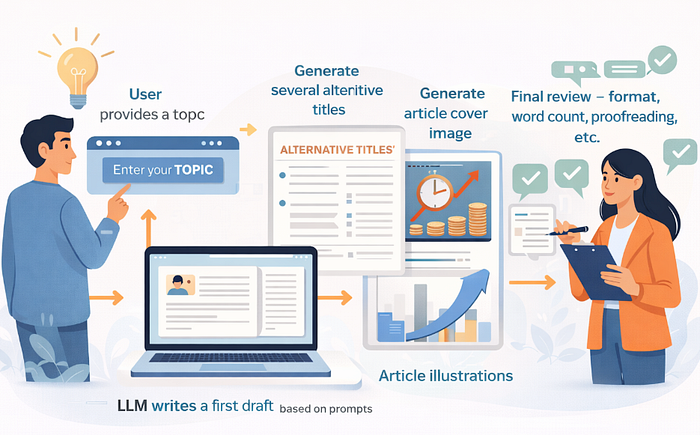
- User provides a topic
- LLM writes a first draft based on prompts
- Generate several alternative titles
- Generate article cover image
- Generate article illustrations
- Final review — format, word count, proofreading, etc.
More complex scenarios might also include topic selection, auto-publishing, and so on.
Previously, this kind of workflow either required building a complex system or configuring elaborate flows using tools like n8n or Coze. Now, it only takes a few markdown files to get it done.
Any process-driven, repetitive work can be implemented with Skills — truly giving you a versatile tool where every repetitive task becomes an opportunity to automate. And there's no shortage of those opportunities.
Automatic Skill Selection
The phrase "the right tool for the job" becomes a reality in the Skills system. Let's say you have 10 Skills installed. When you send a prompt, you don't need to manually select which skill to use (though for specific requirements, manual selection can still be helpful). The agent automatically analyzes your intent and matches it to the most suitable Skill.
Skills can also be combined. For example, if you ask to "write a sales video script and generate a product detail image," and you have both a video script Skill and an image generation Skill installed, the system will automatically invoke both Skills in tandem.
"Copy-Paste" Expertise
A Skill defined by an expert is like a secret manual handed down from a master. You simply drop it into your skills directory, and instantly you possess the same level of expertise and processing standards as the pro.
No apps to install, no complex local environments to set up (sometimes minimal setup is needed) — it's remarkably simple. However, this creates a challenge: not all expertise is free. When someone has spent days crafting a high-quality Skill and wants to monetize it, the open nature of Skills makes that difficult. Once a single copy is shared, it can be duplicated infinitely — leaving creators vulnerable to exploitation by bad actors.
How Are Skills Activated in Claude?
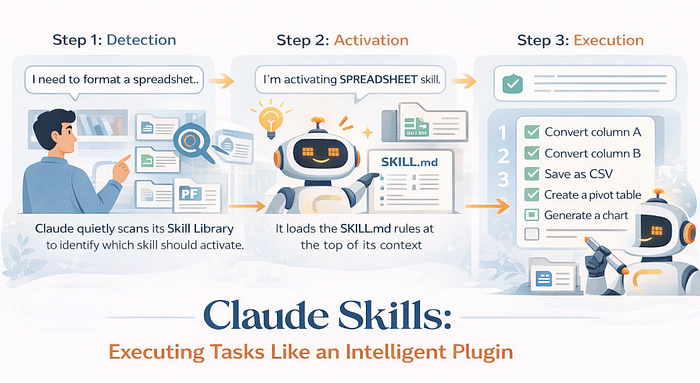
In tools like Claude Code, Gemini CLI, and others, the Skill execution logic is remarkably straightforward — just three steps:
Step 1: Detection
When you describe a task, Claude quietly scans its "skill library" in the background. If your task description matches a Skill's defined trigger conditions, it knows exactly which skill should step up.
Step 2: Activation
The Agent will explicitly tell you: "I'm activating [XX] skill." At this point, it loads the rules from that SKILL.md to the top of its context.
However, context space is limited and precious. Claude Code uses a strategy called "progressive disclosure" — depending on your SKILL.md length, if it's too long, it loads sections incrementally as needed.
Testing suggests the initial load is around 100 lines, so try to keep your SKILL.md within that range.
Step 3: Execution
It strictly follows the execution steps you defined — like a checklist. The steps are laid out, and it works through them one by one, crossing off each completed step before moving to the next, until everything is done. Think of it like someone diligently working through their to-do list.
So a Skill isn't just static text — it's more like an intelligent plugin with execution logic. It transforms Claude Code from a "chatbot that can talk about anything" into a "highly professional digital employee."
The Standard of Skills
We've talked a lot, but I haven't actually explained the structure of a Skill — you only know it's a markdown file. The core of any Skill is a single SKILL.md file. The simplest Skills need only this one file.
The file must be named SKILL.md, and as shown below, must include two metadata attributes: name and description :
---
name: skill-name
description: What this Skill does — its purpose and use case
---

## When to Trigger

Describe when this skill should be activated

## Execution Steps

1.

2.

3.

## What NOT to Do
This is the minimal template for a Skill. The name and description in the frontmatter are required for the system to identify and match the skill. The rest of the content defines the skill's behavior.
If your skill is more complex, you can add additional files.
At the same level as SKILL.md, you can include:
your-skill/
 ├── SKILL.md
 ├── references/ # Reference files (templates, example copy, etc.) - markdown format
 ├── scripts/ # Script files (Python, JS, etc.) - for PDF merging, API calls, etc.
└── assets/ # Resource files (images, fonts, etc.)- references/: Store reference materials like templates, example content, or documentation in markdown format.
- scripts/: Store executable scripts (Python, JavaScript, etc.) for operations like PDF merging, third-party API calls, or other automation.
- assets/: Store static resources like images, fonts, or other media files.
This modular structure lets you build sophisticated Skills while keeping everything organized and maintainable.
Finally, just place this directory structure into the skills folder of the tool's configuration directory.
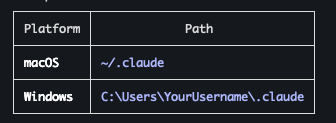
After installing Claude Code, a global directory .claude is created — this holds all configuration. Inside, you'll find a skills directory where Skills are stored.
This path is located at the user's root directory:
Conclusion
In 2026, if you want to boost your workflow efficiency, the simplest way is to use Skills. No development, no coding — as long as you can clearly articulate a process, anyone can leverage them.