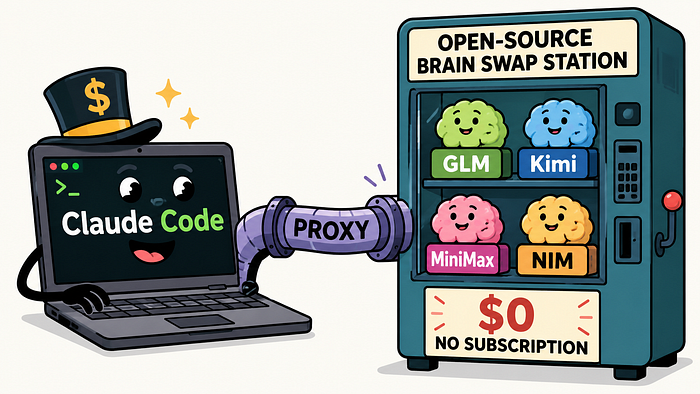
A small open-source proxy points Claude Code at NVIDIA NIM, Kimi, GLM, MiniMax, and friends. Zero subscription. Two-minute setup. Honest tradeoffs inside.
When the Linkedin post first crossed my feed I scrolled past it. "Claude Code, free, unlimited, no subscription" is the kind of headline that gets a thousand reactions and falls apart the moment you actually try to make it work on something that matters. I had seen enough of those posts this year, so I treated this one the same way: ignore, move on, get back to whatever I was actually trying to ship.
If you cant read the article further than please click here
It came back twice more that day, from two engineers I trust, with the same enthusiasm. So I gave in and spent an evening with it on a real project, the kind with multi-file edits, a test suite that actually runs, and the sort of agent loop where you can tell within ten minutes whether the model is genuinely doing the work or just hallucinating diffs. The honest answer is that it works, with caveats worth taking seriously, and the rest of this article is me walking through what those caveats are, what the setup actually involves, and where this fits in the broader story of agentic coding tools right now.
What this actually is
The project is called free-claude-code, and once you understand what it is doing the appeal becomes obvious. It is a small FastAPI proxy that sits between the Claude Code binary and whatever LLM you actually want to serve your tokens. Claude Code, the client you are running on your laptop, thinks it is talking to Anthropic's servers because that is what you configured. It is not. It is talking to localhost:8082, and the proxy at that address translates every Anthropic Messages API call into whatever the upstream provider speaks, then translates the response back. The list of backends you can choose from is genuinely broad: NVIDIA NIM, OpenRouter, Kimi, Wafer, DeepSeek, LM Studio, llama.cpp, Ollama, OpenCode Zen, and Z.ai. Ten different ways to get tokens flowing into the same client interface you are already used to.
What makes this practically interesting, as opposed to just architecturally interesting, is that you do not have to patch Claude Code, fork it, or give up any of the features that make it good. The streaming still works, tool calls still work, the thinking blocks that Sonnet emits still render correctly, the per-model picker still shows the right options. From the inside of Claude Code, nothing about the experience changes. From the outside, you have replaced the brain.
The most compelling backend, at least for anyone trying to get out from under a subscription, is NVIDIA's. NVIDIA runs an inference catalog at build.nvidia.com that hosts most of the strong open-weight models you would actually want for coding work: Kimi K2.5, GLM 4.7, MiniMax M2, DeepSeek, Nemotron, and others. The catalog has a free developer tier with a ceiling of forty requests per minute, no credit card required to sign up. Forty per minute sounds tight when you read it cold, but it is much more generous than it sounds for one developer typing at one keyboard. Claude Code batches its requests, streams responses, and reuses context aggressively, so in normal interactive editing you rarely come close to the ceiling. The one time I bumped against it was when an agent decided to spawn three parallel exploration subagents on a fairly large codebase, and even then the proxy handled the backoff and retry cleanly enough that I only noticed after the fact when I checked the logs.
The skeptic's checklist
Before I install anything new on a working machine I run through a short mental checklist, and this project is the kind of thing that earns the full version of it. The first question is always whether the "free" claim is real, and here it genuinely is, with the obvious asterisk that the free tier is for development rather than production. NVIDIA's terms are clear about that, and forty requests per minute would be a lousy basis for a customer-facing application anyway. For one developer doing what one developer does, the math works.
The second question is what you are actually getting on the other end. This is where you have to be honest with yourself: the model serving your tokens is not Sonnet 4.6, and pretending otherwise is the kind of thing that turns a useful tool into a frustrating one. What you get instead is whichever open-weight model you point at, and the strong contenders right now are Kimi K2.5, GLM 4.7, and a handful of others in roughly the same band. These are genuinely capable models. They are not Sonnet. For routine work, refactors, exploration, and the long tail of medium-complexity edits, the gap is small enough that the price difference more than makes up for it. For the kind of gnarly multi-system debugging where Sonnet's specific training shines, you will feel the step down, and pretending you will not is how people end up disappointed.
The third question is whether tool use actually survives the translation layer, and this was the part I was most worried about. Agentic coding lives or dies by the model's ability to call tools reliably, parse their outputs, and chain them into something useful. A proxy that handles plain chat well but fumbles tool calls is worse than useless, because it looks like it is working until the moment it stops. In practice the tool calls came through cleanly, the file edits landed where they were supposed to, bash commands executed and returned results the agent could reason about, and the full search-edit-test loop that I expect from Claude Code worked the way it normally does. Not flawlessly, since the open-weight models do misfire on tool calls slightly more often than the Anthropic ones, but well enough that the loop converges and the work gets done.
The fourth question is the one that decides whether any of this matters: who is this actually for? I think it lands cleanly in three groups. The first is people who cannot or do not want to justify the Anthropic subscription, either because of budget or because their usage is too sporadic to make the math work. The second, more interesting group is people who already pay for Claude and want a free overflow option for side projects, weekend hacks, or the kind of experimentation where you do not want to feel a meter running. The third group, and the one I find quietly most compelling, is people who want to run local models through the same Claude Code interface they already use professionally, pointing at LM Studio or Ollama or llama.cpp on their own GPU and getting the full agentic experience without anything leaving the machine.
The setup
The two-minute claim from the README is roughly correct if you already have the prerequisites installed. If you do not, budget more like fifteen, almost entirely because uv and Python 3.14 take a moment to land on disk the first time.
Start by making sure Claude Code itself is installed, since the proxy assumes you already have the client. A fresh install is one command:
npm install -g @anthropic-ai/claude-codeThe proxy is written in Python and managed with uv, which is Astral's fast Python package manager and the right answer to almost every Python tooling question in 2026. If you do not have uv yet, the install on macOS and Linux is one curl pipe followed by a Python install:
curl -LsSf https://astral.sh/uv/install.sh | sh
uv self update
uv python install 3.14
Windows users get the PowerShell equivalent, which works equally well:
powershell -ExecutionPolicy ByPass -c "irm https://astral.sh/uv/install.ps1 | iex"
uv self update
uv python install 3.14
With uv in place, the proxy itself installs in a single command. The --force flag makes this command also work as the upgrade path later, which is a nice touch that saves you remembering a separate incantation:
uv tool install --force git+https://github.com/Alishahryar1/free-claude-code.gitThis puts three binaries on your PATH. The one that matters is fcc-server, which runs the proxy itself. The second is fcc-claude, a convenience launcher that starts Claude Code with the proxy's environment variables already filled in so you do not have to remember them. The third is fcc-init, an optional scaffolder for advanced users who want to manage their config by hand, and the Admin UI replaces it for almost everyone.
Before you start the proxy you need an NVIDIA NIM API key, which is the only credential the default configuration requires. Go to build.nvidia.com/settings/api-keys, sign in with any account, and generate a key. The key starts with nvapi- and you want the entire thing in your clipboard, since truncating it produces a 401 later that is much more confusing than it should be.
Now start the proxy:
fcc-serverWhen the server comes up it prints a few lines, and the one you care about looks like this:
INFO: Admin UI: http://127.0.0.1:8082/admin (local-only)Click the URL or paste it into your browser. The Admin UI is the part of this project that I did not see coming, and it is the reason the experience holds together. It is a small web page bound to loopback, so nothing outside your machine can reach it, and it gives you a clean form for every setting the proxy understands. Paste the NVIDIA key into the NVIDIA_NIM_API_KEY field, click Validate to confirm the key is good, then click Apply to save it. The default model is preconfigured as nvidia_nim/z-ai/glm4.7, which is a sensible starting point that you can change later from the same page.
To actually start coding, open a second terminal and run:
fcc-claudeThis launches Claude Code with the proxy's URL and a local auth token preconfigured. The next prompt you type runs through GLM 4.7 on NVIDIA's cluster, completely free, with the same Claude Code interface you would use against a real Anthropic subscription. The first time it works end-to-end is genuinely strange, in a good way.
Picking the right model
Once the basic setup works, the most important knob is which model you actually route to, and the right answer depends on what you are doing. The proxy's per-tier routing is the feature that makes it interesting rather than just usable. Claude Code internally distinguishes between Opus-class, Sonnet-class, and Haiku-class requests depending on what it is doing, and you can route each tier to a different upstream model. The MODEL_OPUS, MODEL_SONNET, and MODEL_HAIKU fields in the Admin UI override the routing for each tier independently, and anything you leave blank falls back to the catch-all MODEL setting.
The configuration I have settled on after a week of use sends the heavy work to Kimi K2.5, which has the strongest multi-file reasoning of the free options on NIM, and keeps GLM 4.7 for everything else because it is genuinely fast and competent on routine edits. The Admin UI values look like this:
MODEL_OPUS    = nvidia_nim/moonshotai/kimi-k2.5
MODEL_SONNET  = nvidia_nim/moonshotai/kimi-k2.5
MODEL_HAIKU   = nvidia_nim/z-ai/glm4.7
MODEL         = nvidia_nim/z-ai/glm4.7
The reasoning behind this split is that Claude Code fires a lot of small probes during a session: token counts, model discovery, internal routing checks, short tool-call follow-ups. Sending those to a fast cheap model and reserving the bigger model for the actual heavy lifting matches the workload nicely. If you want to experiment with MiniMax M2 instead, swap it in on the Opus and Sonnet lines; the cost of trying is one form submission and a click.
The features I did not expect
A few of the proxy's design choices suggest that whoever built this has actually used it in production, rather than just sketching it out for a README. The first is the way it handles Claude Code's chattier probes. The client fires a steady stream of trivial requests during normal operation, things like token counting and model discovery checks, and a naive proxy would forward all of them to the upstream provider and burn through your rate limit on overhead. This proxy intercepts those locally and answers them in-process, which means your forty-per-minute NVIDIA budget covers many more meaningful interactions than the raw arithmetic would suggest.
The second is thinking-block support. Reasoning models like Kimi K2.5 emit a structured thinking trace before they emit their answer, and Claude Code knows how to display that trace as a live stream when it is talking to a real Anthropic model. The proxy normalizes the upstream provider's thinking output into the format Claude Code expects, so you see the reasoning as it streams, just like you would with Sonnet. The toggle for this is ENABLE_MODEL_THINKING in the Admin UI and it is on by default, which is the right call.
The third surprise is the messaging integration. The proxy ships with a Discord and Telegram bot wrapper that lets you dispatch Claude Code sessions to a bot from your phone, complete with optional voice-note transcription via either local Whisper or NVIDIA's hosted Whisper endpoint. This is a strange feature to find bundled with a coding proxy, and yet I can imagine reaching for it more than once when I am away from my laptop and want to kick off a small task.
The fourth thing worth mentioning is the editor integration. VS Code and JetBrains both work with the proxy by setting three environment variables in the extension's config, which means the same Claude Code interface you use in the terminal also works inside your editor, talking to whichever model you have configured. The end-to-end experience inside VS Code, with GLM 4.7 serving the tokens, is good enough that I find myself forgetting which model is on the other end.
How this differs from Ollama's Claude Code integration
This is the question I got most often when I started telling people about the project. Ollama, the popular local-model runtime, ships an official Claude Code integration that lets you run ollama launch claude and immediately be working against a local or cloud-hosted model. On the surface this looks like exactly the same idea, and the obvious question is whether free-claude-code is just a more complicated version of something that already exists in a simpler form. The short answer is that they share the same architectural insight but solve different problems, and which one you should use depends on what you actually need.
Both projects expose an Anthropic-compatible endpoint at a local URL so that Claude Code can talk to it the same way it would talk to Anthropic's servers. The fundamental observation that the Anthropic Messages protocol is a translation target rather than a closed ecosystem is the same in both. The divergence happens immediately after that, and it is meaningful. Ollama is a model runtime first and an integration second; the daemon you talk to is the same daemon that actually loads and runs the model weights, whether those weights live on your machine or on Ollama's hosted cloud service. The whole stack is one product. free-claude-code is a router rather than a runtime; it does not serve any models itself, but instead translates between Claude Code's expectations and whatever ten different upstream providers it knows how to speak to, one of which happens to be Ollama.
The practical consequences of that difference cascade through everything else. If you have a capable GPU and you care about keeping your code on your machine, Ollama is the simpler choice and probably the right one; you install one binary, you load a model, you run one command, and you are coding against a local model with no data leaving your laptop. If you do not have a GPU and you want Claude Code to cost nothing, free-claude-code wins because the NVIDIA NIM developer tier is genuinely free and runs serious models you would otherwise need to host yourself. If you want to mix and match, with different models handling different parts of the same session, only free-claude-code supports it, because the per-tier routing means Opus-class requests can hit Kimi while Haiku-class requests hit a local Qwen and the fallback goes to a hosted GLM. Ollama's architecture is one model per session, which is fine for most uses but limiting if you want to optimize cost and quality across different request types.
A cleaner way to think about the relationship is that Ollama owns the runtime layer and free-claude-code owns the routing layer, with Ollama showing up as one of the runtimes you can route to. They are not really competitors. If you are happy with one model and one backend, Ollama is the simpler answer. If you want flexibility, the proxy gives it to you, including the option to use Ollama as one of its backends when you want local execution for part of the workload.
The honest caveats
None of this should be read as "Sonnet is over." Anyone telling you that an open-weight model behind a translation proxy is a one-for-one replacement for Sonnet 4.6 is either selling you something or has not used both for long enough to feel the difference. GLM 4.7 and Kimi K2.5 are excellent models for their tier, and they handle most day-to-day coding work with the kind of competence that would have seemed magical eighteen months ago. But there is a quality gap, and it shows up most clearly in the subtle debugging scenarios where you are asking the model to reason carefully about a system it has not seen before, hold a lot of state in its head, and produce an answer that depends on getting several adjacent details right at once. In those scenarios you feel Sonnet's training, and you feel the gap.
There are smaller caveats too. The open-weight models misfire on tool calls slightly more often, which usually means the agent recovers on its own but occasionally means you have to nudge it back on track with a short hint. The free NVIDIA tier is explicitly for development rather than production use, and building a customer-facing application on top of it would be a contract violation as well as a bad idea. Forty requests per minute is plenty for one developer but not enough for a small team sharing a single key, so collaborating with a colleague through one proxy is not really viable.
If any of those caveats matter to you, the local providers offer a clean escape hatch. Pointing the proxy at LM Studio or Ollama or llama.cpp gives you genuinely unlimited use, full privacy, and the freedom to run whatever model your hardware can hold, in exchange for the speed and memory cost of doing inference on your own machine. For a lot of workflows that trade is the right one, and the fact that you can make it without leaving the same Claude Code interface is the point.
Why this matters more than it looks
The thing I keep coming back to, after a week of using this seriously, is that the agent harness is the real moat in agentic coding tools, and the model is more replaceable than the marketing implies. Claude Code is not just a chat box with a fancy wrapper; it is a careful orchestrator of file edits, shell commands, search, subagent dispatch, and context management, and most of what makes it good is the client-side engineering rather than the specific model behind it. The model is necessary but not sufficient. The harness is what makes the difference between an agent that works and an agent that wastes your afternoon.
A proxy like free-claude-code makes that decoupling explicit. The client stays the same, the brain is interchangeable, and the right way to think about your agentic coding stack starts to look less like "I use Claude" and more like "I use Claude Code, and I pick the model based on the task." That is a quietly important shift, because it means the harness you learn becomes a long-term investment that survives whatever model competition happens next, rather than a commitment to a single vendor's roadmap.
It also means the bill is a third thing entirely, separable from both the harness and the model. You can pay Anthropic for Sonnet when you want the best quality available, run a free model through a proxy when you want to experiment cheaply, and host a local model on your own GPU when you want privacy or unlimited throughput. The right setup is probably some combination of all three, depending on the day and the task, and tools like this one are what make that combination possible.
Where to go from here
The repository lives at github.com/Alishahryar1/free-claude-code, it is MIT-licensed, and it is actively maintained. The setup I have walked through above is the path of least resistance, but the project supports a much wider range of configurations than I have touched on here, including the editor integrations, the messaging bots, the voice-note transcription, and the local-model providers. The README is thorough if you want to explore further.
If you take only one thing away from this article, let it be the suggestion to actually install this on a small project you care about and see how it feels. The first time the agent edits three files, runs your tests, reports the failure cleanly, and waits for your next instruction, and you remember that you are paying nothing for any of it, the trajectory of agentic coding tooling becomes a lot more concrete. I came in skeptical and I am keeping it installed, and I think that is going to be a common reaction once more people try it.
Sumit writes about ML, quantization, and the messy edges of applied AI at Towards Deep Learning and builds interactive ML explainers at thinkidiot.com.