MICROCONTROLLERS
In a previous article we got the SPI bus set up on an AVR ATMEGA328P microcontroller. Now let's start using it.
Setting pins
Before we get going, we need to set up the pins for the SPI bus on the AVR (which we're using in controller mode). I'm using the ATMEGA328P here, so I'm going to define some macros to make things clearer. You can adapt these to your needs if using a different microcontroller.
#define SPI_CS_GPIO PB2
#define SPI_CS_PORT PORTB
#define SPI_CS_DDR DDRB

#define SPI_COPI_GPIO PB3
#define SPI_COPI_PORT PORTB
#define SPI_COPI_DDR DDRB

#define SPI_CIPO_GPIO PB4
#define SPI_CIPO_PORT PORTB
#define SPI_CIPO_DDR DDRB

#define SPI_SCK_GPIO PB5
#define SPI_SCK_PORT PORTB
#define SPI_SCK_DDR DDRB
Now let's use these to set up the pins.
SPI_COPI_DDR |= (1 << SPI_COPI_GPIO);  // COPI as output
SPI_CS_DDR |= (1 << SPI_CS_GPIO);      // CS as output
SPI_SCK_DDR |= (1 << SPI_SCK_GPIO);    // SCK as output
// CIPO should be configured automatically as input as that's default state
// on GPIOs, but if you want to be emphatic
SPI_CIPO_DDR &= ~(1 << SPI_CIPO_GPIO); // CIPO as input
SPI_CS_PORT |= (1 << SPI_CS_GPIO);     // take CS high to deselect peripheral
SPI_CIPO_PORT |= (1 << SPI_CIPO_GPIO); // set pullup on CIPO
To simplify matters later, we might also want to set up a couple of macros to control the CS line.
#define SPI_PERI_SELECTED SPI_CS_PORT &= ~(1 << SPI_CS_GPIO)
#define SPI_PERI_DESELECTED SPI_CS_PORT |= (1 << SPI_CS_GPIO)
Now we're set up, let's look at the register that does all the hard work.
SPDR — SPI Data Register
This is the third of the key SPI registers and it works like magic. Just write a byte to this register and the AVR will fire up SPI and send the whole byte of data down the wires without any further work on your part, handling all the clocking itself. And thanks to that dance between shift registers that I mentioned in the first part, when it's done doing that, that same SPDR now contains the incoming data. So an exchange of data between controller and peripheral consists of the controller doing this:
- Take the
CSline low to enable the peripheral device. - Write a byte to
SPDR. - Wait for the exchange to complete.
- Take the
CSline high again. - Read what's in
SPDR.
That's it. How do we know if the exchange is complete? Simple — the SPIF bit in the SPSR register gets set. So all you need do is wait for that. In the example below we simply hang around in a while loop. That's blocking and you might find it wasteful of clock cycles if your microcontroller is hard-pressed. If so, you'll want to look into enabling SPI interrupts that will get triggered when SPIF gets set. You can then get on with other things while the SPI data exchange takes place. But that's a bit advanced for this article.
So here's a bit of code that sends a byte of data over SPI and gets one back.
uint8_t value = 0xFA; // randomly chosen value for demo purposes
SPI_PERI_SELECTED;
SPDR = value;         // initiates transfer
while(!(SPSR & (1 << SPIF))); // wait for SPIF bit to be set
SPI_PERI_DESELECTED;
And that's it! SPDR now contains whatever was sent back by the peripheral — most likely nothing of any interest.
And that's the bit about SPI that can catch you out. The byte that the controller just sent to the peripheral may have been a command of some kind. To get the peripheral's response, just send another byte of any arbitrary value and the peripheral will send you its response.
In fact, you might have to send and receive multiple bytes. I mentioned in the previous article that I'd messed around with a serial RAM chip. Here's how you go about writing a value to a memory location on that chip:
- Take the
CSline low. - Send the write command (0x02). Ignore what comes back from the chip.
- Send the high byte of the 16-bit memory address. Ignore what comes back from the chip.
- Send the low byte of the 16-bit memory address. Ignore what comes back from the chip.
- Send the one-byte value to be stored at that location. Ignore what comes back from the chip.
- Take
CSline high.
So in this case, all the traffic is one-way and all the data coming back from the chip (actually just zeroes) is thrown away. Now let's read a value from a memory location. This is what you do:
- Take the
CSline low. - Send the read command (0x03). Ignore what comes back from the chip.
- Send the high byte of the 16-bit memory address. Ignore what comes back from the chip.
- Send the low byte of the 16-bit memory address. Ignore what comes back from the chip.
- Send any one-byte value you like, which is ignored by the chip. However, the chip sends back the value held at the memory location which it has already stored in its shift register as a result of the above operations.
- Take
CSline high.
The value held at the memory location is now in SPDR.
And here's what that looks like on an oscilloscope:
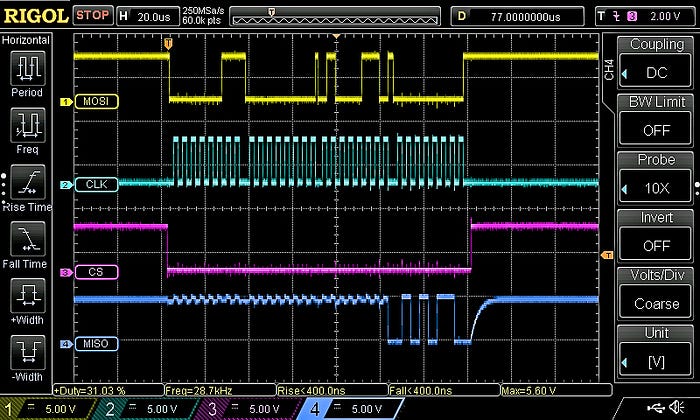
That might seem like a lot of work to get one byte of data from the memory. But the 23LCV512 is typical of many SPI devices in that, once the initial contact is made, continually prodding it will return more information.
So, for example, if you wanted to get 32 bytes of data, you'd use the same process as described above, just sending the start address, but at step 5, instead of sending one byte's worth of junk data — in order to prompt the slave into sending data back — you'd send 32 of them. But not all at once. After each byte, you'd need to retrieve what's been set in SPDR and store it somewhere because that's about to get overwritten after you send the next junk byte.
And that's all there is to basic SPI use.
You can find all the AVR-related articles here.
I've created a GitHub repo for supporting files to accompany this AVR series of articles. You can find it here: https://github.com/mspeculatrix/AVR_8bit_Basics/
Steve Mansfield-Devine is a freelance writer and photographer. You can find photography portfolio at Zolachrome, buy his books and e-books, or follow him on Bluesky or Mastodon.
You can also buy Steve a coffee. He'd like that.