Hands-on Tutorials
A complete step-by-step guide from setup to deployment of local language models, making it private, portable, and shareable, with integrated local databases.
There is great pleasure in baking your own cake — the same is true for working with language models. When you are a data scientist, you need to separate yourself from the general user and understand how the different parts of language models are connected to generate the output. In this blog, you will learn to effectively customize models for specialized tasks that work locally and privately. By the end, you have your own personal local large language model up and running that can do all kinds of tasks. Whether it is thousands of documents that you want to search through, creating assistants, or doing agentic tasks. With the hands-on part, you will learn to build a lightweight model that runs your model locally, privately, and with local databases. For all exercises, the Python library LLMlight will be used.
If you found this article helpful, you are welcome to follow me because I write more about data science! I recommend experimenting with the hands-on examples in this blog. This will help you to learn quicker, understand better, and remember longer. Grab a coffee and have fun!
A Brief Introduction: Automation of Tasks.
There was a time when deterministic rule-based systems dominated automation tasks. The challenge for rule-based systems is to define the logic explicitly. Once deployed, the same task will be consistently performed unless manually updated. A deterministic system. The maintenance is generally low, and the output is consistent. While simpler systems like this should always be preferred over more complex systems, it is not always possible. Machine learning systems gradually entered the party, enabling automation of tasks that failed when using a simple set of rules. Think of automatic image analysis or the detection of abnormalities in IoT devices.
Watch out for the technological whiplash: We need to find the balance between stability and new innovations.
In recent years, large language models (LLMs) have pushed automation even further, taking on a wide range of text-based tasks that once required human effort. Now we can summarize large reports, and make large reports with only a few words. Although this can be great, LLMs also introduce a layer of unpredictability. Their "behavior" or output can shift with model updates, fine-tuning, or even subtle changes in input phrasing. This makes them incredibly powerful for complex tasks like summarization, reasoning, or conversation, but also harder to control and predict.
Company's Internal Struggles: Technical Success vs. Human Readiness
When you aim to integrate LLMs into your company's workflow, because all other simpler systems have failed, the execution from an engineering point of view is simple: use cloud services, deploy an LLM, connect it with local databases, and put it into operation. However, such initiatives often fail because the use of language models also requires skilled personnel, and when aiming to run the models locally, a solid foundation of infrastructure is necessary. Then there is also the never-ending maintenance. Think of fine-tuning, monitoring performance, ensuring compliance, legal aspects, and so on. The solution? Don't go fast. Guide the personnel, educate them, and make small visible steps.
The operational overhead of using language models is significant and widely underestimated.
The Speed of Innovation Is A Real Struggle!
Another challenge is the speed of innovation. It may sound great that every other week a new model is introduced, but the downside is that when you commit to a specific model, such as GPT-3 a few months ago, you start building around its strengths and limitations. So this means that teams invest time in training, customizing, and integrating the model into their systems. Yet, within weeks or months, newer models like Claude, Grok, or GPT-4 arrive, offering better performance, more nuanced reasoning, or lower costs. Without even finishing the internal discussions to make the step to GPT-4, GPT-5 already arrived.
The speed of new innovation is not in your favor. One year in the field of A.I. is seven years in your company.
This creates a dilemma: stick with the language model you've built, or choose something newer and potentially better? Switching models isn't trivial. From an engineering point it -maybe- is, but from a company point of view, it is not. It may require retraining staff and rethinking architecture, and dealing with new operational costs. But staying with the same model puts risks of falling behind in a rapidly evolving landscape. This way of working is a huge change compared to the traditional rule-based systems or even machine learning models. In the latter case, there was often a long process of labeling, model training, and evaluation, and thus time to prepare for the arrival of a new model. When using language models and cloud services, we usually only do the inference, meaning that the time to ship is reduced to days, or sometimes even hours or minutes.
It's no longer about learning; it's about unlearning and relearning what you thought you understood.
This means that choosing the "best" model is an ongoing process of evaluation and adaptation. Whether you're building applications or conducting research, staying informed and flexible is key to making the most of what these evolving models have to offer.
The Dilemma: Open-Source or Closed-Source Solutions?
The development of large language models is a complex and resource-intensive process, involving massive datasets, high-performance computing infrastructure, and sophisticated training algorithms. Having said that, not all models are created or shared equally. We can divide LLM models into two categories: closed-source and open-source models. A great GitHub page is here, where you can find a collection of the most popular models together with courses, books, and more. A visual comparison of large models is shown in the image below.
- Closed-source models: These are models that are developed by major tech companies, such as OpenAI or Anthropic AI, and contain hundreds of billions of parameters, making them incredibly powerful. Access is via cloud APIs, which means no headaches in deployment; you don't need the infrastructure or the computing power. The trade-off is that you do need to send your data to external servers. This is because the weights of the model are never shared (aka the trained parameters that define the intelligence of the model). Overall, these models would have been far too large for local deployment.
- Open-source models: These are designed with transparency and accessibility in mind. Projects like LLaMA, Mistral, and Qwen have made it possible for researchers, developers, and even hobbyists to experiment with powerful LLMs without relying on centralized services. Crucially, the weights are openly released, meaning anyone can run, inspect, or fine-tune the model locally. Usually, these models are published in multiple sizes, with the most common sizes being 3B, 7B, or more capable 13B and 70B variants. These models are also known as Small Language Models (SMO). Although not all models are 'small' anymore, they can be fine-tuned for specific domains.
Ultimately, the choice between LLMs and SMOs is not just about size; it is also about convenience and scale, but at the cost of transparency and autonomy. In terms of performance and costs, an insightful blog has been published [1] that compares 16 leading models (both open and closed source). It is described that "Some models cost 165 times more than others for identical performance, and that open-source alternatives are seriously challenging the big tech giants.". A ranking of the accuracy of the models is shown in the table below, where two of the top five performing models (DeepSeek-R1 and Grok-3) are open source. Another interesting finding is that GPT-5 mini has the same performance as GPT-5 but costs ~6x less. Organizations and local users can thus access competitive performance while maintaining full control over their data and infrastructure.
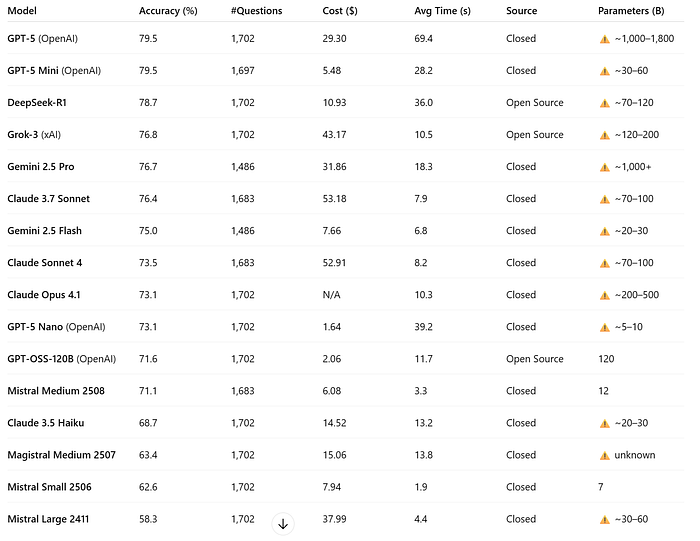
Small Local Language Models For Specialized Tasks
NVIDIA Research recently published that "Small Language Models (SLMs) are the future of Agentic AI" [2]. On top of this, Microsoft introduced its 1-Bit LLMs, which allow running larger language models locally on your own machine. This is really great because in combination with Agentic AI, we do not need to rely on a single model but can create multiple models, each specialized for a specific task that jointly solve the task.
The underlying architecture should force models towards a shared objective. In other words, rather than asking one massive question to a large model like ChatGPT, the task is decomposed into smaller, more targeted questions, each handled by a smaller, specialized model. The output of each model is subsequently combined into one final result. This approach is attractive because smaller, specialized models can also tackle concrete tasks efficiently, making it easier to achieve high accuracy. In other words, by distributing tasks among multiple focused models, Agentic AI leverages the strengths of smaller models without sacrificing performance.
Example: You want to automate your entire mailbox. A large model could attempt to handle the entire process at once, but an agentic setup might break it down: one small model classifies incoming emails, another drafts replies, and a third schedules follow-up tasks in your calendar. Together, these specialized agents deliver a more efficient and reliable workflow than relying on a single large model. This also makes it easier to find any bugs and resolve issues. However, the use of SMOs comes with a new set of challenges like the limited context window. In the next section, we will dive into the importance of context windows.
The Challenges Of Small Context Windows.
One of the challenges when working with local language models is their limited context window. Think of it like this: our human brain contains vast amounts of information, and much of it is "always available". But when we try to recall something like "Where are my keys?" we need to activate certain neurons and mentally retrace our steps: "I was at home, then I went to the kitchen, then…" This step-by-step memory retrieval is similar to the idea of a context window in language models.
Ideally, we do not want to be constrained by the length of context windows, yet the memory limitations of your hardware make them unavoidable.
So, metaphorically, the entire size of our brain can be seen as 100% of the context window; it is the full memory of everything we know. In practice, when we think through problems, we only access a subset at a time. Large language models (LLMs) behave similarly: they have a large context window, meaning they can "remember" and reason over a lot of information within a single interaction. However, the context window of LLMs is hard-limited. Smaller models, on the other hand, have a much smaller context window because the limitation is also in the hardware (memory) of your machine. This limitation forces models to "forget" or truncate information, making stepwise reasoning or long instructions more challenging. When you work with local language models, you have the challenge to fit all relevant information into the limited context window. A solution is the use of Retrieval-Augmented Generation (RAG). In the next section, we jump into that topic but first, we need to understand how the context window is build. Let's go to the next section, where we break down the context window and the tokens.
The Relation Between Tokens And the Context Window
The context window of any language model consists of multiple layers of information as depicted in the Figure below: the user query, the model's output, the conversational context, the system and instructions that guide behavior. Depending on the application, it may also include retrieved document chunks, chat history, metadata, or role information (e.g., who is speaking), and control tokens that tell the model how to respond. All of this text is part of the context window to let the model generate its next word.
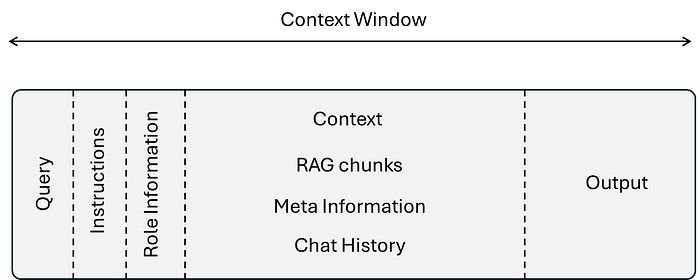
The context window is measured in tokens. As an example, GPT-4o gets 128k tokens, and the latest models up to 2M tokens while local language models are set by default to 4096 tokens. Tokens are the fundamental units in an LLMs. Unlike words, tokens are often sub-word fragments — for instance, the word "happiness" might be split into the tokens "ha", "ppiness", while "AI" is a single token. On average, one token corresponds to about 3–4 characters of English text, or roughly 0.75 words. Because the context window is defined in tokens, not words, its effective length in natural language varies by language and writing style. A model with a 4096 token context window can thus process roughly 3000 words of English, but fewer if the text contains many short words, special characters, or complex formatting.
As a data scientist, you are in control of how to divide the text in the context window. So, in case you use the entire context window for instructions, meta information, and chunks of text from the RAG, there is no room left to generate the output. The model will likely throw an error in this case. The importance of good instructions and the role of the LLM can be seen by the closed-source models. These are basically very comprehensive and are simply too large for local model usage. As an example, the Claude Anthropic model contains an impressive 16K words of instructions. Check out this Repo for various leaked instructions:
Retrieval-Augmented Generation (RAG) To The Rescue
Retrieval-Augmented Generation (RAG) is a strategy to store large amounts of information and retrieve it effectively without the need to load all information at once into memory. Let's go back to the analogy of our brains and our lost keys. You can think of RAG as if your brain were chopped into tiny chunks that you could search through. This means that we do not need a very large context window anymore, but instead can store the information effectively in databases. When you now ask, "Where are my keys?", the system needs to scan through all those chunks and retrieve only the ones that look most relevant. Those top X chunks are then fed into the model as its "limited memory." From there, the language models are very good at weaving those fragments into a coherent story — even though they only see part of the full picture. The downside is that if the crucial clue happens to be in a chunk that wasn't retrieved, the model may simply fill the gap with a plausible-sounding answer of what could have happened, rather than what really did.
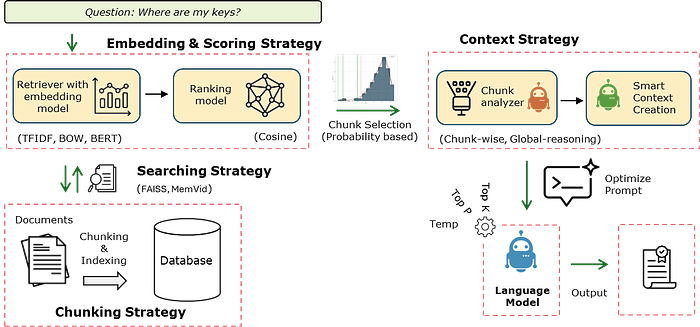
When we talk about RAG strategies, the one just described represents the simplest form of retrieval-augmented generation and is often referred to as "Simple RAG" or "Naive RAG" (see Figure 1). This baseline approach can be optimized at four major stages: chunking, searching, embedding, and scoring. Together, these form a more advanced and customizable RAG pipeline. See here for more details about different types of RAG strategies.
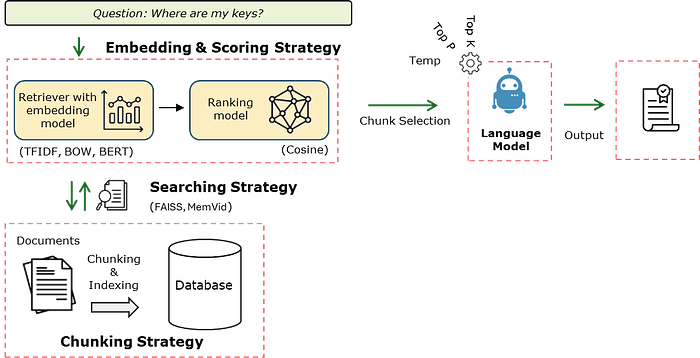
- Chunking Strategy: Defines how source documents are split into smaller, coherent segments. Better chunking ensures that each piece contains enough context to be meaningful while avoiding redundancy or fragmentation. This step directly impacts retrieval relevance and efficiency. Here is an interesting blog about chunking strategies.
- Search/Retrieval Strategy: Specifies how the system locates candidate chunks in the vector database. Brute-force nearest neighbor search, FAISS approximate nearest neighbor (ANN), or memory-efficient approaches like MemVid can be used depending on dataset size, latency requirements, and hardware constraints.
- Embedding Strategy: Determines how chunks and queries are represented in vector space. Options include TF-IDF, Word2Vec, Sentence-BERT, or modern OpenAI embeddings. The embedding choice shapes the semantic quality of retrieval, as it dictates how similarity is measured. Read here a blog with more detailed information.
- Scoring Strategy: Assigns relevance scores to candidate chunks to determine which should influence the final answer. Cosine similarity is the most common.
Frameworks for Fine-Tuning, Serving, and Deploying LLMs
For traditional machine learning and deep learning tasks, some popular frameworks are scikit-learn and PyTorch. These have become the go-to tools. Scikit-learn excels at classical ML problems such as regression, classification, and clustering, offering simple APIs for models that run efficiently on CPUs. When it comes to large language models (LLMs), there are frameworks such as Hugging Face Transformers, LLaMA Factory, and LiteLLM. These offer parameter-efficient fine-tuning methods, distributed training capabilities, and memory optimizations tailored for models with billions of parameters.
These kind of frameworks are usually not for personal use and extends far beyond simple model serialization by enabling GPU batching, streaming outputs, and scalable inference pipelines. In this blog, we aim to get models up and running locally, so we will not dive into these frameworks. In case you are interested, I recommend reading this blog. Meanwhile, we will go to the next section and set up our own local model.
Foundation Models, Fine Tuning, or RAG?
RAG models are thus a great way to make information searchable using pre-trained models. Nevertheless, there are cases where a custom foundation model becomes necessary. This is especially true when working with private or proprietary data. Existing models, like GPT, Claude, are trained on large amounts of public datasets and lack context about your company's internal environment and workflows. The key advantage of having your own foundation model is that it unlocks the ability to chat directly with the model without relying on external retrieval mechanisms like RAG. Why does this matter? Well, you don't have to build and maintain a separate search index or retrieval logic. This foundation model "knows" the data. This means that you can always ask follow-up questions, or refer to earlier parts of the chat, and explore certain topics without worrying whether the model will fetch the right document. There is a downside, though. Creating foundation models is demanding because it requires significant computational resources and expertise. But this is maybe the easy part. What matters even more is that a robust governance framework is required to ensure the model is safe, fair, and aligned with legal standards. An interesting blog about creating a local foundation model with hands-on code can be found here:
Building a 2 Billion Parameter LLM from Scratch Using Python
It starts making sense
gitconnected.com
Fine-tuning is essentially the middle ground because, instead of training from scratch, it allows you to adapt a pre-trained model to your specific domain by exposing it to curated internal data, such as in legal text summarization, medical question answering, or customer support chat. Fine-tuning dramatically reduces cost and complexity while still delivering high relevance and performance. It's especially effective when you want the model to understand company-specific terminology, workflows, or tone without reinventing the wheel. Note that the weights of the model need to be open-source. This means that closed-source models can not be fine-tuned unless the company itself provides possibilities. The advantages are thus:
- Domain-specific jargon: Field of Biology, legal docs, company-specific terminology, Medical Field.
- Cost optimization: You can create multiple smaller and specialized models instead of one expensive closed-source model.
- Privacy concerns: Data remains on your own servers
Three blogs with great hands-on examples can be found here:
Set Up Your Own Local Model.
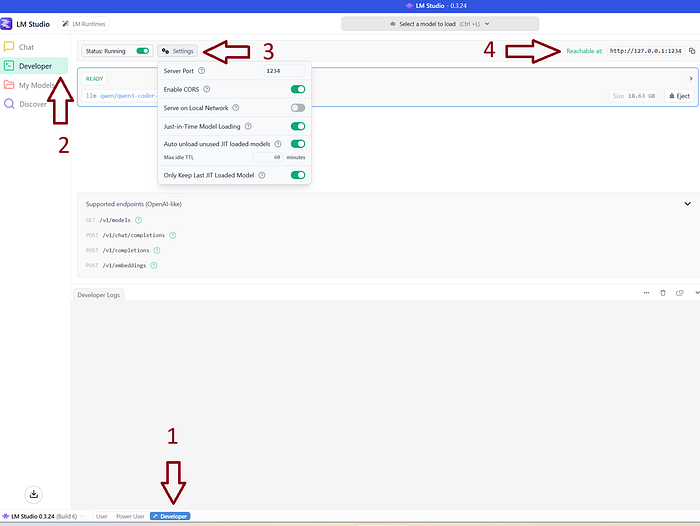
Getting your own local model up and running has become easy. There is no need anymore to compile GitHub repos or download Docker files. The most favorable software at this point is LM studio. It is free, there is a user interface, and it connects surprisingly well with the hardware in your machine. Above all, popular models can easily be downloaded and directly used. The installation is a regular setup file. Besides LMstudio, there are also various other good alternatives, such as Ollama or Claude. Either way, if tools have an endpoint, you can use them to work with the language models in your local Python environment. In this blog, I will continue using LMstudio (Figure below).
After installation, go to the developer window (Steps 1 and 2) and enable "start running" (Step 3). This will make the models accessible via the localhost (Step 4): https://127.0.0.1:1234.
The models can be downloaded in the "Discover" tab (Step 2). In the screenshot below is an example of the 70B Hermes model, where it is indicated that it would not fit on my machine. The smaller model 20B model fits partly into my VRAM (GPU) and can thus work. The rightmost screenshot shows that it can be loaded fully into my VRAM. Note that when models can only be loaded partially, the computation time dramatically increases.

When you have downloaded your favorite models and enabled the "start running", you can also experiment in the Chat section to see what the speed of response time is. In the next section, we will create our first model in Python.
The LLMlight Library.
The LLMlight library is an easy-to-use and lightweight Python package for running Language Models locally with minimal dependencies. It is an agentic pipeline with various stages from handling the input prompt to the output of the model. A schematic overview of LLMlight is depicted in the figure below. In general, there are six key steps in the pipeline: first, the chunking of text, then search strategy, embedding strategyand scoring strategy, context strategy, and finally the prompting strategy . The parameters, like temperature, top-p sampling, can be adjusted so that you keep control over the response variation.
Chunking Strategy
The very first step is the chunking of the input text. This can be controlled using the chunks parameter. Chunks can be created based on characters or words, with a certain overlap between the chunks. The default is: {'method': 'chars', 'size': 1000, 'overlap': 200} . Chunking ensures that each piece contains coherent information, which improves retrieval relevance and reduces overlap or fragmentation of knowledge.
Search Strategy — Local Databases
The search strategy specifies how the search for candidate chunks is conducted in the (vector) database. LLMlight intends to keep it lightweight and easy to use. This also accounts for the storage of information in databases. Vector databases are great and fast, but also require (complex) installation procedures. LLMLight, therefore, incorporates memmvid that stores the information offline in a single mp4 video file. This means that it can also be shipped to any other system or edge device without the need to install databases. The performance is impressive; the Memvid website states that 100K chunks can be processed in ~2 minutes and store the information into 180MB. The inferences can be done within 50ms.
Embedding Strategies
Determines how chunks and queries are represented in vector space. The available embedding methods in LLMlight are:
- TF-IDF: Best for structured documents with matching query terms
- Bag of Words: Simple word frequency approach
- BERT: Advanced contextual embeddings for free-form text
- BGE-small: Efficient embedding model for general use
Scoring Strategies
The scoring strategy assigns relevance scores to candidate chunks so that the top best chunks can be returned. Cosine similarity is the default.
Context Strategies:
The context strategy in LLMlight contains two agents that work together to create a single comprehensive text based on all input chunks. The chunk-analyzer-agent has specific instructions to analyze each chunk and its relation to the other chunks. The smart-context-agent then uses the processed chunks and summarizes it with specific instructions into one coherent text. The reason to do such an extensive approach is that the detected chunks can be gathered from various documents/sources. The LLMlight library contains three context strategies, No processing, chunk-wise and global-reasoning. In exercise 5, we will go through each of the strategies and evaluate the results.
- None: No preprocessing. The raw and entire context text is used
- chunk-wise: Breaks the context into manageable chunks
- global-reasoning: Creates a global summary of the context
Prompt Optimization
The final prompt is a combination of various parts that are either provided by the user or are created by the agents.
- System message: Defines the AI's role and behavior
- Context: Processed and retrieved relevant information
- User query: The specific question or request
- Instructions: Additional guidance for response generation
Local Memory/ Storage
LLMlight intends to keep it lightweight and easy for use. This also accounts for the storage of information in databases. Vector databases are great and fast, but also require (complex ) installation procedures. LLMLight, therefore, incorporates memmvid that stores the information offline in a single file. This means that it can also be shipped to any other system or edge device without the need to install databases. The performance is impressive; it is stated that 100K chunks can be processed in ~2 minutes and store the information into 180MB. The inferences can be done within 50ms.
# Install the library
pip install llmlight
Exercise 1: Load A Model and Have A Simple Chat.
In this first exercise, we will use the endpoint to connect with the available models, and then ask some basic questions to the model. In my case, the default endpoint of LM is http://localhost:1234 which can be used for various tasks (see figure below for the supported endpoints). We now need to use the chat completions which is also the default within LLMlight. I have a number of models in my LMstudio environment, which means that I can easily decide which model to use for specific tasks. Note that when you run the model for the first time, the model needs to be loaded into memory, which can take some time.
"http://localhost:1234/v1/chat/completions"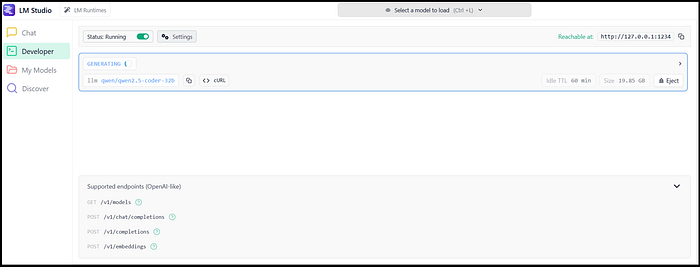
pip install llmlight
# Load the library
from LLMlight import LLMlight

# Initialize the model
client =  LLMlight(endpoint="http://localhost:1234/v1/chat/completions")

# Print the available models
print(client.models)

"""
['qwen/qwen3-coder-30b',
 'microsoft/phi-4',
 'openai/gpt-oss-20b',
 'qwen/qwen3-4b-thinking-2507',
 'qwen/qwen2.5-coder-32b',
 'claude-3.7-sonnet-reasoning-gemma3-12b',
 'qwen/qwen2.5-coder-14b',
 'qwen/qwen3-32b',
 'google/gemma-3-27b',
 'mistralai/mistral-small-3.2',
 'google/gemma-3-12b',
 'deepseek/deepseek-r1-0528-qwen3-8b']
"""


# Alternatively: Validate the models and list only those the respond
modelnames = client.get_available_models(validate=True)

"""
[LLMlight.LLM] [INFO    ] LLMlight is initialized!
[LLMlight.LLM] [INFO    ] Model: hermes-3-llama-3.2-3b
[LLMlight.LLM] [INFO    ] Preprocessing: disabled
[LLMlight.LLM] [INFO    ] Retrieval method: RAG_basic
[LLMlight.LLM] [INFO    ] Embedding: {'memory': 'memvid', 'context': 'bert'}
[LLMlight.LLM] [INFO    ] Collecting models in the API endpoint..
[LLMlight.LLM] [INFO    ] Looking up models: http://localhost:1234/v1/models
[LLMlight.LLM] [INFO    ] Validating the working of each available model. Be patient.
[LLMlight.LLM] [INFO    ] LLMlight is initialized!
[LLMlight.LLM] [INFO    ] Model: qwen/qwen3-coder-30b
[LLMlight.LLM] [INFO    ] Preprocessing: disabled
[LLMlight.LLM] [INFO    ] Retrieval method: RAG_basic
[LLMlight.LLM] [INFO    ] Embedding: {'memory': 'memvid', 'context': 'bert'}
[LLMlight.LLM] [INFO    ] Creating response with qwen/qwen3-coder-30b..
[LLMlight.LLM] [INFO    ] No preprocessing method is applied.
[LLMlight.LLM] [WARNING ] No context is provided into the prompt.
[LLMlight.LLM] [INFO    ] Running model now..
"""

# Only the valid models are returned
print(modelnames)
If this is your first time, this will already bring a lot of joy because this simple question-and-answer (QA) can already help you assist in your projects. In the code block below, we will ask our first question to the model.
# Load the library
from LLMlight import LLMlight

# Initialize with one of our listed models
client =  LLMlight(model='mistralai/mistral-small-3.2', endpoint="http://localhost:1234/v1/chat/completions")
# Say hello
response = client.prompt('hello, who are you?')
# Print
print(response)

"""
[05-09-2025 14:12:08] [LLMlight.LLM] [INFO    ] Creating response with mistralai/mistral-small-3.2..
[05-09-2025 14:12:08] [LLMlight.LLM] [INFO    ] No preprocessing method is applied.
[05-09-2025 14:12:08] [LLMlight.LLM] [INFO ] No context is provided into the prompt.
[05-09-2025 14:12:08] [LLMlight.LLM] [INFO    ] Running model now..

"Hello! I'm an AI assistant designed to help answer your questions using a knowledge base. How can I assist you today?"
"""

# Set the Role for the model
system_message = "You are a helpful assistant."
# Let it answer your question
response = client.prompt('What is the capital of France?', system=system_message, top_p=0.9)
# print
print(response)

"""
The capital of France is Paris.
"""
Exercise 2: QA With Documents: No Chunking
In this exercise, we will import a pdf file, but you can also use any other text as the input, for client.prompt(context=text) can be a list with strings. We will feed the text from the PDF to the model and let it answer our questions. In the code block below, we will read a PDF from a URL, but you can also set the path to a local PDF file. The context will contain the flattened text from the PDF file. Please note that only the text information will be retained; images will be removed. When making a prompt, or in other words, asking the model a question, it can occur that the model is not using the context to answer the question, but leverages its own knowledge. It is therefore advised to give the model specific instructions.
# Load library
from LLMlight import LLMlight

# Initialize with default settings
client = LLMlight(model='mistralai/mistral-small-3.2',
                  context_strategy=None,
                  endpoint="http://localhost:1234/v1/chat/completions")

# Read pdf
url = 'https://proceedings.neurips.cc/paper_files/paper/2017/file/3f5ee243547dee91fbd053c1c4a845aa-Paper.pdf'
pdf_text = client.read_pdf(url)

# Add more text to the context
context = pdf_text + '\n More text can be appended in this manner'

# Make a prompt
response = client.prompt('What is an attention network?',
                         context=context,
                         instructions='Answer the question using only the information from the context.')

print(response)

"""
Based on the provided context, an attention function can be described
as a mapping between a query and a set of key-value pairs to an output.
It allows each position in a sequence to attend to all positions in
another sequence or the same sequence, depending on its use case.

The context also mentions two common types of attention functions:
1. Additive attention: Uses a feed-forward network with a single hidden layer to compute compatibility.
2. Dot-product multiplicative attention: Computes compatibility using dot products and is generally faster and more space-efficient in practice.

These attention mechanisms are used in various ways within the Transformer model, such as self-attention layers and encoder-decoder attention layers.
"""
In this way, it becomes very easy to add more PDF files or other texts to the context file until we hit a point where we run out of memory. In the next subsection, we will do the same experiment, but then with chunking so that we can start handling more information.
Exercise 3: QA With Documents: With Chunking
Let's repeat this exercise, but now create chunks and take the top 5 best-scoring chunks for our query What is an attention network?. The approach is going to be very helpful when the number of documents can not fit into the context window anymore. The default setting for creating chunks is set with chunks = {'method': 'chars', 'size': 1000, 'overlap': 200} . This indicates that every 1000 characters, a chunk is created with an overlap of 200 characters. The overlap is to help make more sense of the context when it is chunked into pieces. The embedding on the other hand can be set to TFIDF, BOW, BERT and None. The model now summarizes the answer but also provides in which chunk the information is found.
# Load library
from LLMlight import LLMlight

# Initialize with default settings
client = LLMlight(model='mistralai/mistral-small-3.2',
                  endpoint="http://localhost:1234/v1/chat/completions",
                  context_strategy='chunk-wise',
                  retrieval_method='naive_rag',
                  embedding={'memory': 'memvid', 'context': 'bert'},
                  top_chunks=5)

# Read pdf
path = 'https://proceedings.neurips.cc/paper_files/paper/2017/file/3f5ee243547dee91fbd053c1c4a845aa-Paper.pdf'
context = client.read_pdf(path, return_type='text')

# Make a prompt
response = client.prompt('What is an attention network?',
                         context=context,
                         instructions='Answer the question using only the information from the context.')

print(response)

"""
Based on the provided context, an attention function can be described as
mapping a query and a set of key-value pairs to an output.
It is used to allow each position in a sequence to attend to all positions
in another sequence or the same sequence.
This mechanism helps in learning long-range dependencies
more effectively (### Chunk 2 & 3).

The context also mentions two commonly used attention functions:
additive attention and dot-product multiplicative attention.
Dot-product attention is similar to the algorithm described,
except for a scaling factor, and it is more efficient in practice
due to optimized matrix multiplication code (### Chunk 4).
"""
Exercise 4: Add Thousands of Documents To Your Model.
Besides analyzing a few documents, we can also analyze hundreds or thousands of documents at once. This, however, requires setting up a database to store the information because at a certain point it will not fit into your machine's memory. To take away the burden of configuring and connecting databases, the LLMlight library utilizes memmvid which will create a local and offline database where all files are stored. You do not need to set up anything besides deciding the name of your storage file. In the code block below, we will store PDF files, text parts, and all files in a particular directory.
# Import
from LLMlight import LLMlight

# Initialize with default settings
client = LLMlight(model='mistralai/mistral-small-3.2',
                  file_path='local_database.mp4',
                  endpoint="http://localhost:1234/v1/chat/completions",
                  )

url1 = 'https://proceedings.neurips.cc/paper_files/paper/2017/file/3f5ee243547dee91fbd053c1c4a845aa-Paper.pdf'
url2 = 'https://erdogant.github.io/publications/papers/2020%20-%20Taskesen%20et%20al%20-%20HNet%20Hypergeometric%20Networks.pdf'

# Add multiple PDF files to the database
client.memory_add(files=[url1, url2])

# Add more chunks of information
client.memory_add(text=['Small chunk that is also added to the database.',
                        'The capital of France is Amsterdam.'],
                  overwrite=True)

# Add all file types from a directory
client.memory_add(dirpath='c:/my_documents/',
                  filetypes = ['.pdf', '.txt', '.epub', '.md', '.doc', '.docx', '.rtf', '.html', '.htm'],
                  )

# Save database to disk
client.memory_save()
After saving the local database, the data can easily be accessed, which makes this approach attractive. You can thus make multiple separate databases for specialized tasks, which can then be easily shared across users. You can now start a new session and use the code block below to load your local database and search through the database.
# Import
from LLMlight import LLMlight

# Initialize with local database
client = LLMlight(model='mistralai/mistral-small-3.2',
                  file_path='local_database.mp4',
                  endpoint="http://localhost:1234/v1/chat/completions",
                  )

# Get the top 5 chunks
client.memory_chunks(n=5)

# Search through the chunks using a query
out1 = client.memory.retriever.search('Attention Is All You Need', top_k=3)
out2 = client.memory.retriever.search('Enrichment analysis, Hypergeometric Networks', top_k=3)
out3 = client.memory.retriever.search('Capital of Amsterdam', top_k=3)
Exercise 5: Context Strategy: Global Reasoning vs Chunk-wise Approach
In this exercise, we will experiment with different context strategies. Although many existing strategies do not have this specific step, it can be beneficial to combine the chunks of text smartly. LLMlight contains three flavors; No processing, chunk-wise and global-reasoning.
- No Processing: This is the most naive approach, where all chunks are scored using the embedding method. The top candidate chunks are simply combined into one big part. The combined text is used in the prompt as context together with the instructions, system messages, and input query.
- chunk-wise: In this approach, all chunks are scored using the embedding method. For each of the top candidate chunks, a transformation is applied to make one coherent text. See below in the code block how the text is transformed. The final text is returned to the language model, processed using the instructions and system message.
"""
### Instructions:
Carefully analyze the above chunk in isolation while considering that it is part of a broader document. Apply the following instructions to this specific chunk:
{instructions}
- Avoid repetition and irrelevant details.
- Be clear and concise so this output can later be integrated with others.

---

### User Question:
{query}

---

### Output:
Provide your detailed, coherent analysis of this chunk below.
"""- global-reasoning: In this approach, all chunks are scored according to the embedding and returned. For each chunk, a reasoning approach is applied that transforms the chunk of text, given the following code-block. This approach adds thus more information from the language model into the chunk of text. This can help to answer broader questions that can not always be found in the original text alone. As an example,
Is the advice well thought out?.
"""
### Instructions:
    You are an expert summarizer. For the given chunk of text:
    - Extract all **key points, decisions, facts, and actions**.
    - Ensure your analysis captures important ideas, implications, or patterns.
    - Preserve the **logical flow** and **chronological order**.
    - **Avoid repetition** or superficial statements.
    - Focus on **explicit and implicit information** that could be relevant in the full document.
    - Keep the summary **clear, precise**, and suitable for combining with other chunk summaries later.

### User Task:
    Summarize this chunk comprehensively and professionally.
"""
To demonstrate the impact of the different approaches, I created a rather complex question by asking "Who are Graphical Hypergeometric Networks?" . Obviously, this is not a "who" question, but the model needs to determine this by itself. The results below demonstrate that the global-reasoning approach is more of the "storytelling", whereas chunk-wise seems more strict, as it also describes that none of the chunks contained the information.
# Load library
from LLMlight import LLMlight

# ================ NO CONTEXT STRATEGY ===================
# Initialize
client = LLMlight(model='mistralai/mistral-small-3.2',
                  file_path='local_database.mp4',
                  context_strategy=None,
                  endpoint="http://localhost:1234/v1/chat/completions",
                  )

# Make the prompt
response = client.prompt('What are Graphical Hypergeometric Networks?', instructions='Answer the question using the information from the context.')
print(response)

"""
Graphical Hypergeometric Networks (HNet) is a method to test associations across variables for significance using statistical inference. It aims to address the challenge of describing relationships between variables in datasets with mixed data types, which often require intensive preprocessing steps.

The key features of HNet include:

1. **Association Learning**: HNet detects statistically significant associations in both structured and unstructured datasets.
2. **Network Representation**: The detected associations are represented as networks, where nodes and edges can be directed or undirected.
3. **Interactive Visualization**: HNet uses an interactive, stand-alone, and dynamic network graph representation called d3graph to deeply examine the detected associations. This visualization allows users to highlight links between associated nodes by double-clicking on a node of interest.

HNet is particularly useful for handling datasets with mixed data types and for exploring complex relationships between variables without making strong assumptions about the data structure.
"""
# ================ CHUNK-WISE ===================
# Initialize
client = LLMlight(model='mistralai/mistral-small-3.2',
                  file_path='local_database.mp4',
                  context_strategy='chunk-wise',
                  endpoint="http://localhost:1234/v1/chat/completions",
                  )

# Make a prompt
response = client.prompt('What are Graphical Hypergeometric Networks?', instructions='Answer the question using the information from the context.')
print(response)

"""
The provided context does not contain enough information to answer the
question "Who are Graphical Hypergeometric Networks?" None of the chunks
specify any individuals or groups associated with this term.
The context mainly discusses HNet (Graphical Hypergeometric Networks) as
a method or concept related to statistical inference and network graph
representation, but it does not provide details about who they are.
"""
# ================ GLOBAL-REASONING ===================
# Initialize
client = LLMlight(model='mistralai/mistral-small-3.2',
                  file_path='local_database.mp4',
                  context_strategy='global-reasoning',
                  endpoint="http://localhost:1234/v1/chat/completions",
                  )

# Make a prompt
response = client.prompt('What are Graphical Hypergeometric Networks?', instructions='Answer the question using the information from the context.')
print(response)

"""
Based on the provided context, Graphical Hypergeometric Networks (HNet)
is not a group of individuals but rather a method or tool used in
statistical data analysis. It is designed to test the significance of
associations across variables using statistical inference,
likely utilizing hypergeometric distributions within a graphical model
framework.

This summary captures key details from multiple summaries:

- HNet addresses challenges in analyzing mixed-type datasets by detecting statistically significant associations between variables.
- It can handle both discrete and discrete-numeric practices/variables.
- Associations are stored in an adjacency matrix (Padj) and corrected for multiple testing using the Benjamini/Yekutieli version of the mini/Hochberg procedure.
- The method can be visualized as a network with edge-links and edge-weights, often using tools like d3graph for interactive exploration.

In essence, HNet is a proposed methodology in statistical data analysis aimed at identifying meaningful patterns or relationships in complex datasets.
"""
Exercise 6: Reproducibility Of Language Models.
One of the major concerns with language models is their reproducibility. First of all, the output between different types of models can differ, but also for the same model when given the same prompt. This is due to the inherent randomness in the sampling process, and due to factors such as the chosen model's architecture, the size of its context window, and the underlying training data. The variability makes it challenging for researchers and practitioners to replicate experiments, compare results, or ensure consistency in production environments. However, there are parameters we can tune to improve reproducibility:
- Setting a fixed random seed.
- Setting the temperature parameter lower makes the model's responses more deterministic.
- Adjusting parameters like top-k or top-p sampling constraints randomness in token selection.
While absolute reproducibility may not always be achievable, especially across different hardware or library versions, careful parameter control allows us to balance between creativity and consistency. Let's have a real look at the output when tuning the temperature. See the code block below, where we run 5 times with a temperature of 0.99 and 5 times with a temperature of 0.1, making the output deterministic.
# Load library
from LLMlight import LLMlight

# Initialize with default settings
client = LLMlight(model='mistralai/mistral-small-3.2',
                  endpoint="http://localhost:1234/v1/chat/completions",
                  )
# Add multiple PDF files to the database
url = 'https://proceedings.neurips.cc/paper_files/paper/2017/file/3f5ee243547dee91fbd053c1c4a845aa-Paper.pdf'
pdf_text = client.read_pdf(url)

# Create response
for temp in [0.99, 0.99, 0.99, 0.1, 0.1, 0.1]:
    response = client.prompt('Summarize how layers are used in an attention network in combination to the increasing complexity.',
                             context=pdf_text,
                             instructions='You are a helpfull assistant. Keep your answer brief.',
                             temperature=temp,
                             )

    print(f'Temperature: {temp}\n\n{response}')
The output clearly shows that the high temperature causes variation in the output, while the low temperature makes the output more stable, although variations are still seen.
"""
# =============================================================================
# ITERATION 1: TEMPERATURE: 0.99
# =============================================================================

### Summary of Layers and Complexity in Attention Networks:

1. **Self-Attention Layer**:
   - Connects all positions with a constant number of operations.
   - Computationally faster than recurrent layers when sequence length \( n \) is smaller than dimensionality \( d \).
   - Commonly used in state-of-the-art models like machine translation.

2. **Recurrent Layers**:
   - Require \( O(n) \) sequential operations, making them slower for longer sequences.
   - More computationally expensive compared to self-attention layers for typical sequence lengths.

3. **Convolutional Layers**:
   - Generally more expensive than recurrent layers by a factor of \( k \).
   - Separable convolutions reduce complexity significantly but can still be comparable to self-attention combined with a point-wise feed-forward layer.

### Complexity Considerations:
- **Self-Attention**: Lower computational complexity for sequences shorter than the representation dimensionality.
- **Recurrent Layers**: Higher complexity due to sequential operations.
- **Convolutional Layers**: More expensive but can be optimized with separable convolutions.


# =============================================================================
# ITERATION 2: TEMPERATURE: 0.99
# =============================================================================
Attention networks utilize different types of layers (self-attention, recurrent, convolutional) to map sequences, with self-attention being more efficient for certain tasks due to its constant path length and lower computational complexity when sequence length is smaller than representation dimensionality. Convolutional layers can increase complexity but separable convolutions reduce it significantly.

The encoder in an attention network consists of a stack of identical layers, each composed of two sub-layers: one for self-attention and another for feed-forward processing. Residual connections and layer normalization are applied around each sub-layer to facilitate training.
Self-Attention Layers:
- Connect all positions with a constant number of operations.
- More efficient than recurrent layers for shorter sequence lengths.
Convolutional Layers:
- Generally more expensive than recurrent layers, but separable convolutions reduce complexity significantly
Recurrent Layers:
- Require O(n) sequential operations, making them less efficient for longer sequences.


# =============================================================================
# ITERATION 3: TEMPERATURE: 0.99
# =============================================================================
The context discusses various types of layers (self-attention, recurrent, convolutional) used in sequence transduction tasks and their computational complexities:

1. **Self-Attention Layers**: These connect all positions with a constant number of operations, making them efficient for learning long-range dependencies when the sequence length is smaller than the representation dimensionality. They are generally faster than recurrent layers in such cases.

2. **Recurrent Layers**: These require O(n) sequential operations, which can be less efficient compared to self-attention layers, especially for longer sequences.

3. **Convolutional Layers**: Generally more expensive than recurrent layers by a factor of k, but separable convolutions reduce this complexity considerably. However, even with optimizations, their complexity can be comparable to combining a self-attention layer with a point-wise feed-forward layer.

The use of these layers in combination allows for more interpretable models and efficient learning of long-range dependencies, which is crucial in tasks like machine translation. The context also mentions that self-attention layers are used in both the encoder and decoder stacks, often combined with residual connections and layer normalization to improve training stability and performance.

"""


"""
# =============================================================================
# ITERATION 4: TEMPERATURE: 0.1
# =============================================================================

Based on the provided context, here's a summary of how layers are used in an attention network and their computational complexity:

1. **Self-Attention Layers**: These layers connect all positions with a constant number of sequentially executed operations. They are faster than recurrent layers when the sequence length (n) is smaller than the representation dimensionality (d), which is common in state-of-the-art models.

2. **Recurrent Layers**: These require O(n) sequential operations, making them less efficient than self-attention layers for learning long-range dependencies.

3. **Convolutional Layers**: Generally more expensive than recurrent layers by a factor of k. However, separable convolutions decrease the complexity considerably to O(k * n * d + n * d^2). Even with k = n, their complexity is comparable to combining a self-attention layer and a point-wise feed-forward layer.

The model uses a combination of these layers, with self-attention being a key component due to its ability to learn long-range dependencies more efficiently. The computational complexity increases with the sequence length and the dimensionality of the representations.


# =============================================================================
# ITERATION 5: TEMPERATURE: 0.1
# =============================================================================
Based on the provided context, here's a summary of how layers are used in an attention network and their computational complexity:

1. **Self-Attention Layers**: These layers connect all positions with a constant number of sequentially executed operations. They are generally faster than recurrent layers when the sequence length (n) is smaller than the representation dimensionality (d), which is common in state-of-the-art models.

2. **Recurrent Layers**: These require O(n) sequential operations, making them less efficient than self-attention layers for longer sequences.

3. **Convolutional Layers**: These are generally more expensive than recurrent layers by a factor of k. However, separable convolutions can decrease the complexity considerably to O(k * n * d + n * d^2). Even with k = n, their complexity is comparable to combining a self-attention layer and a point-wise feed-forward layer.

4. **Combination in Model**: The model uses a combination of self-attention layers and point-wise feed-forward layers. This approach helps manage computational complexity while maintaining the ability to learn long-range dependencies.

The context does not provide specific details about how these layers are stacked or arranged within the network, but it emphasizes that self-attention layers offer advantages in terms of computational efficiency and parallelization.


# =============================================================================
# ITERATION 6: TEMPERATURE: 0.1
# =============================================================================
Based on the provided context, here's a summary of how layers are used in an attention network and their computational complexity:

1. **Self-Attention Layers**: These connect all positions with a constant number of sequentially executed operations. They are faster than recurrent layers when the sequence length (n) is smaller than the representation dimensionality (d), which is common in state-of-the-art models.

2. **Recurrent Layers**: These require O(n) sequential operations, making them slower than self-attention layers for shorter sequences.

3. **Convolutional Layers**: Generally more expensive than recurrent layers by a factor of k. However, separable convolutions decrease the complexity considerably to O(k * n * d + n * d^2). Even with k = n, their complexity is comparable to a combination of a self-attention layer and a point-wise feed-forward layer.

4. **Layer Types in Model**: The model uses a combination of self-attention layers and point-wise feed-forward layers. This approach helps manage computational complexity while improving the ability to learn long-range dependencies.

The context does not provide specific details about how layers are combined in an attention network, but it highlights that self-attention layers are preferred for their efficiency and ability to handle long-range dependencies effectively.
"""
Exercise 7: Storage in Local Databases.
When using language models in real-world applications, it is often inefficient or sometimes even impossible to pass the entire knowledge base into the model at once without using cloud services. A common solution is to maintain a local database that acts as an external memory store. Vector databases such as FAISS are widely used for this purpose: they allow chunks of text to be embedded into dense vectors and then quickly searched using similarity measures. When a query is made, the system retrieves the most relevant vectors from the local store and provides them to the model, effectively extending its context with domain-specific information without retraining the model.
Beyond FAISS, lighter storage mechanisms such as JSON-based databases can be used depending on the application. JSON files offer transparency and portability, making them useful for smaller projects or cases where human-readable storage is desirable. Another innovative solution is encoding embeddings into QR codes and storing them inside an MP4 video, with a separate JSON index managing the FAISS search space. This design is created with MemVid, which keeps the entire database small, portable, and offline-friendly. This makes is thus ideal for environments where speed and storage efficiency are critical.
The LLMlight library utilizes MemVid that automatically compresses millions of embeddings into a compact, self-contained video. This makes it not only efficient but also allows to creation of different knowledge bases that are easily transferable between machines and can also be used on smaller edge devices.
# Load library
from LLMlight import LLMlight

# Initialize
client = LLMlight(model='mistralai/mistral-small-3.2',
                  file_path='local_database.mp4',
                  endpoint="http://localhost:1234/v1/chat/completions",
                  )

url1 = 'https://proceedings.neurips.cc/paper_files/paper/2017/file/3f5ee243547dee91fbd053c1c4a845aa-Paper.pdf'
url2 = 'https://erdogant.github.io/publications/papers/2020%20-%20Taskesen%20et%20al%20-%20HNet%20Hypergeometric%20Networks.pdf'

# Add multiple PDF files to the database
client.memory_add(files=[url1, url2])

# Add more chunks of information
client.memory_add(text=['Small chunk that is also added to the database.',
                        'The capital of France is Amsterdam.'],
                  overwrite=True)

# Add all file types from a directory
client.memory_add(dirpath='c:/my_documents/',
                  filetypes = ['.pdf', '.txt', '.epub', '.md', '.doc', '.docx', '.rtf', '.html', '.htm'],
                  )

# Store to disk
client.memory_save()
After saving, you can easily connect to your local databases and query at any time, as shown in the code block below.
# Load library
from LLMlight import LLMlight

# Initialize
client = LLMlight(model='mistralai/mistral-small-3.2',
                  file_path='local_database.mp4',
                  endpoint="http://localhost:1234/v1/chat/completions",
                  )

# Make a prompt
response = client.prompt('What are Graphical Hypergeometric Networks?', instructions='Answer the question using the information from the context.')
print(response)
Statistical Validation via Null Distribution Modeling
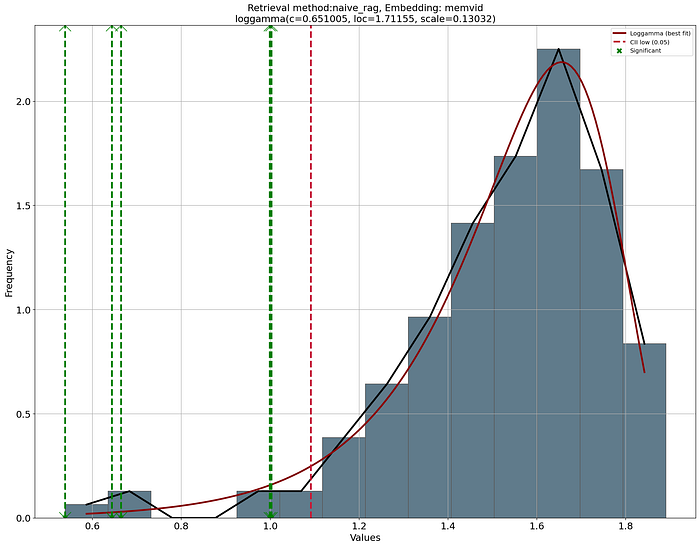
The detection of chunks is based on the cosine distance. Each chunk receives a similarity score, after which the chunks are ranked and the top-K chunks are returned. However, these top chunks do not necessarily need to be truly relevant. As an example, even a random piece of text can, by chance, obtain a relatively high score if it shares frequent words or superficial patterns with the query. Without a statistical safeguard, we risk mistaking noise for meaningful information.
To address this, LLMlight constructs a null distribution of scores by comparing the query against randomly sampled chunks. By fitting a probability distribution to these random scores, we create a statistical baseline that tells us what kind of similarities would appear "just by chance." With such an approach, we can thus evaluate the observed top-K scores in terms of p-values and statistical significance rather than raw scores. In practice, this makes retrieval more robust: instead of trusting that a high score equals relevance, we test whether it is significantly higher than expected under randomness, providing a principled method to separate true signal from noise. I would highly recommend reading more details here about probability density fitting because it forms the basis in many applications.
Create Summaries
Creating summaries with a limited context window requires you to be creative because not all text can fit in the entire context window. In LLMlight, the summarize function works by dividing the input document into manageable text chunks using the configurable chunking strategy. Each chunk is then processed sequentially with an LLM request, where the prompt is enriched with both the current text and the summaries of previously processed chunks. This iterative approach ensures that context and coherence are maintained across different parts of the document, preventing the common problem of fragmented or repetitive summaries that occur when processing large texts in isolation.
Once all chunks are summarized, the function performs a final synthesis step. It combines the partial summaries into a single prompt and requests the model to produce a unified, well-structured document. This final step ensures logical flow, smooth transitions, and balanced coverage of insights while adhering to the requested response format. The result is a summary that captures the essential information from the entire document without losing coherence or introducing hallucinations. See below the schematic overview of the working.
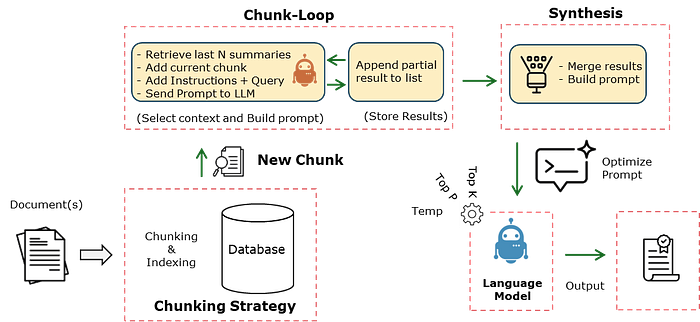
The code block to experiment with creating summaries is shown below. Note that I use a relatively small model in this example, and that will definitely impact the quality of the summaries.
# Import library
from LLMlight import LLMlight

# Initialize model
client = LLMlight(model='mistralai/mistral-small-3.2',
                  endpoint="http://localhost:1234/v1/chat/completions",
                  )

# Read one or multiple PDF files
url = 'https://proceedings.neurips.cc/paper_files/paper/2017/file/3f5ee243547dee91fbd053c1c4a845aa-Paper.pdf'
pdf_text = client.read_pdf(url)

# Create summary
summary_text = client.summarize(context=pdf_text)

"""
[LLMlight.LLMlight] [INFO] Model: mistralai/mistral-small-3.2
[LLMlight.LLMlight] [INFO] Context Strategy: disabled
[LLMlight.LLMlight] [INFO] Retrieval method: naive_rag
[LLMlight.LLMlight] [INFO] Embedding: {'memory': 'memvid', 'context': 'bert'}
[LLMlight.LLMlight] [INFO] LLMlight is initialized!
[LLMlight.LLMlight] [INFO] Downloading file from url..
[LLMlight.utils] [INFO] Reading pdf
[LLMlight.LLMlight] [INFO] Processing the document using 41 for the given task..
[LLMlight.LLMlight] [INFO] Working on text chunk 0/41
...
[LLMlight.LLMlight] [INFO] Working on text chunk 41/41
[LLMlight.LLMlight] [INFO] Combining all information to create a single coherent output..
"""
In case you want to create a different variant for the summarizer, the exact function is as follows:
def summarize(self,
         query="Extract key insights while maintaining coherence of the previous summaries.",
         instructions="Extract key insights from the **new text chunk** while maintaining coherence with **Previous summaries",
         system="You are a professional summarizer with over two decades of experience. Your strength is that you know how to deal with partial and incomplete texts but you do not make up new stuff. Keep the focus on the original input.",
         response_format="**Make a comprehensive, structured document covering all key insights**",
         context=None,
         return_type='string',
         ):
    """
    Summarize large documents iteratively while maintaining coherence across text chunks.

    This function splits the input text into smaller chunks and processes each part in sequence.
    For every chunk, it generates a partial summary while incorporating the context of the
    previous summaries. After all chunks have been processed, the function combines the partial
    results into a final, coherent, and structured summary.

    Parameters
    ----------
    query : str, optional
        The guiding task or question for summarization (default extracts key insights).
    instructions : str, optional
        Additional instructions for the summarizer, tailored to each chunk.
    system : str
        System message that sets the role and behavior of the summarizer.
    response_format : str, optional
        Defines the format of the final output (default is a structured document).
    context : str or dict, optional
        Input text or structured content to be summarized. If None, uses `self.context`.
    return_type : str, optional
        Format of the returned result (default "string").

    Returns
    -------
    str
    A comprehensive, coherent summary that integrates insights across all chunks.

    """
    if system is None:
        logger.error('system can not be None. <return>')
        return
    if (context is None) and (not hasattr(self, 'text') or self.context is None):
        logger.error('No input text found. Use context or <model.read_pdf("here comes your file path to the pdf")> first. <return>')
        return

    if context is None:
        if isinstance(self.context, dict):
            context = self.context['body'] + '\n---\n' + self.context['references']
        else:
            context = self.context

    # Create chunks based on words
    chunks = utils.chunk_text(context, method=self.chunks['method'], chunk_size=self.chunks['size'], overlap=self.chunks['overlap'])

    logger.info(f'Processing the document using {len(chunks)} for the given task..')

    # Build a structured prompt that includes all previous summaries
    response_list = []
    for i, chunk in enumerate(chunks):
        logger.info(f'Working on text chunk {i}/{len(chunks)}')

        # Keep last N summaries for context (this needs to be within the context-window otherwise it will return an error.)
        previous_results = "\n---\n".join(response_list[-self.top_chunks:])

        prompt = (
        "### Context:\n"
        + (f"Previous results:\n{previous_results}\n" if len(response_list) > 0 else "")

        + "\n---\nNew text chunk (Part of a larger document, maintain context):\n"
        + f"{chunk}\n\n"

        "### Instructions:\n"
        + f"{instructions}**.\n\n"

        f"### Question:\n"
        f"{query}\n\n"

        "### Improved Results:\n"
        )

        # Get the summary for the current chunk
        chunk_result = self.requests_post_http(prompt, system, temperature=self.temperature, top_p=self.top_p, task='max', stream=False, return_type='string')

        response_list.append(f"Results {i+1}:\n" + chunk_result)

    # Final summarization pass over all collected summaries
    results_total = "\n---\n".join(response_list[-self.top_chunks:])
    final_prompt = f"""
    ### Context:
    {results_total}

    ### Task:
    Your task is to connect all the parts into a **coherent, well-structured document**. Make sure it becomes is a very good summary.

    ### Instructions:
    - Maintain as much as possible the key insights but ensure logical flow.
    - Connect insights smoothly while keeping essential details intact.
    - Only use bulletpoints when really needed.
    - {response_format}

    Begin your response below:
    """
    logger.info('Combining all information to create a single coherent output..')
    # Create the final summary.
    final_result = self.requests_post_http(final_prompt, system, temperature=self.temperature, top_p=self.top_p, task='max', stream=False, return_type=return_type)

  # Return
  return final_result
Language Models Can Be Used In Many Use Cases.
With the integration of local databases such as FAISS, JSON, and MemVid, the LLMlight library makes it straightforward to build practical retrieval-augmented applications. You can, for instance, create a "Chat with your PDF" tool where documents are chunked, embedded, and retrieved on demand to provide contextual answers. An email search engine with auto-reply can leverage embeddings and probability-based relevance testing to not only find the right messages but also draft accurate responses in your tone. Similarly, you can design a personal document assistant that continuously learns your style and preferences, grounding its output in your own data rather than generic internet text. These use cases demonstrate how LLMlight bridges lightweight retrieval with powerful language models, enabling the creation of personalized, domain-specific AI assistants.
There are many use cases that you can easily build with the LLMlight library. Some examples include:
- Chat with your PDF: Upload a PDF and interact with it conversationally, with answers grounded in the document's content.
- Email Search Engine with Auto-Reply: Retrieve relevant emails quickly and draft accurate responses in your own style.
- Personal Document Assistant: Maintain a knowledge base of your files and generate outputs aligned with your unique writing tone.
- Meeting Notes Generator: Transcribe audio, extract action items, and generate concise summaries that can be stored for future reference.
- Knowledge Base Q&A: Build a private question–and–answer system over your reports, manuals, or research articles.
- Code Snippet Finder: Index and search your source code to answer technical questions or suggest reusable snippets.
- Local Research Assistant: Organize academic papers, highlight key findings, and create literature reviews tailored to your research focus.
Checklist Before Creating Any Language Model
At this point, you know how to set up our environment and create a language model that we can utilize for our use case. I do have some tips that I recommend addressing in each of your projects carefully:
- Not every solution requires a language model. Only consider complex models when simpler solutions do not give the desired results. Start with lookup lists, regular expressions, and TF-IDF. This will save you time, complexity, maintenance, costs, and frustration.
- A language model needs to be optimized for your specific use case. It is not simply about checking input and output. You have now learned that all steps in between can significantly impact the results. Ensure that the steps you take are suitable for your use case.
- Always make sure that all input text is encoded with UTF-8 or Latin-1. Do not switch encodings, because some models may skip specific encodings, causing you to miss entire documents.
- Never chunk too small (< 200 characters). This will cause hallucinations, as chunks will not contain complete information. Solutions like global reasoning and chunk-wise strategies only help to a certain extent.
- Remove headers, footers, boilerplates, etc. These often create too much noise in the system, decreasing the performance of the model.
- Always think critically about embeddings. Some embeddings are trained for semantic similarity, like BERT models. If you are creating a QA system, TF-IDF can outperform semantic embeddings like BERT in certain domains.
- Vague queries will lead to vague answers. For example, "Give me sports tips" will retrieve chunks that may or may not be of interest.
- Each language model must have guardrails. Depending on your use case, force the model to provide citations or indicate in which chunk the information was found.
Final words.
In this blog, we discussed the struggles that can occur when you aim to use language models in real-world applications. First of all, most solutions do not require an LLM and can be handled with deterministic solutions such as heuristics, regular expressions, TFIDF, or other natural language methods. When you decide to build an LLM, be aware that your solution may become fragile and may never reach production because of the technical overhead and misalignment with personnel and company standards.
In case you decide to proceed with LLMs, the easiest setups are with online models such as GPT or Claude. I would recommend starting with such a model. If the results are as expected and you find alignment within your company, then you can start experimenting with local models as shown in this blog. Three reasons for local models are: You want to keep your information private, you want to fine-tune or modify the model, or you do not want the model to be suddenly changed or discontinued without notice.
With the hands-on examples, you learned how to create solutions with local language models where we only needed a few lines of code. For this, we utilized the LLMlight library. We experimented with chunking strategies, embedding methods, and smart context aggregation strategies. From simple Q&A to multi-document reasoning and creating summaries. The strength of LLMlight is also in the integration of statistical validation through null distribution modeling. This allows the detection of meaningful chunks to prevent responses from being merely artifacts of surface-level similarity. Make sure that you always prefer a deterministic solution over a non-deterministic AI-based solution.
Be Safe, Stay Frosty.
Cheers E.
I hope you enjoyed reading this blog. You are welcome to follow me because I write more about data science! Also, try the hands-on examples in this blog. This will help you to learn quicker, understand better, and remember longer. Grab a coffee and have fun!
Software
Let's connect!
References
- Sukel, M. (n.d.). Benchmarking 16 LLM's: 165× cheaper, same accuracy. The AI Factory.
- Belcak, P., Heinrich, G., Diao, S., Fu, Y., Dong, X., Muralidharan, S., Lin, Y. C., & Molchanov, P. (2025). Small language models are the future of agentic AI. arXiv. https://doi.org/10.48550/arXiv.2506.02153
- Ramakrushna Mohapatra, Top 10 LLM & RAG Projects for Your AI Portfolio (2025–26), Medium Aug 2025
- Papadimitriou, I., Gialampoukidis, I., Vrochidis, S., & Kompatsiaris, I. (2024, December 16). RAG Playground: A framework for systematic evaluation of retrieval strategies and prompt engineering in RAG systems. arXiv. https://arxiv.org/abs/2412.12322
- Mansurova, M. (2024, February 13). Text embeddings: Comprehensive guide — Evolution, visualisation, and applications of text embeddings. Medium. https://medium.com/data-science/text-embeddings-comprehensive-guide-afd97fce8fb5
- Ajayi, A. (2025, June 30). 21 chunking strategies for RAG: And how to choose the right one for your next LLM application. AI Advances (Medium). https://ai.gopubby.com/21-chunking-strategies-for-rag-f28e4382d399
- Khan, F. (2025, March 12). Testing 18 RAG techniques to find the best: Crag, HyDE, Fusion and more!. Level Up Coding (gitconnected.com). https://levelup.gitconnected.com/testing-18-rag-techniques-to-find-the-best-094d166af27f Level Up Coding
- Khan, F. (2025, August 11). Building the entire RAG ecosystem and optimizing every component: Routing, indexing, retrieval, transformation and more. Level Up.
- Memvid - Turn millions of text chunks into a single, searchable video file, Computer Software, GitHub Rep.